How do I track points usage?
Track points usage using:
-
Tabs and reports in the Points module
-
SessionM Insights reporting and analysis tool.
Points module
The Points module provides the following tabs and reports.
| Tab or report | Description |
|---|---|
| View Point Sources tab | View high-level information about your point sources, including names, status and accounts. |
|
View Point Accounts tab |
View high-level information about point accounts, including name, status and sources. |
| View Point Audit Logs | View changes to point accounts and sources related to points spent or earned. Useful for troubleshooting, testing and validating your system |
| View Point Liability Report |
View point liability snapshots by point source. |
Insights reporting and analysis
The SessionM Insights reporting and analysis tool helps you track points usage with the following reports
-
Point liability:
-
Point source
-
Point source over time
-
Current tier
-
-
Overall point report
-
Daily point report
-
Cumulative point report
-
Point issuance channel over time
-
Point issuance by channel
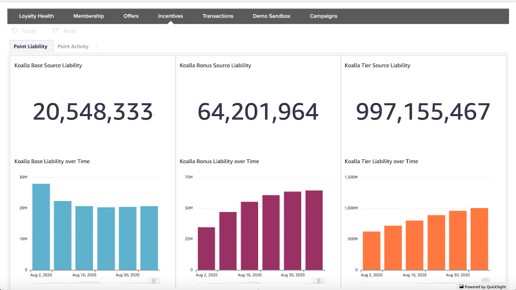
The following image shows the Points Liability report for the Koalla Clothing loyalty program. Separate totals are reported for base source points, bonus points source and tier qualifying points source.
See About Insights for more information.