July 2024 Release Notes
June 17 - 20, 2024
July 9 - 15, 2024
2024.4
No downtime is required for the release.
NOTE: As of June 3rd, the staging and production release dates have been pushed out one week.
As of June 10th, we added a Notice of Upcoming Deprecations
Customers & Audiences
Improvements to Composer URL Structure
Feature Description
Composer links historically have not allowed Users clicking them to land on the Audience page they belonged to. Users would instead be re-directed to a landing page that instructed them to navigate back to the home page, then to Composer, where they would need to find the Audience manually.
In addition, the Composer module was limited in that a User was not able to have two or more different Composer Audiences open in separate tabs at the same time.
Composer has been enhanced to allow links to bring users to the intended Audience page, which will more easily help Users collaborate with one another and Support teams to find Audiences where issues have been reported.
Users also can now work on multiple Audiences at a time, by having them open in separate tabs. This will make it much easier to build a new Audience that may share some of the same configurations as another Audience, by being able to quickly navigate between tabs to compare and contrast between the two.
How it Works
To address this issue the URLs inside Composer have been updated.
- FROM:
https://composer.ent-sessionm.com/audiences - TO:
https://composer.ent-sessionm.com/TenantName/audiences
If a user is logged into the platform, they will be brought to the desired page after clicking on a link and can have multiple tabs open at the same time.
For example, Jim is building a new Composer audience and his co-worker Pam mentions it’s very similar to one she has built. Pam can now share the link to the audience with Jim, who can click on the link and have that tab open at the same time as he builds the other audience.
Campaigns & Content
Behavior Templates Improvements
Feature Description
Issues were found in the existing Behavior Templates functionality that produced errors when saving and applying to new campaigns.
How it Works
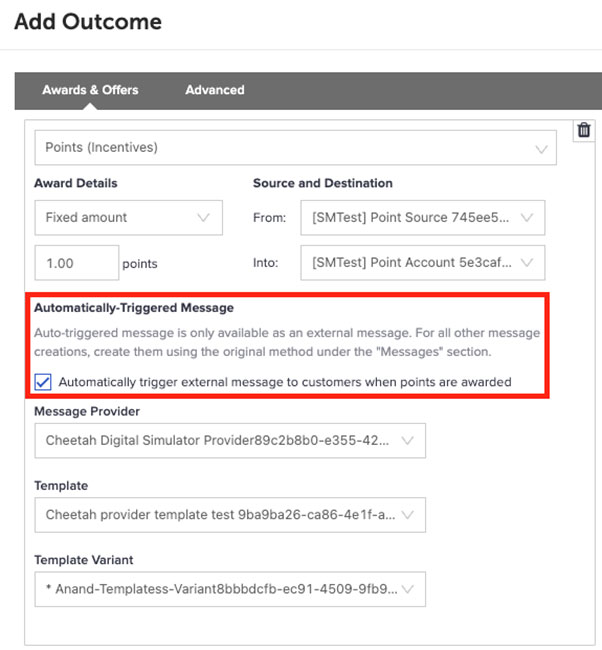
Point Outcome with Automatic Triggered Message
If a behavior points outcome also contained an “Automatically Triggered Message” it produced an error when saved as a template.
This issue has been resolved and marketers are now able to successfully save and apply behavior templates with an automated message.
Behavior Template with a Prerequisite
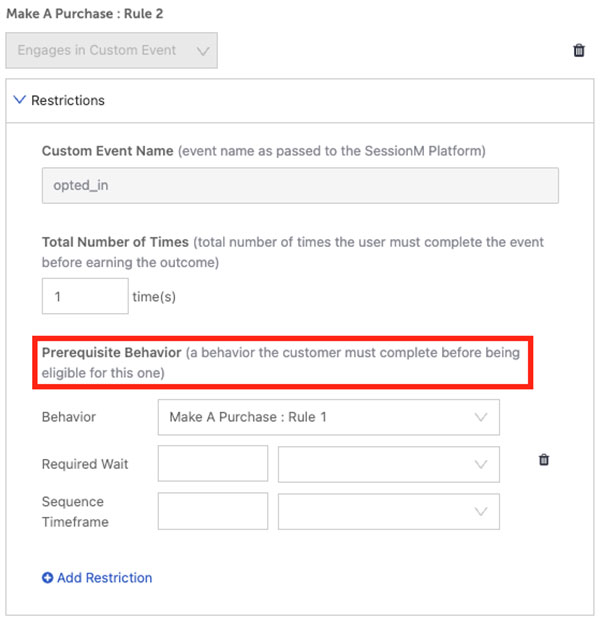
If a behavior template contained a Prerequisite Behavior restriction and was saved as a template, it produced an error.
This issue has been resolved and marketers are now able to successfully save and apply behavior templates with a prerequisite behavior.
For more information on Campaign behaviors and templates, please visit the Campaigns Behavior Procedure Guide
Loyalty
The updates below apply to the new rules’ engine. To learn more about the new rules engine and if these apply to you, visit About Loyalty 2.
On/Off Toggle for the Tier Maintenance Policy in Loyalty 2
Feature Description
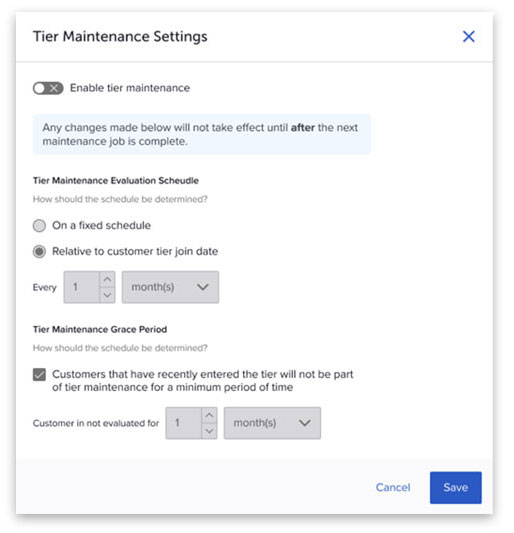
The new rules engine user interface for the tier maintenance policy configuration did not have a way to turn on or off maintenance. This can lead to accidentally configuring a policy and consumers being run through maintenance when they shouldn’t be. A toggle was added within the tier maintenance policy configuration window to avoid any issues when viewing and editing tier maintenance policies. Additionally, when a policy is turned off you will be able to see what was previously configured.
How it Works
- Once in a Loyalty Program, navigate to the "Rules to Stay Within a Tier" box and select the gear icon.
- The tier maintenance policy window will now be visible. Select or deselect the toggle to turn on or off a policy.
A Tier Maintenace policy is enabled when the toggle is green. When enabled, the policy configurations can be updated.
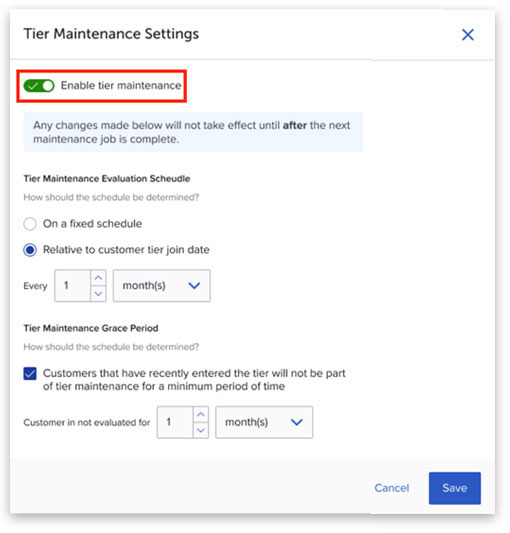
When the toggle is gray, the policy is turned off. Policies can not be configured while turned off, there will be a view-only version of the previously configured policy. If a policy has never been configured default values are populated, as seen below.
Warning Message When Editing a Historical Rule in Loyalty 2
Feature Description
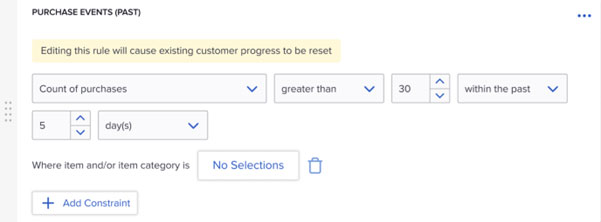
Clients reported issues when updating Loyalty rules based on historical activity such as “count of purchases over period of time.” When a historical rule is edited, the rule will evaluate behavior from the current date forward and not retroactively.
How it Works
The loyalty module now contains enhanced messaging to enable clients to understand the impact of updating a historical rule, to flag that historical data collection will start over.
- For example, if you have a transaction cap rule that looks at transactions within the past 7 days, then update the rule to look at the past 8 days, transactions will start collecting from the time the change was saved.
- To make the impact to the rule change clear, there will now be a warning message when attempting to update a historical rule.
- The warning states, “Editing this rule will cause existing customer progress to reset.”
Platform Wide
Organization Management Module now in Admin & Rights
Feature Description
Organizational Management configurations require set up and configuration in the SessionM back-end system. This previously required support from the SessionM services team.
How it Works
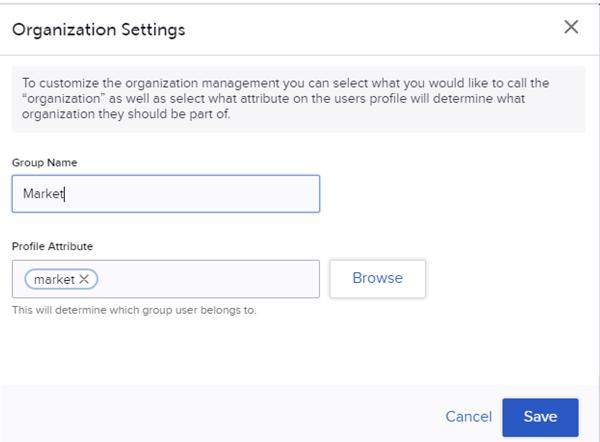
A new section in the Admin & Rights module has been introduced: “Organization Management.” This allows admins to configure an environment’s Organization hierarchy and related settings.
Key features include:
- Ability to create Organizations and Categorization
- Configure how the “Organization” is displayed and referred in the platform
- Configure profile attribute utilized for assigning profiles to their Org(s)
- Management of Organization Configurations

Visit the Organization Management explainer for more details and information on how these configurations impact your SessionM environment.
Notice of Upcoming Deprecations
Campaign Activity Data: “sent” records
In the upcoming September Release, SessionM will be removing a specific record type from campaign activity data.
In SessionM’s Campaign Activity data, there are records created every time the Campaign API is called to retrieve a Campaign for a specific customer profile.
These records are:
- included in the “campaign_activity” table in SessionM Data Cloud and daily Data Extracts where creative_type = behavior and action = sent
- visualized in the Campaigns Performance dashboard under the “impression” metric
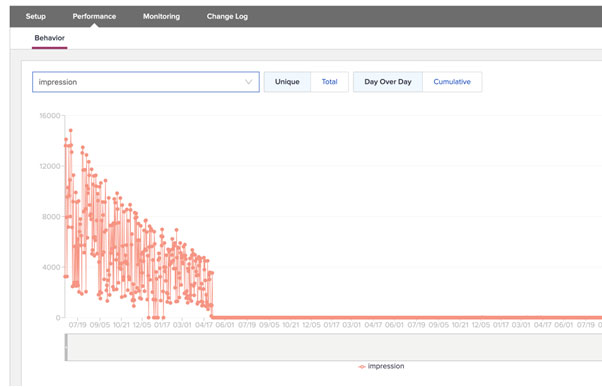
This is a legacy metric that is not currently utilized to track campaign outcomes and will not materially impact campaign reporting.
By removing this record type from the campaign activity data, some clients may see improved processing times in Campaign-related operations. In addition, Data Cloud hydration times may be improved for some clients due to the reduction in daily data volume.
If you have any questions or concerns about this change, please reach out to your Account team.