

Timeline APIs
Create and maintain timeline services — event types and categories, event publishing, and the views and templates that render a timeline.
These APIs support the creation and maintenance of timeline services for an organization. With respect to this service, an event can be defined as an arbitrary action that occurred at a specific time, anchored to an arbitrary object and contains data attributes specific to this particular type of action.
As you consult the conceptual discussions and the tables that detail JSON requests and responses, bear in mind that timelines utilize a collection of objects and attributes that contain the word "stream." For example, consider these object names: stream, stream_view and stream_type. When this site describes a timeline attribute or object, it uses these names. However, when discussions are more conceptual and descriptive in nature, this site uses the word "timeline." Of course this site always utilizes the literal names for all objects and attributes in timeline-related sample code or their associated references; in these cases, the term "stream" is never replaced with "timeline."
In more concrete terms, an implementation of the timeline service could be a member statement that represents customer activity. For example, an event could have the following characteristics:
- Action: purchase
- Anchored object: customer
- Timestamp: datetime of purchase
- Data: {item: "T-shirt", price: 19.99, color: "red", size: "Medium"}
Part of the functionality offered by this collection of APIs is the ability to create event types and categories, or groupings, of event types. The Timeline Event Types API allows you to build out and maintain event types as well as associate rendering templates to them.
Timeline services can reflect a variety of timelines, including those for customer activity, campaign activity, enduser communication and Point of Sale (POS) activity.
You can use the Timeline Service API to build and maintain the service. When designing your timeline service, do so in a generic manner. This approach makes it easy to define additional event timelines with different event definitions and levels of granularity that require a minimal development effort. One of the functions this API offers is the ability to consume raw data from external devices that are generating events. Related methods can interpret raw event data and render it in specific customer contexts. With this API, you can publish an event and retrieve a page of events for a particular event timeline view.
Each service can record types of temporal events with varying sets of data attributes per event type. Doing so generates a timeline of events in reverse chronological order that can be accessed in a paged manner.
An event timeline can be of infinite size. However, the Timeline Configuration API includes methods that can constrain a very large timeline with views that read from the timeline service and inject context into the raw event data being presented. This API includes methods for creating event templates and rendering contexts for these views.
Views allow for paging through a timeline, either rendered literally as pages of events or shown with an "infinite scroll" mechanism. They can reflect different levels of granularity, and individual events within them can appear in multiple views. For example, the same event can be included in the view for a particular customer's events, and also show up in a view tied to a particular campaign.
This section contains the following discussions:
If you want information on working with events, see the Events API.
Timeline APIs Architecture
The Timeline APIs architecture features object entities that reflect the three APIs that enable the programmatic capture of event histories, or timelines. These entities can be best understood in the following two sections, with each discussion rooted in a diagram:
- Event Definition
- Event Display
Event Definition
Before you can present timelines of customer events, you must define the events being represented in the timeline. Events are the digital representation of a customer's activity that gets passed to SessionM as data. Generally they can be defined as one of the three types: engagement (or activity), location and purchase.
SessionM offers the Event Types API so you can build out a hierarchy of event metatdata. In short, event categories contain event types which define events. The following diagram depicts these entities:
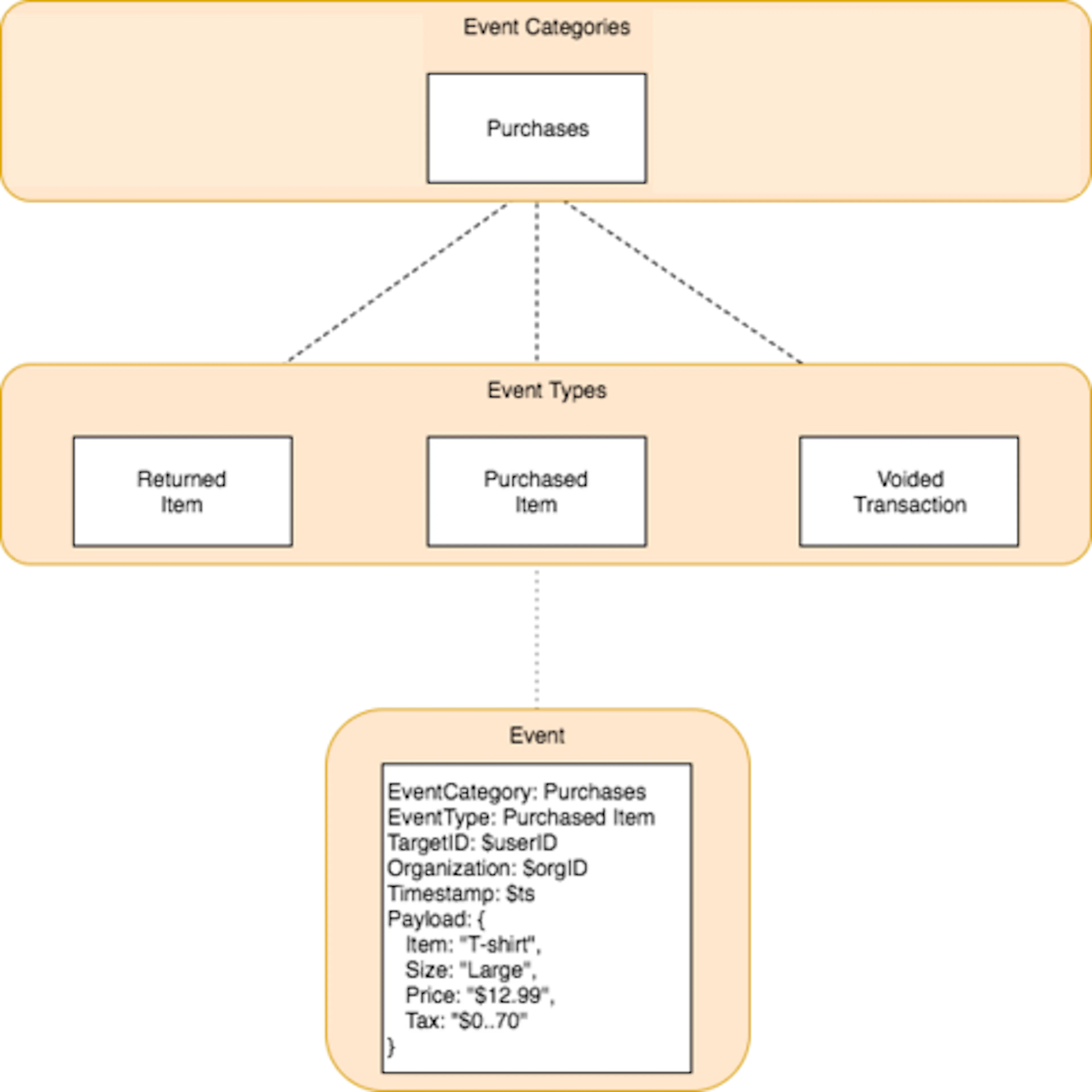
The Event Categories box shown at the top of the diagram represents a category that aggregates a set of event types into a single, common grouping. In this case, the event category is "Purchases." It contains three event types, which are shown in the Event Types box located in the middle of the diagram. Each event type defines the kind of event that is being expressed; in this example, the purchase event types include "Returned Item," "Voided Transaction" and, of course, "Purchased Item."" Each of these types represents a result that can follow from a purchase:
- Item being purchased.
- Purchased item being returned.
- Purchase transaction for item being voided.
All fit logically within the event category, "Purchases."
The bottom box of the diagram depicts the Event object type. Unlike the other boxes in the diagram, the Event box shows the attributes defined by both the higher level types and the attributes that are critical to defining what an event is. Inherited attributes include the event category and the event type, which are shown toward the top of the event box. Other attributes include identifiers, a timestamp and the heart of the event, a payload. It is the payload that expresses perhaps the most familiar characteristics of a purchase event: What the item is, its size, its price and its associated tax.
Event Display
With event categories, event types and events defined, determine how timelines of events can be displayed. Timelines can reflect event histories of a variety of actors, however, the current SessionM implementation features those reflecting customer events.
This customer event timeline is populated from events generated by customers using external devices. Supported by methods available in the Timeline Service API, the raw data from these events can be published as timeline objects in the SessionM Platform. Once data is in residence as a user_event_stream, it can be configured for display via timeline views and rendering contexts. The diagram show below depicts these entities and their relationships:
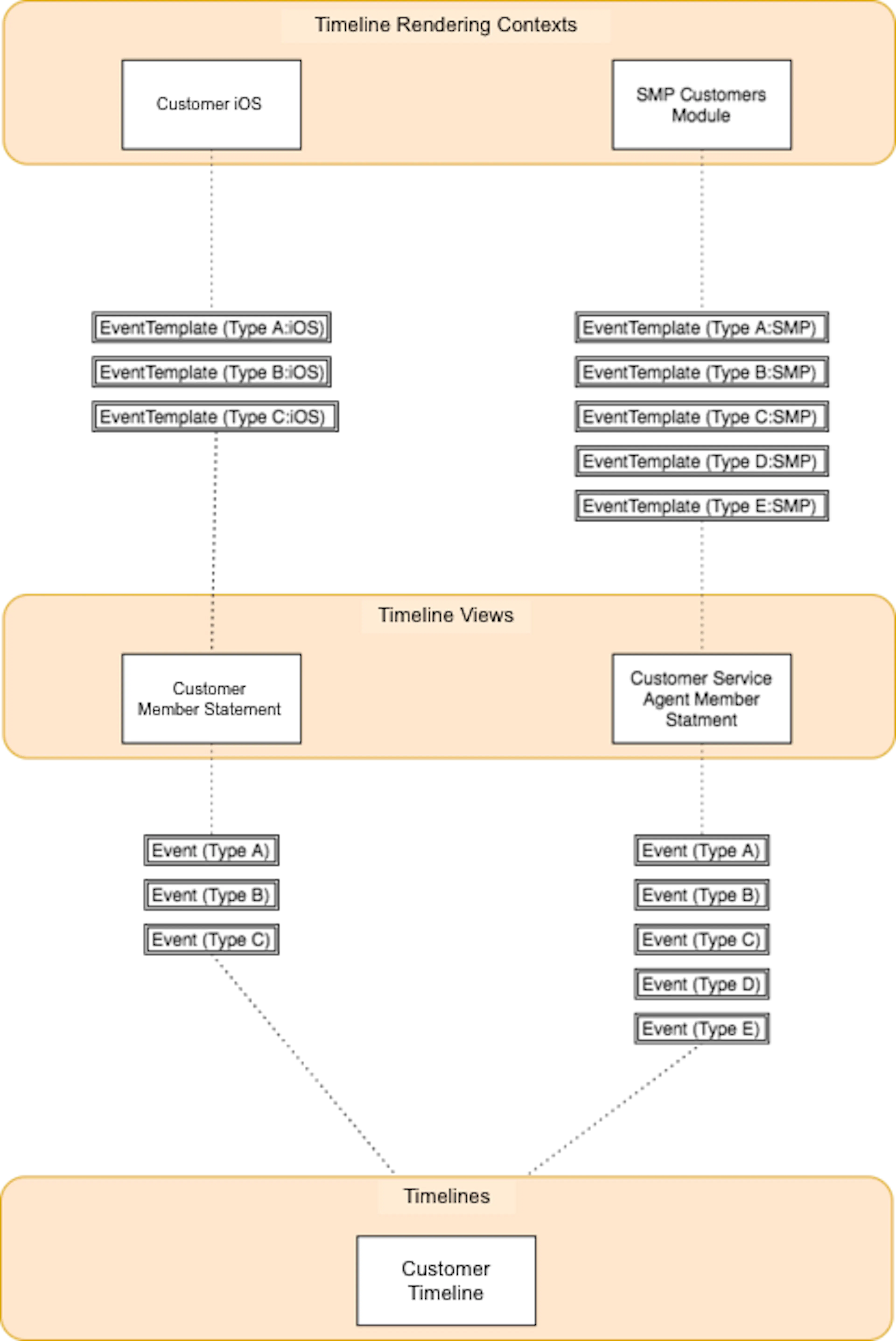
Note that the publishing of raw external event data as a timeline is not presented in the diagram above; it happens outside of the platform.
Event data consumed from external sources resides in the bottom box of the diagram, which is labeled "Timelines." In this case, the timeline shown is a customer timeline. Since the number of events in any timeline can be quite large, timeline views determine what subset of events will be presented, a specification that is shown in the middle box of the diagram, "Timeline Views." Two views are shown; one as a customer member statement and one as a customer service agent member statement. Each view expresses its own collection of events, all of which are defined by particular event types and represented as multiple Event boxes located between the Timelines and Timeline Views layers.
While timelines do provide a mechanism for narrowing which events will be shown in a timeline, event templates and rendering contexts define how those events will appear. The top box of the diagram labeled "Timeline Rendering Contexts" contains two rendering contexts, each of which specifies context for a view being presented in an associated template. In this case, the rendering contexts include one for customers engaged in a iOS-based mobile experience and the other for customer service agents accessing the platform's customers module in the UI. For both contexts, event templates have been defined, along with their association to an event type and a rendering context, as shown in multiple Event Template boxes located between the Timeline Views and the Timeline Rendering Contexts layers.
Timeline Event Types API
The Timeline Event Types API offers a collection of endpoints that build and manage event types for events shown in an event timeline. Event types are kinds of actions; they name and define the actions that are common to your organization and, often, customers.
Maintained in the SessionM Platform, each event type defines the metadata for each event that can occur; for example, "Purchased Item XYZ" or "Opened an Email." A grouping of event types, however, are event categories; for example, "Customer Actions." Event categories are an optional way of defining a set of related event types. Finally, an event itself is an instance of an event type; for example, "Customer ABC Purchased Item XYZ."
In addition to managing the types and categories for events, this API includes endpoints for creating and managing rendering templates for the event types. Templates can serve a variety of contexts, including:
- SessionM customer module
- Customer's mobile experience
- Customer's desktop experience
API Contingencies and Combinations:
- Event types define the categories and types of events customers can generate with their actions. You can create customers using the Standard Profile API.
- Timelines capture event histories. Event types are a critical part of creating subsets of what is often very large event histories. You can define subsets of these timelines as views using the Timeline Configuration API.
This API provides the following methods:
- Create an event category
- Create an event type
- Create a rendering template
- Retrieve event categories
- Retrieve rendering templates
- Retrieve an event type
- Update an event category
- Update a rendering template
- Update an event type
Create an Event Category
Create an event category for grouping a set of event types together.
Endpoints for Create an Event Category
This method offers the following endpoints:
REST Endpoints
POST /priv/:api_version/apps/:api_key/timelines/categories
For more information on how to specify an endpoint as part of an actual URL, see Before You Begin. The procedure in this section includes a sample URL for a customer transaction.
Endpoint Parameters for Create an Event Category
The following parameters are available when specifying the endpoint for this method:
| Endpoint Parameter | Description |
|---|---|
| api_version | Internal parameter that supports API versioning. |
| api_key | Supplied by the SessionM Platform, the API key is necessary to authenticate any HTTP request to a SessionM API. This key is associated to an API secret, which ties the authentication to a specific application or web site within the organization. The platform maintains each application or site as a digital property, something that can be configured using the SessionM UI. |
Request Object for Create an Event Category
When this method runs, it passes in a request object that contains an category object, as shown below:
JSON Request
{
  "category": {
    "name": "Points Economy",
    "description": "Points Economy"
  }
}
This object is detailed in the following table:
Request Attributes for Category
| Attribute | TypeRequired/Optional | Description |
|---|---|---|
| name | stringrequired | Timeline view name. For example, "Acme Inc.'s member statement". |
| description | stringoptional | Timeline view description. For example, "Acme Inc.'s member statement, defined as a view on the user timeline." |
Response Object for Create an Event Category
In addition to a status key-value pair, the response object returned by the method contains an event_category object, as shown below:
JSON Response
{
  "status": "ok",
  "event_category": {
    "id": 9,
    "name": "Points Economy",
    "slug": "POINTS_ECONOMY",
    "description": "Points Economy",
    "created_at": "2017-08-24T17:15:00Z",
    "updated_at": "2017-08-24T17:15:00Z"
  }
}
This object is detailed in the following table:
Response Attributes for Category
| Attribute | Type | Description |
|---|---|---|
| id | integer | Database identifier for the event category. |
| name | string | Name for the event category. |
| slug | string | Permalink generated from the name of the event category. For example, "POINTS_ECONOMY". |
| description | string | Description of event category. |
| updated_at | datetime | ISO8601 formatted timestamp when the timeline category was updated. |
| created_at | datetime | ISO8601 formatted timestamp when the timeline category was created. |
Statuses and Errors for Create an Event Category
When this method makes a successful call to the platform, it returns a 200-level status code. When the string returned with a 200-level status code is ok, the transaction did process. But, if the string returned is error, you need to discover what type of error occurred.
Returned errors can be either method-specific or generic. No error messages are defined for this method except for the generic statuses and errors returned for any object. For more information, see the associated section in Generic Statuses and Errors.
Create an Event Type
Create an event type for the kind of action that occurred, such as "Purchased" or "Opened Email."
Endpoints for Create an Event Type
This method offers the following endpoints:
REST Endpoints
POST /priv/:api_version/apps/:api_key/timelines/:timeline_id/event-types
For more information on how to specify an endpoint as part of an actual URL, see Before You Begin. The procedure in this section includes a sample URL for a customer transaction.
Endpoint Parameters for Create an Event Type
The following parameters are available when specifying the endpoint for this method:
| Endpoint Parameter | Description |
|---|---|
| api_version | Internal parameter that supports API versioning. |
| api_key | Supplied by the SessionM Platform, the API key is necessary to authenticate any HTTP request to a SessionM API. This key is associated to an API secret, which ties the authentication to a specific application or web site within the organization. The platform maintains each application or site as a digital property, something that can be configured using the SessionM UI. |
| timeline_id | Identifier for an event timeline. Same as id on the stream object. |
Request Object for Create an Event Type
When this method runs, it passes in a request object that contains a event_type object, as shown below:
JSON Request
{
    "event_type": {
        "name": "New Name",
        "description": "new description",
        "event_stream_event_category_id": 1
    }
}
This object is detailed in the following table:
Request Attributes for Event Type
| Attribute | TypeRequired/Optional | Description |
|---|---|---|
| name | stringrequired | Name of the event type for the kind of activity that occurred. |
| description | stringoptional | Description of event type. |
| event_stream_event_category_id | integerrequired | Identifier for the associated event category. |
JSON Response
{
    "status": "ok",
    "event_type": {
      "id": 1,
      "name": "Name",
      "slug": "NAME",
      "description": "Description",
      "event_stream_event_category_id": 1,
      "event_stream_stream_id": 1
  }
}
Response Object for Create an Event Type
In addition to a status key-value pair, the response object returned by the method contains a event_type object, as shown below:
JSON Response
{
    "status": "ok",
    "event_type": {
      "id": 1,
      "name": "Name",
      "slug": "NAME",
      "description": "Description",
      "event_stream_event_category_id": 1,
      "event_stream_stream_id": 1
  }
}
This object is detailed in the table below:
Response Attributes for Event Type
| Attribute | Type | Description |
|---|---|---|
| *id | integer | Identifier for the event type. |
| name | string | Name of event type. |
| slug | string | Permalink generated from the name of the event type. |
| description | string | Description of event type. |
| event_stream_event_category_id | integer | Identifier for the timeline category associated with the event type. |
| event_stream_stream_id | integer | Identifier for the timeline associated with the event type. |
Statuses and Errors for Create an Event Type
When this method makes a successful call to the platform, it returns a 200-level status code. When the string returned with a 200-level status code is ok, the transaction did process. But, if the string returned is error, you need to discover what type of error occurred.
Returned errors can be either method-specific or generic. No error messages are defined for this method except for the generic statuses and errors returned for any object. For more information, see the associated section in Generic Statuses and Errors.
Create a Rendering Template
Create a rendering template, mapping an event template to a specific rendering context. The context specifies the environment in which events should be rendered and targets a particular template to that environment.
Endpoints for Create a Rendering Template
This method offers the following endpoints:
REST Endpoints
POST /priv/:api_version/apps/:api_key/timelines/:timeline_id/event-types/:event_type_id/templates
For more information on how to specify an endpoint as part of an actual URL, see Before You Begin. The procedure in this section includes a sample URL for a customer transaction.
Endpoint Parameters for Create a Rendering Template
The following parameters are available when specifying the endpoint for this method:
| Endpoint Parameter | Description |
|---|---|
| api_version | Internal parameter that supports API versioning. |
| api_key | Supplied by the SessionM Platform, the API key is necessary to authenticate any HTTP request to a SessionM API. This key is associated to an API secret, which ties the authentication to a specific application or web site within the organization. The platform maintains each application or site as a digital property, something that can be configured using the SessionM UI. |
| timeline_id | Identifier for an event timeline. Same as id on the stream object. |
| event_type_id | Identifier for the event type. |
Request Object for Create a Rendering Template
When this method runs, it passes in a request object that contains a rendering_template object, as shown below:
JSON Request
{
  "rendering_template": {
    "event_stream_event_template_id": 2,
    "event_stream_stream_view_id": 7,
    "event_stream_rendering_context_id": 4,
    "version": 1
  }
}
This object is detailed in the following table:
Request Attributes for Rendering Template
| Attribute | TypeRequired/Optional | Description |
|---|---|---|
| event_stream_event_template_id | integerrequired | Identifier of the associated event template. |
| event_stream_stream_view_id | integerrequired | Identifier of the associated event timeline view. |
| event_stream_rendering_context_id | integerrequired | Identifier of the associated rendering context. |
| version | integeroptional | Version of the rendering template. |
Response Object for Create a Rendering Template
In addition to a status key-value pair, the response object returned by the method contains a rendering_template object, as shown below:
JSON Response
{
  "status": "ok",
  "rendering_template": {
    "id": 4,
    "event_stream_event_template_id": 2,
    "event_stream_stream_view_id": 7,
    "event_stream_rendering_context_id": 4,
    "version": 1
  }
}
This object is detailed in the table below:
Response Attributes for Rendering Template
| Attribute | Type | Description |
|---|---|---|
| id | Database identifier for the rendering template. | |
| event_stream_event_template_id | integer | Identifier of the associated event template. |
| event_stream_stream_view_id | integer | Identifier of the associated event timeline view. |
| event_stream_rendering_context_id | integer | Identifier of the associated rendering context. |
| version | integer | Version of the rendering template. |
Statuses and Errors for Create a Rendering Template
When this method makes a successful call to the platform, it returns a 200-level status code. When the string returned with a 200-level status code is ok, the transaction did process. But, if the string returned is error, you need to discover what type of error occurred.
Returned errors can be either method-specific or generic. No error messages are defined for this method except for the generic statuses and errors returned for any object. For more information, see the associated section in Generic Statuses and Errors.
Retrieve Event Categories
Retrieve all event categories for an organization.
Endpoints for Retrieve Event Categories
This method offers the following endpoints:
REST Endpoints
GET /priv/:api_version/apps/:api_key/timelines/categories
For more information on how to specify an endpoint as part of an actual URL, see Before You Begin. The procedure in this section includes a sample URL for a customer transaction.
Endpoint Parameters for Retrieve Event Categories
The following parameters are available when specifying the endpoint for this method:
| Endpoint Parameter | Description |
|---|---|
| api_version | Internal parameter that supports API versioning. |
| api_key | Supplied by the SessionM Platform, the API key is necessary to authenticate any HTTP request to a SessionM API. This key is associated to an API secret, which ties the authentication to a specific application or web site within the organization. The platform maintains each application or site as a digital property, something that can be configured using the SessionM UI. |
Request Object for Retrieve Event Categories
Not applicable.
Response Object for Retrieve Event Categories
In addition to a status key-value pair, the response object returned by the method contains a result array, which is a hash array of one or many event_category objects. Consider the following sample:
JSON Response
{
    "status": "ok",
    "result": [
    {
        "event_category": {
           "created_at": "2017-08-25T10:23:24-04:00",
           "description": "Points Economy",
           "id": 30,
           "name": "Points Economy 1",
           "organization_id": 112,
           "slug": "POINTS_ECONOMY_1",
           "updated_at": "2017-08-25T10:23:24-04:00"
        }
    },
    {
        "event_category": {
           "created_at": "2017-08-25T10:23:24-04:00",
           "description": "Points Economy",
           "id": 31,
           "name": "Points Economy 2",
           "organization_id": 112,
           "slug": "POINTS_ECONOMY_2",
           "updated_at": "2017-08-25T10:23:24-04:00"
        }
    },
    {
        "event_category": {
           "created_at": "2017-08-25T10:23:24-04:00",
           "description": "Points Economy",
           "id": 32,
           "name": "Points Economy 3",
           "organization_id": 112,
           "slug": "POINTS_ECONOMY_3",
           "updated_at": "2017-08-25T10:23:24-04:00"
        }
    }
  ]
}
The array is empty if no categories exist. When present, the event_category object can contain several attributes. For more information, see the event_category object.
Statuses and Errors for Retrieve Event Categories
When this method makes a successful call to the platform, it returns a 200-level status code. When the string returned with a 200-level status code is ok, the transaction did process. But, if the string returned is error, you need to discover what type of error occurred.
Returned errors can be either method-specific or generic. No error messages are defined for this method except for the generic statuses and errors returned for any object. For more information, see the associated section in Generic Statuses and Errors.
Retrieve Rendering Templates
Retrieve all existing rendering templates for a specified event type.
Endpoints for Retrieve Rendering Templates
This method offers the following endpoints:
REST Endpoints
GET /priv/:api_version/apps/:api_key/timelines/:timeline_id/event-types/:event_type_id/templates
For more information on how to specify an endpoint as part of an actual URL, see Before You Begin. The procedure in this section includes a sample URL for a customer transaction.
Endpoint Parameters for Retrieve Rendering Templates
The following parameters are available when specifying the endpoint for this method:
| Endpoint Parameter | Description |
|---|---|
| api_version | Internal parameter that supports API versioning. |
| api_key | Supplied by the SessionM Platform, the API key is necessary to authenticate any HTTP request to a SessionM API. This key is associated to an API secret, which ties the authentication to a specific application or web site within the organization. The platform maintains each application or site as a digital property, something that can be configured using the SessionM UI. |
| timeline_id | Identifier for an event timeline. Same as id on the stream object. |
| event_type_id | Identifier for the event type. |
Request Object for Retrieve Rendering Templates
Not applicable.
Response Object for Retrieve Rendering Templates
In addition to a status key-value pair, the response object returned by the method contains a templates array, which is a hash array of one or many rendering_template objects. Consider the following sample:
JSON Response
{
  "status": "ok",
  "templates": [{
      "rendering_template": {
        "id": 1,
        "event_stream_stream_view_id": 6,
        "event_stream_event_template_id": 1,
        "event_stream_rendering_context_id": 1,
        "version": 1
      }
    },
    {
      "rendering_template": {
        "id": 2,
        "event_stream_stream_view_id": 6,
        "event_stream_event_template_id": 1,
        "event_stream_rendering_context_id": 2,
        "version": 1
      }
    },
    {
      "rendering_template": {
        "id": 3,
        "event_stream_stream_view_id": 6,
        "event_stream_event_template_id": 1,
        "event_stream_rendering_context_id": 3,
        "version": 1
      }
    }
  ]
}
The array is empty if no templates exist. When present, the rendering_template object can contain several attributes. For more information, see the rendering_template object.
Statuses and Errors for Retrieve Rendering Templates
When this method makes a successful call to the platform, it returns a 200-level status code. When the string returned with a 200-level status code is ok, the transaction did process. But, if the string returned is error, you need to discover what type of error occurred.
Returned errors can be either method-specific or generic. The platform returns the following error messages for this method:
| Code | Reason |
|---|---|
| no_rendering_template_found | Specified rendering template for event category, or type, cannot be found. |
For information on the generic statuses and errors returned for any object, see the associated section in Generic Statuses and Errors.
Retrieve an Event Type
Retrieve a specified event type with all of its related attributes.
Endpoints for Retrieve an Event Type
This method offers the following endpoints:
REST Endpoints
GET /priv/:api_version/apps/:api_key/timelines/:timeline_id/event-types/:event_type_id
For more information on how to specify an endpoint as part of an actual URL, see Before You Begin. The procedure in this section includes a sample URL for a customer transaction.
Endpoint Parameters for Retrieve an Event Type
The following parameters are available when specifying the endpoint for this method:
| Endpoint Parameter | Description |
|---|---|
| api_version | Internal parameter that supports API versioning. |
| api_key | Supplied by the SessionM Platform, the API key is necessary to authenticate any HTTP request to a SessionM API. This key is associated to an API secret, which ties the authentication to a specific application or web site within the organization. The platform maintains each application or site as a digital property, something that can be configured using the SessionM UI. |
| timeline_id | Identifier for an event timeline. Same as id on the stream object. |
| event_type_id | Identifier for the event type. |
Request Object for Retrieve an Event Type
Not applicable.
Response Object for Retrieve an Event Type
In addition to a status key-value pair, the response object returned by the method contains an event_type object, as shown below:
JSON Response
{
  "status": "ok",
  "event_type": {
    "id": 2,
    "name": "Earned Achievement "Free Hamburger"",
    "slug": "EARNED_ACHIEVEMENT_FREE_HAMBURGER",
    "description": "Earned Achievement "Free Hamburger"",
    "event_stream_event_category_id": 10,
    "event_stream_stream_id": 17
  }
}
This object is detailed in the table below:
Response Attributes for Event Type
| Attribute | Type | Description |
|---|---|---|
| id | integer | Database identifier for the event category, or type. |
| name | string | Name for the event category, or type. |
| slug | string | Slug for event category, or type. |
| description | string | Description of event category, or type. |
| event_stream_event_category_id | integer | Identifier for the associated event category, or type. |
| event_stream_stream_id | integer | Identifier of the associated timeline. |
Statuses and Errors for Retrieve an Event Type
When this method makes a successful call to the platform, it returns a 200-level status code. When the string returned with a 200-level status code is ok, the transaction did process. But, if the string returned is error, you need to discover what type of error occurred.
Returned errors can be either method-specific or generic. The platform returns the following error messages for this method:
| Code | Reason |
|---|---|
| no_event_type_found | Specified event type, or category, cannot be found. |
For information on the generic statuses and errors returned for any object, see the associated section in Generic Statuses and Errors.
Update an Event Category
Update an event category that groups a set of event types together.
Endpoints for Update an Event Category
This method offers the following endpoints:
REST Endpoints
PUT /priv/:api_version/apps/:api_key/timelines/categories/:category_id
For more information on how to specify an endpoint as part of an actual URL, see Before You Begin. The procedure in this section includes a sample URL for a customer transaction.
Endpoint Parameters for Update an Event Category
The following parameters are available when specifying the endpoint for this method:
| Endpoint Parameter | Description |
|---|---|
| api_version | Internal parameter that supports API versioning. |
| api_key | Supplied by the SessionM Platform, the API key is necessary to authenticate any HTTP request to a SessionM API. This key is associated to an API secret, which ties the authentication to a specific application or web site within the organization. The platform maintains each application or site as a digital property, something that can be configured using the SessionM UI. |
| category_id | Identifier for an event category. |
Request Object for Update an Event Category
When this method runs, it passes in a request object that contains a category request object as shown below:
JSON Request
{
  "category": {
    "name": "Points Economy",
    "description": "Points Economy"
  }
}
Response Object for Update an Event Category
In addition to a status key-value pair, the response object returned by the method contains an event_category object, as shown below:
JSON Response
{
  "status": "ok",
  "event_category": {
    "id": 9,
    "name": "Points Economy",
    "slug": "POINTS_ECONOMY",
    "description": "Points Economy",
    "created_at": "January 30, 2017 10:22",
    "updated_at": "January 30, 2017 10:22"
  }
}
Statuses and Errors for Update an Event Category
When this method makes a successful call to the platform, it returns a 200-level status code. When the string returned with a 200-level status code is ok, the transaction did process. But, if the string returned is error, you need to discover what type of error occurred.
Returned errors can be either method-specific or generic. The platform returns the following error messages for this method:
| Code | Reason |
|---|---|
| no_event_category_found | Specified event category cannot be found. |
For information on the generic statuses and errors returned for any object, see the associated section in Generic Statuses and Errors.
Update a Rendering Template
Update a specified rendering template for an event type.
Endpoints for Update a Rendering Template
This method offers the following endpoints:
REST Endpoints
PUT /priv/:api_version/apps/:api_key/timelines/:timeline_id/event-types/:event_type_id/templates/:template_id
For more information on how to specify an endpoint as part of an actual URL, see Before You Begin. The procedure in this section includes a sample URL for a customer transaction.
Endpoint Parameters for Update a Rendering Template
The following parameters are available when specifying the endpoint for this method:
| Endpoint Parameter | Description |
|---|---|
| api_version | Internal parameter that supports API versioning. |
| api_key | Supplied by the SessionM Platform, the API key is necessary to authenticate any HTTP request to a SessionM API. This key is associated to an API secret, which ties the authentication to a specific application or web site within the organization. The platform maintains each application or site as a digital property, something that can be configured using the SessionM UI. |
| timeline_id | Identifier for an event timeline. Same as id on the stream object. |
| event_type_id | Identifier for the event type. |
| template_id | Identifier for a rendering template. |
Request Object for Update a Rendering Template
When this method runs, it passes in a request object that contains a rendering_template object, as shown below:
JSON Request
{
  "rendering_template": {
    "event_stream_event_template_id": 2,
    "event_stream_stream_view_id": 7,
    "event_stream_rendering_context_id": 4,
    "version": 1
  }
}
Response Object for Update a Rendering Template
In addition to a status key-value pair, the response object returned by the method contains a rendering_template object, as shown below:
JSON Response
{
                "status": "ok",
                "rendering_template": {
                "id": 4,
                "event_stream_event_template_id": 2,
                "event_stream_stream_view_id": 7,
                "event_stream_rendering_context_id": 4,
                "version": 1
                }
                }
Statuses and Errors for Update a Rendering Template
When this method makes a successful call to the platform, it returns a 200-level status code. When the string returned with a 200-level status code is ok, the transaction did process. But, if the string returned is error, you need to discover what type of error occurred.
Returned errors can be either method-specific or generic. The platform returns the following error messages for this method:
| Code | Reason |
|---|---|
| no_rendering_template_found | Specified rendering template cannot be found. |
For information on the generic statuses and errors returned for any object, see the associated section in Generic Statuses and Errors.
Update an Event Type
Update an event type, modifying attributes such as its name and description.
Endpoints for Update an Event Type
This method offers the following endpoints:
REST Endpoints
PUT /priv/:api_version/apps/:api_key/timelines/:timeline_id/event-types/:event_type_id
For more information on how to specify an endpoint as part of an actual URL, see Before You Begin. The procedure in this section includes a sample URL for a customer transaction.
Endpoint Parameters for Update an Event Type
The following parameters are available when specifying the endpoint for this method:
| Endpoint Parameter | Description |
|---|---|
| api_version | Internal parameter that supports API versioning. |
| api_key | Supplied by the SessionM Platform, the API key is necessary to authenticate any HTTP request to a SessionM API. This key is associated to an API secret, which ties the authentication to a specific application or web site within the organization. The platform maintains each application or site as a digital property, something that can be configured using the SessionM UI. |
| timeline_id | Identifier for an event timeline. Same as id on the stream object. |
| event_type_id | Identifier for the event type. |
Request Object for Update an Event Type
When this method runs, it passes in a request object that contains an event_type object, as shown below:
JSON Request
{
  "event_type": {
    "name": "Earned Achievement "Free Hamburger"",
    "description": "Earned Achievement "Free Hamburger""
  }
}
This object is detailed in the table below:
Request Attributes for Event Type
| Attribute | TypeRequired/Optional | Description |
|---|---|---|
| name | stringoptional | Name of the event type. |
| description | stringoptional | Description of the event type. |
JSON Response
{
  "status": "ok",
  "event_type": {
    "id": 2,
    "name": "Earned Achievement "Free Hamburger"",
    "slug": "EARNED_ACHIEVEMENT_FREE_HAMBURGER",
    "description": "Earned Achievement "Free Hamburger"",
    "event_stream_event_category_id": 10,
    "event_stream_stream_id": 17
  }
}
Response Object for Update an Event Type
In addition to a status key-value pair, the response object returned by the method contains an event_type object, as shown below:
JSON Response
{
  "status": "ok",
  "event_type": {
    "id": 2,
    "name": "Earned Achievement "Free Hamburger"",
    "slug": "EARNED_ACHIEVEMENT_FREE_HAMBURGER",
    "description": "Earned Achievement "Free Hamburger"",
    "event_stream_event_category_id": 10,
    "event_stream_stream_id": 17
  }
}
Statuses and Errors for Update an Event Type
When this method makes a successful call to the platform, it returns a 200-level status code. When the string returned with a 200-level status code is ok, the transaction did process. But, if the string returned is error, you need to discover what type of error occurred.
Returned errors can be either method-specific or generic. The platform returns the following error messages for this method:
| Code | Reason |
|---|---|
| no_event_category_found | Specified event category, or type, cannot be found. |
For information on the generic statuses and errors returned for any object, see the associated section in Generic Statuses and Errors.
Timeline Service API
A timeline service can record various types of temporal events, each with its own different set of data attributes. It allows developers to access them as a timeline of infinite size. You can use the service to define different kinds of timelines; while a user event timeline is quite typical, you can also create a campaign timeline. Having multiple timelines allows you to keep events logically separated along service boundaries and not easily intermingled. The Timeline Service API offers a collection of endpoints that build and manage an event timeline service.
Before timelines can exist on the SessionM Platform, the events being generated from external sources or devices must be captured. This API supports this task by providing methods that manage the consumption of events published by external devices and interpret raw event data so it can be rendered in a specific customer context.
API Contingencies and Combinations:
- Timelines are typically very large. Using the Timeline Configuration API, you can define subsets of a timeline with particular views and rendering contexts.
- Timelines can show the actions customers take. Before you can begin retrieving customer events, the customer must be created using the Standard Profile API.
- Timelines can reflect activities associated with campaigns. As events are generated and managed, you might want to utilize some of the APIs under Campaigns grouping. These APIs provide several different methods, including some for learning about the completed and ongoing activities performed by customers.
This API provides the following methods:
- Publish an external event into a timeline
- Retrieve events for a single view
- Create a timeline type
- Create a timeline service
- Retrieve all timeline services
- Retrieve a specified timeline service
- Update a timeline service
Publish an External Event into a Timeline
Publish events generated from external devices outside of the SessionM Platform into timelines in either a synchronous or asynchronous mode. The raw data generated by events is represented by user_event_stream objects specified on the platform.
Endpoints for Publish an External Event into a Timeline
This method offers the following endpoints:
REST Endpoints (Async and Sync)
POST /v1/apps/:api_key/users/:user_id/timelines/:stream_id
POST /v1/apps/:api_key/external/users/:external_id/timelines/:stream_id
POST /v1/apps/:api_key/users/:user_id/timelines/stream_type_slug
POST /v1/apps/:api_key/external/users/:external_id/timelines/stream_type_slug
For more information on how to specify an endpoint as part of an actual URL, see Before You Begin. The procedure in this section includes a sample URL for a customer transaction.
Endpoint Parameters for Publish an External Event into a Timeline
The following parameters are available when specifying the endpoint for this method:
| Endpoint Parameter | Description |
|---|---|
| api_key | Supplied by the SessionM Platform, the API key is necessary to authenticate any HTTP request to a SessionM API. This key is associated to an API secret, which ties the authentication to a specific application or web site within the organization. The platform maintains each application or site as a digital property, something that can be configured using the SessionM UI. |
| user_id | Internal identifier for the customer within the SessionM Platform. |
| external_id | Identifier for a customer in an external system integrating with the SessionM Platform. |
| stream_id | Integer that identifies the timeline. |
| stream_type_slug | Human-readable value that identifies the timeline. |
Request Object for Publish an External Event into a Timeline
When this method runs, it passes in a request object that contains a stream object, as shown below:
JSON Request
{
  "transactional": false,
  "stream_type": "USER",
  "event_type": "PURCHASE_TRANSACTION",
  "timestamp": "2017-06-05 12:30:00",
  "payload": {
    "value": "17.00",
    "num_points": "17"
  }
}
This object is detailed in the following table:
Request Attributes
| Attribute | TypeRequired/Optional | Description |
|---|---|---|
| transactional | booleanoptional | If true, event published directly; if false, which is generally the case, event is saved to an event timeline log file. |
| stream_type | stringrequired | Timeline type. |
| event_type | stringrequired | Event type, such as PUSH_MESSAGE_OPENED, LOYALTY_RULE_ACHIEVED, POINTS_COMPED or PURCHASE_TRANSACTION. |
| target_id | integeroptional | Anchored object by which to filter events. E.g., player_id. |
| payload | JSONrequired | Arbitrary semi-structured data related to the event instance. Any type of event context is possible. For example, if the event context is "points deducted," then the payload would be the number of points. Or, if the context is a purchase event, than the attributes might be "price" and "quantity." |
Response Object for Publish an External Event into a Timeline
In addition to a status key-value pair, the response object returned by the method contains a result object, which can contain the saved attribute. If this boolean is set to true, the event has been published.
Consider the following sample:
JSON Response
{
  "status": "ok",
  "result": {
    "saved": true
  }
}
Statuses and Errors for Publish an External Event into a Timeline
When this method makes a successful call to the platform, it returns a 200-level status code. When the string returned with a 200-level status code is ok, the transaction did process. But, if the string returned is error, you need to discover what type of error occurred.
Returned errors can be either method-specific or generic. No error messages are defined for this method except for the generic statuses and errors returned for any object. For more information, see the associated section in Generic Statuses and Errors.
Retrieve Events for a Single View
Retrieves an array of events in a timeline view that reflects a specific user or type of user. The event data returned represents a wide range of event activity, which can vary depending upon what type of user is performing the events. For example, the events in a view associated with an enduser, or customer, making a purchase differs a great deal from an administrator creating new event types.
Endpoints for Retrieve Events for a Single View
This method offers the following endpoints:
REST Endpoints
GET /v1/apps/:api_key/external/users/:external_id/timelines/NEW_VIEW
GET /v1/apps/:api_key/users/:user_id/timelines/NEW_VIEW
For more information on how to specify an endpoint as part of an actual URL, see Before You Begin. The procedure in this section includes a sample URL for a customer transaction.
Endpoint Parameters for Retrieve Events for a Single View
The following parameters are available when specifying the endpoint for this method:
| Endpoint Parameter | Description |
|---|---|
| api_key | Supplied by the SessionM Platform, the API key is necessary to authenticate any HTTP request to a SessionM API. This key is associated to an API secret, which ties the authentication to a specific application or web site within the organization. The platform maintains each application or site as a digital property, something that can be configured using the SessionM UI. |
| user_id | Identifier for user who performed the event actions. |
| external_id | Identifier for a customer in an external system integrating with the SessionM Platform. |
| context_slug | Permalink that defines the event-rendering environment. Use this in lieu of a rendering template to display view in the SessionM Platform UI. This parameter targets an event template, providing information on how to render events. Note that event templates are tied to an event timeline rendering context. |
| since | Starting timestamp from which to query for subsequent events. If no value is passed, all events are returned. |
| count | Number, or limit, for events to return. |
| event_category_id | Identifier for event category to filter on. |
| event_types | Event Type(s) associated with view. |
| target_id | SessionM ID that is synonymous with player_id. |
If you want to filter the view, you can pass in filters via the endpoint. Specify the endpoint by drawing from a set of possible filter types, all listed below with corresponding sample data:
- Context slug - context_slug=ABC
- Since - since=1484585770
- Count - count=2
- Event category ID - filter[event_category_id]=123
- Event type ID(s) - event_types=12,13,14
- Target ID - This is an internal ID generated on the SessionM Platform.
Combining several of these parameters together might produce the following endpoint:
GET /v1/apps/:api_key/external/users/:external_id/timelines/NEW_VIEW?count=1&since=1530045547&event_types=12,13,14&filter[event_category_id]=123
Note that an important part of this endpoint's syntax is the interplay between the since and count attributes to produce pagination. For example, you might return 300 pages of a view with the following calls:
- Call 1: count = 100 and since is omitted.
- Call 2: count = 100 and since = (timestamp of last value from Call 1)
- Call 3: count = 100 and since = (timestamp of last value from Call 2)
Views rendered in the SessionM UI derive from the activity log for the platform. The value for this view is end_user_member_statement with a context of mmc_customer_campaigns.
Request Object for Retrieve Events for a Single View
Not applicable.
Response Object for Retrieve Events for a Single View
In addition to a status key-value pair, the response object returned by the method contains the result array, as shown below:
JSON Response
{
  "status": "ok",
  "result": [
    {
      "event_stream_stream_id": "735c10bc-7ddc-11e7-b3e5-0242ac11000b",
      "event_stream_event_category_id": 186,
      "event_stream_event_type_id": 449,
      "target_id": 600,
      "timestamp": 1467830700000,
      "created_at": 1502377143000,
      "event_stream_payload": {
        "tier_level": "Silver",
        "rewards_system_id": "6",
        "event_category_slug": "TIERS",
        "event_type_slug": "TIER_ADVANCED",
        "event_category_name": "TIERS",
        "organization": {
          "organization_name": "SM Tour - TCOLV",
          "uuid": "687b4ce2-61c0-11e7-8406-be8512245348"
        },
        "created_at": "1502377143",
        "request_id": "730646b6-7ddc-11e7-96f4-ff5e1b0abf72",
        "event_type_name": "Tier Advanced",
        "external_ids": []
      },
      "contexts": [
        {
          "id": 21,
          "name": "mmc:customer:campaigns",
          "value": " Tier advanced to Silver"
        }
      ]
    },
    {
      "event_stream_stream_id": "738c2170-7ddc-11e7-b3e5-0242ac11000b",
      "event_stream_event_category_id": 181,
      "event_stream_event_type_id": 441,
      "target_id": 600,
      "timestamp": 1467801120000,
      "created_at": 1502377144000,
      "event_stream_payload": {
        "reason_code": "Reason Code 103: Good Will  +100 points",
        "num_points": 100,
        "rewards_system_id": "6",
        "event_category_slug": "POINTS",
        "event_type_slug": "POINTS_COMPED",
        "event_category_name": "POINTS",
        "organization": {
          "organization_name": "SM Tour - TCOLV",
          "uuid": "687b4ce2-61c0-11e7-8406-be8512245348"
        },
        "created_at": "1502377143",
        "request_id": "72fbed9c-7ddc-11e7-8aec-3984f8bf80a4",
        "event_type_name": "Points Comped",
        "external_ids": []
      },
      "contexts": [
        {
          "id": 21,
          "name": "mmc:customer:campaigns",
          "value": " Reason Code 103: Good Will  +100 points +100.0 points"
        }
      ]
    },
    {
      "event_stream_stream_id": "7303b788-7ddc-11e7-b3e5-0242ac11000b",
      "event_stream_event_category_id": 181,
      "event_stream_event_type_id": 442,
      "target_id": 600,
      "timestamp": 1467744300000,
      "created_at": 1502377143000,
      "event_stream_payload": {
        "num_points": 100,
        "rewards_system_id": "6",
        "event_category_slug": "POINTS",
        "event_type_slug": "POINTS_EARNED",
        "event_category_name": "POINTS",
        "organization": {
          "organization_name": "SM Tour - TCOLV",
          "uuid": "687b4ce2-61c0-11e7-8406-be8512245348"
        },
        "created_at": "1502377143",
        "request_id": "72e9007e-7ddc-11e7-8486-43b6f8bf80a4",
        "event_type_name": "Points Earned",
        "external_ids": []
      },
      "contexts": [
        {
          "id": 21,
          "name": "mmc:customer:campaigns",
          "value": " +100.0 points"
        }
      ]
    }
  ]
}
This object is detailed in the following table:
Response Attributes for Result
| Attribute | Type | Description |
|---|---|---|
| event_stream_stream_id | string | Identifier for the timeline. |
| event_stream_event_category_id | integer | Identifier for event category used in filtering. |
| event_stream_event_type_id | integer | Identifier for event type used in filtering. |
| target_id | integer | Anchored object used in event filtering, player_id. |
| timestamp | datetime | UTC timestamp of when event occurred. May be set to arbitrary datetime in the past. |
| created_at | datetime | UTC timestamp of when event was recorded to data store. |
| event_stream_payload | object | Arbitrary semi-structured data related to the event instance and used to render events. |
| contexts | array | Rendered events which are shown to the user. For more information, see the Response Attributes for Contexts table below. |
Response Attributes for Contexts
| Attribute | Type | Description |
|---|---|---|
| id | integer | Rendering context identifier. |
| name | string | Rendering context name. |
| value | string | Rendered event. |
Statuses and Errors for Retrieve Events for a Single View
When this method makes a successful call to the platform, it returns a 200-level status code. When the string returned with a 200-level status code is ok, the transaction did process. But, if the string returned is error, you need to discover what type of error occurred.
Returned errors can be either method-specific or generic. No error messages are defined for this method except for the generic statuses and errors returned for any object. For more information, see the associated section in Generic Statuses and Errors.
Create a Timeline Type
Create a timeline type.
Endpoints for Create a Timeline Type
This method offers the following endpoints:
REST Endpoints
POST /priv/:api_version/apps/:api_key/timelines/stream_types
For more information on how to specify an endpoint as part of an actual URL, see Before You Begin. The procedure in this section includes a sample URL for a customer transaction.
Endpoint Parameters for Create a Timeline Type
The following parameters are available when specifying the endpoint for this method:
| Endpoint Parameter | Description |
|---|---|
| api_version | Internal parameter that supports API versioning. |
| api_key | Supplied by the SessionM Platform, the API key is necessary to authenticate any HTTP request to a SessionM API. This key is associated to an API secret, which ties the authentication to a specific application or web site within the organization. The platform maintains each application or site as a digital property, something that can be configured using the SessionM UI. |
Request Object for Create a Timeline Type
When this method runs, it passes in a request object that contains a stream_type object, as shown below:
JSON Request
{
    "stream_type": {
        "name": "Name",
        "description": "Description"
    }
}
This object is detailed in the following table:
Request Attributes for Stream Type
| Attribute | TypeRequired/Optional | Description |
|---|---|---|
| name | stringrequired | Name of the timeline type. |
| description | stringoptional | Description of timeline type. |
Response Object for Create a Timeline Type
In addition to a status key-value pair, the response object returned by the method contains a stream_type object, as shown below:
JSON Response
{
  "status": "ok",
  "stream_type": {
      "id": 41,
      "name": "Name",
      "slug": "NAME",
      "description": "Description"
  }
}
This object is detailed in the following table:
Response Attributes for Stream Type
| Attribute | Type | Description |
|---|---|---|
| id | integer | Identifier for timeline. |
| name | string | Name of timeline. |
| slug | string | Permalink that identifies the timeline, or stream, type. |
| description | string | Description of timeline. |
Statuses and Errors for Create a Timeline Type
When this method makes a successful call to the platform, it returns a 200-level status code. When the string returned with a 200-level status code is ok, the transaction did process. But, if the string returned is error, you need to discover what type of error occurred.
Returned errors can be either method-specific or generic. No error messages are defined for this method except for the generic statuses and errors returned for any object. For more information, see the associated section in Generic Statuses and Errors.
Create a Timeline Service
Create an timeline service for the current organization. Doing so creates a kind of super view of all events occurring in the timeline for the organization.
Endpoints for Create a Timeline Service
This method offers the following endpoints:
REST Endpoints
POST /priv/:api_version/apps/:api_key/timelines/streams
For more information on how to specify an endpoint as part of an actual URL, see Before You Begin. The procedure in this section includes a sample URL for a customer transaction.
Endpoint Parameters for Create a Timeline Service
The following parameters are available when specifying the endpoint for this method:
| Endpoint Parameter | Description |
|---|---|
| api_version | Internal parameter that supports API versioning. |
| api_key | Supplied by the SessionM Platform, the API key is necessary to authenticate any HTTP request to a SessionM API. This key is associated to an API secret, which ties the authentication to a specific application or web site within the organization. The platform maintains each application or site as a digital property, something that can be configured using the SessionM UI. |
JSON Request
{
  "stream": {
    "event_stream_stream_type_id": 1
  }
}
Request Object for Create a Timeline Service
When this method runs, it passes in a request object that contains a stream object, as shown below:
JSON Request
{
  "stream": {
    "event_stream_stream_type_id": 1
  }
}
This object is detailed in the following table:
Request Attributes for Stream
| Attribute | TypeRequired/Optional | Description |
|---|---|---|
| event_stream_stream_type_id | stringrequired | Identifier for the event timeline. |
Response Object for Create a Timeline Service
In addition to a status key-value pair, the response object returned by the method contains a result array, which is a hash array of one or many stream objects. Consider the sample below:
JSON Response
{
  "status": "ok",
  "stream": {
    "id": 7,
    "organization_id": 4,
    "event_stream_stream_type_id": 7,
    "created_at": "2017-01-09T10:27:25-05:00",
    "updated_at": "2017-01-09T10:27:25-05:00"
  }
}
The array is empty if no timelines exist. When present, the stream object can contain the following details:
Response Attributes for Stream
| Attribute | Type | Description |
|---|---|---|
| id | integer | Timeline database identifier. |
| organization_id | integer | Identifier of the associated organization. |
| event_stream_stream_type_id | integer | Identifier of the associated timeline. |
| created_at | datetime | ISO8601 formatted timestamp of when the timeline was created. |
| updated_at | datetime | ISO8601 formatted timestamp of when the timeline was updated. |
Statuses and Errors for Create a Timeline Service
When this method makes a successful call to the platform, it returns a 200-level status code. When the string returned with a 200-level status code is ok, the transaction did process. But, if the string returned is error, you need to discover what type of error occurred.
Returned errors can be either method-specific or generic. No error messages are defined for this method except for the generic statuses and errors returned for any object. For more information, see the associated section in Generic Statuses and Errors.
Retrieve All Timeline Services
Retrieves all existing timeline services for the current organization.
Endpoints for Retrieve All Timeline Services
This method offers the following endpoints:
REST Endpoints
GET /priv/:api_version/apps/:api_key/timelines/streams
For more information on how to specify an endpoint as part of an actual URL, see Before You Begin. The procedure in this section includes a sample URL for a customer transaction.
Endpoint Parameters for Retrieve All Timeline Services
The following parameters are available when specifying the endpoint for this method:
| Endpoint Parameter | Description |
|---|---|
| api_version | Internal parameter that supports API versioning. |
| api_key | Supplied by the SessionM Platform, the API key is necessary to authenticate any HTTP request to a SessionM API. This key is associated to an API secret, which ties the authentication to a specific application or web site within the organization. The platform maintains each application or site as a digital property, something that can be configured using the SessionM UI. |
Request Object for Retrieve All Timeline Services
Not applicable.
Response Object for Retrieve All Timeline Services
In addition to a status key-value pair, the response object returned by the method contains a result array, which is a hash array of one or many stream objects. Consider the sample below:
JSON Response (Multiple Timelines Found)
{
  "status": "ok",
  "streams": [
  {
        "stream": {
            "created_at": "2017-08-25T10:47:17-04:00",
            "disabled": false,
            "event_stream_stream_type_id": 51,
            "id": 49,
            "organization_id": 249,
            "updated_at": "2017-08-25T10:47:17-04:00"
        }
  },
  {
        "stream": {
            "created_at": "2017-08-25T10:47:17-04:00",
            "disabled": false,
            "event_stream_stream_type_id": 52,
            "id": 50,
            "organization_id": 249,
            "updated_at": "2017-08-25T10:47:17-04:00"
        }
  },
  {
        "stream": {
            "created_at": "2017-08-25T10:47:17-04:00",
            "disabled": false,
            "event_stream_stream_type_id": 53,
            "id": 51,
            "organization_id": 249,
            "updated_at": "2017-08-25T10:47:17-04:00"
        }
  }
  ]
}
The array is empty if no timelines exist. When present, the stream object can contain several attributes.
Statuses and Errors for Retrieve All Timeline Services
When this method makes a successful call to the platform, it returns a 200-level status code. When the string returned with a 200-level status code is ok, the transaction did process. But, if the string returned is error, you need to discover what type of error occurred.
Returned errors can be either method-specific or generic. No error messages are defined for this method except for the generic statuses and errors returned for any object. For more information, see the associated section in Generic Statuses and Errors.
Retrieve a Specified Timeline Service
Retrieves a specified timeline service.
Endpoints for Retrieve a Specified Timeline Service
This method offers the following endpoints:
REST Endpoints
GET /priv/:api_version/apps/:api_key/timelines/streams/:timeline_id
For more information on how to specify an endpoint as part of an actual URL, see Before You Begin. The procedure in this section includes a sample URL for a customer transaction.
Endpoint Parameters for Retrieve a Specified Timeline Service
The following parameters are available when specifying the endpoint for this method:
| Endpoint Parameter | Description |
|---|---|
| api_version | Internal parameter that supports API versioning. |
| api_key | Supplied by the SessionM Platform, the API key is necessary to authenticate any HTTP request to a SessionM API. This key is associated to an API secret, which ties the authentication to a specific application or web site within the organization. The platform maintains each application or site as a digital property, something that can be configured using the SessionM UI. |
| timeline_id | Identifier for an event timeline. Same as id on the stream object. |
Request Object for Retrieve a Specified Timeline Service
Not applicable.
Response Object for Retrieve a Specified Timeline Service
In addition to a status key-value pair, the response object returned by the method contains a stream object, as shown below:
JSON Response
{
  "status": "ok",
  "stream": {
    "id": 12,
    "organization_id": 17,
    "event_stream_stream_type_id": 12,
    "created_at": "2017-01-30T07:58:18-05:00",
    "updated_at": "2017-01-30T07:58:18-05:00"
  }
}
Statuses and Errors for Retrieve a Specified Timeline Service
When this method makes a successful call to the platform, it returns a 200-level status code. When the string returned with a 200-level status code is ok, the transaction did process. But, if the string returned is error, you need to discover what type of error occurred.
Returned errors can be either method-specific or generic. The platform returns the following error messages for this method:
| Code | Reason |
|---|---|
| no_stream_found | Specified timeline cannot be found. |
For information on the generic statuses and errors returned for any object, see the associated section in Generic Statuses and Errors.
Update a Timeline Service
Update an existing timeline service.
Endpoints for Update a Timeline Service
This method offers the following endpoints:
REST Endpoints
PUT /priv/:api_version/apps/:api_key/timelines/streams/:timeline_id
For more information on how to specify an endpoint as part of an actual URL, see Before You Begin. The procedure in this section includes a sample URL for a customer transaction.
Endpoint Parameters for Update a Timeline Service
The following parameters are available when specifying the endpoint for this method:
| Endpoint Parameter | Description |
|---|---|
| api_version | Internal parameter that supports API versioning. |
| api_key | Supplied by the SessionM Platform, the API key is necessary to authenticate any HTTP request to a SessionM API. This key is associated to an API secret, which ties the authentication to a specific application or web site within the organization. The platform maintains each application or site as a digital property, something that can be configured using the SessionM UI. |
| timeline_id | Identifier for an event timeline. Same as id on the stream object. |
Request Object for Update a Timeline Service
When this method runs, it passes in a request object that contains a stream object, as shown below:
JSON Request
{
  "stream": {
    "event_stream_stream_type_id":  1
  }
}
Response Object for Update a Timeline Service
In addition to a status key-value pair, the response object returned by the method contains a stream object, as shown below:
JSON Response
{
  "status": "ok",
  "stream": {
    "id": 12,
    "organization_id": 17,
    "event_stream_stream_type_id": 12,
    "created_at": "2017-01-30T07:58:18-05:00",
    "updated_at": "2017-01-30T07:58:18-05:00"
  }
}
Statuses and Errors for Update a Timeline Service
When this method makes a successful call to the platform, it returns a 200-level status code. When the string returned with a 200-level status code is ok, the transaction did process. But, if the string returned is error, you need to discover what type of error occurred.
Returned errors can be either method-specific or generic. The platform returns the following error messages for this method:
| Code | Reason |
|---|---|
| no_stream_found | Specified timeline cannot be found. |
For information on the generic statuses and errors returned for any object, see the associated section in Generic Statuses and Errors.
Timeline Configuration API
The Timeline Configuration API supports the creation and retrieval of timeline views, which refine the contents presented by a timeline service by providing specific views, or subsets, of the entire timeline.
Each timeline can have multiple stored “view" definitions. For example, a customer's member statement is a particular view of an all-encompassing customer timeline.
This API also offers objects that create event templates and their corresponding rendering contexts. The event template model defines how an event should be rendered in a given context. The rendering context model is a global list of contexts in which to render events. It targets a template to a type of environment in which to render. For example, mobile:ios.
API Contingencies and Combinations:
- Timelines show the actions customers take. Before you can begin retrieving customer events, the customer must be created using the Standard Profile API.
- Event templates and rendering contexts are associated with event types (via IDs) for events shown in an event timeline. Before you can create an event template or a rendering context, you can create an event type using the Timeline Event Types API.
- Timeline configuration presupposes that you have a timeline. Therefore, use the Timeline Service API to create and manage timelines.
- Timelines can reflect activities associated with campaigns. As events are generated and managed, you might want to utilize some of the APIs under Campaigns grouping. These APIs provide several different methods, including some for learning about the completed and ongoing activities performed by customers.
This API provides the following methods:
- Create a timeline view
- Retrieve details on a timeline view
- Create an event template
- Create a rendering context
Create a Timeline View
Create a view of a specific subset of the timeline's entire history of events.
Endpoints for Create a Timeline View
This method offers the following endpoints:
REST Endpoints
POST /priv/:api_version/apps/:api_key/timelines/:timeline_id/views
For more information on how to specify an endpoint as part of an actual URL, see Before You Begin. The procedure in this section includes a sample URL for a customer transaction.
Endpoint Parameters for Create a Timeline View
The following parameters are available when specifying the endpoint for this method:
| Endpoint Parameter | Description |
|---|---|
| api_version | Internal parameter that supports API versioning. |
| api_key | Supplied by the SessionM Platform, the API key is necessary to authenticate any HTTP request to a SessionM API. This key is associated to an API secret, which ties the authentication to a specific application or web site within the organization. The platform maintains each application or site as a digital property, something that can be configured using the SessionM UI. |
| timeline_id | Identifier for an event timeline. Same as id on the stream object. |
Request Object for Create a Timeline View
When this method runs, it passes in a request object that contains a stream_view object, as shown below:
JSON Request
{
  "stream_view": {
    "name": "Acme Inc.'s member statement",
    "description": "Acme Inc.'s member statement, defined as a view on the user event timeline.",
    "query": "select * from table",
    "event_stream_stream_id": 1
}
This object is detailed in the following table:
Request Attributes for Stream View
| Attribute | TypeRequired/Optional | Description |
|---|---|---|
| name | stringrequired | Name of the timeline view. For example, "Acme Inc.'s member statement". |
| description | stringoptional | Description of timeline view. For example, "Acme Inc.'s member statement, defined as a view on the customer timeline".) |
| query | stringoptional | Timeline view query for building an SQL query, such as target_id, event_category_id, event_type_ids, since and count. |
| event_stream_stream_id | integerrequired | Identifier of the associated timeline. |
Response Object for Create a Timeline View
In addition to a status key-value pair, the response object returned by the method contains a stream_view object, as shown below:
JSON Response
{
  "status": "ok",
  "stream_view": {
    "id": 3,
    "name": "Acme Inc.'s member statement 1",
    "slug": "ACME_INCS_MEMBER_STATEMENT_1",
    "description": "Acme Inc.'s member statement, defined as a view on the user event stream.",
    "event_stream_stream_id": 14,
    "query": "target_id, event_category_id, event_type_ids, since, count"
  }
}
This object is detailed in the following table:
Response Attributes for Stream View
| Attribute | Type | Description |
|---|---|---|
| id | integer | Identifier for the timeline view. |
| name | string | Name of the timeline view. For example, "Acme Inc.'s member statement". |
| slug | string | Permlink for the timeline view. For example, ACME_INCS_MEMBER_STATEMENT. |
| description | string | Description of timeline view. For example, "Acme Inc.'s member statement, defined as a view on the customer timeline".) |
| query | string | Timeline view query for filtering a timeline service's response. Filters for a timeline query need to match the timeline query. |
| event_stream_stream_id | integer | Identifier of the associated timeline. |
Statuses and Errors for Create a Timeline View
When this method makes a successful call to the platform, it returns a 200-level status code. When the string returned with a 200-level status code is ok, the transaction did process. But, if the string returned is error, you need to discover what type of error occurred.
Returned errors can be either method-specific or generic. The platform returns the following error messages for this method:
| Code | Reason |
|---|---|
| no_stream_view_found | Specified timeline view cannot be found. |
For information on the generic statuses and errors returned for any object, see the associated section in Generic Statuses and Errors.
Retrieve Details on a Timeline View
Retrieve details of a timeline view. The details returned can be presented in a retrieved page of events from the timeline view.
This endpoint operates in the following steps:
- Fetch page of raw event data from timeline storage service.
- Fetch rendering templates for the view.
- Return rendered page of events.
Endpoints for Retrieve Details on a Timeline View
This method offers the following endpoints:
REST Endpoints
GET /priv/:api_version/apps/:api_key/timelines/:timeline_id/views/:view_id
For more information on how to specify an endpoint as part of an actual URL, see Before You Begin. The procedure in this section includes a sample URL for a customer transaction.
Endpoint Parameters for Retrieve Details on a Timeline View
The following parameters are available when specifying the endpoint for this method:
| Endpoint Parameter | Description |
|---|---|
| api_version | Internal parameter that supports API versioning. |
| api_key | Supplied by the SessionM Platform, the API key is necessary to authenticate any HTTP request to a SessionM API. This key is associated to an API secret, which ties the authentication to a specific application or web site within the organization. The platform maintains each application or site as a digital property, something that can be configured using the SessionM UI. |
| timeline_id | Identifier for an event timeline. Same as id on the stream object. |
| view_id | Identifier for a timeline view. |
Request Object for Retrieve Details on a Timeline View
Not applicable.
Response Object for Retrieve Details on a Timeline View
In addition to a status key-value pair, the response object returned by the method contains a stream_view object, as shown below:
JSON Response
{
  "status": "ok",
  "stream_view": {
    "id": 3,
    "name": "Acme Inc.'s member statement 1",
    "slug": "ACME_INCS_MEMBER_STATEMENT_1",
    "description": "Acme Inc.'s member statement, defined as a view on the user event stream.",
    "event_stream_stream_id": 14,
    "query": "target_id, event_category_id, event_type_ids, since, count"
  }
}
Statuses and Errors for Retrieve Details on a Timeline View
When this method makes a successful call to the platform, it returns a 200-level status code. When the string returned with a 200-level status code is ok, the transaction did process. But, if the string returned is error, you need to discover what type of error occurred.
Returned errors can be either method-specific or generic. The platform returns the following error messages for this method:
| Code | Reason |
|---|---|
| no_stream_view_found | Specified timeline view cannot be found. |
For information on the generic statuses and errors returned for any object, see the associated section in Generic Statuses and Errors.
Create an Event Template
Create an event template that is used for rendering events on a user's timeline.
Endpoints for Create an Event Template
This method offers the following endpoints:
REST Endpoints
POST /priv/:api_version/apps/:api_key/timelines/event_templates
For more information on how to specify an endpoint as part of an actual URL, see Before You Begin. The procedure in this section includes a sample URL for a customer transaction.
Endpoint Parameters for Create an Event Template
The following parameters are available when specifying the endpoint for this method:
| Endpoint Parameter | Description |
|---|---|
| api_version | Internal parameter that supports API versioning. |
| api_key | Supplied by the SessionM Platform, the API key is necessary to authenticate any HTTP request to a SessionM API. This key is associated to an API secret, which ties the authentication to a specific application or web site within the organization. The platform maintains each application or site as a digital property, something that can be configured using the SessionM UI. |
Request Object for Create an Event Template
When this method runs, it passes in a request object that contains a event_template object, as shown below:
JSON Request
{
  "event_template": {
    "html":  "<p>{{mylist}}{{ item }}{{mylistTypo}}</p>",
    "plain_text": "plain text",
    "event_stream_event_type_id": 7
  }
}
This object is detailed in the following table:
Request Attributes for Event Template
| Attribute | TypeRequired/Optional | Description |
|---|---|---|
| html | stringoptional | Value must be in valid HTML format and consistent with the Liquid templating language. |
| plain_text | stringoptional | Presentation of HTML in plain text. |
| event_stream_event_type_id | integerrequired | Event type associated with the timeline. |
Response Object for Create an Event Template
In addition to a status key-value pair, the response object returned by the method contains a event_template object, as shown below:
JSON Response
{
  "status": "ok",
  "event_template": {
    "id": 1,
    "event_stream_event_type_id": 7,
    "html": "<p>{{mylist}}{{ item }}{{mylistTypo}}</p>",
    "plain_text": "plain text"
  }
}
This object is detailed in the table below:
Response Attributes for Event Template
| Attribute | Type | Description |
|---|---|---|
| id | integer | Database identifier for the event template. |
| event_stream_event_type_id | integer | Identifier of the associated timeline event type. |
| html | string | Value must be in valid HTML format and consistent with the Liquid templating language. |
| plain_text | string | Presentation of HTML in plain text. |
Statuses and Errors for Create an Event Template
When this method makes a successful call to the platform, it returns a 200-level status code. When the string returned with a 200-level status code is ok, the transaction did process. But, if the string returned is error, you need to discover what type of error occurred.
Returned errors can be either method-specific or generic. The platform returns the following error messages for this method:
| Code | Reason |
|---|---|
| validation | Mustache template in HTML is not valid. Please check it again. |
For information on the generic statuses and errors returned for any object, see the associated section in Generic Statuses and Errors.
Create a Rendering Context
Create a rendering context, which determines how an event should be rendered in a given context. The rendering context model is a global list of contexts in which to render events. It targets a template to a type of environment in which to render.
Endpoints for Create a Rendering Context
This method offers the following endpoints:
REST Endpoints
POST /priv/:api_version/apps/:api_key/timelines/rendering_contexts
For more information on how to specify an endpoint as part of an actual URL, see Before You Begin. The procedure in this section includes a sample URL for a customer transaction.
Endpoint Parameters for Create a Rendering Context
The following parameters are available when specifying the endpoint for this method:
| Endpoint Parameter | Description |
|---|---|
| api_version | Internal parameter that supports API versioning. |
| api_key | Supplied by the SessionM Platform, the API key is necessary to authenticate any HTTP request to a SessionM API. This key is associated to an API secret, which ties the authentication to a specific application or web site within the organization. The platform maintains each application or site as a digital property, something that can be configured using the SessionM UI. |
Request Object for Create a Rendering Context
When this method runs, it passes in a request object that contains a rendering_context object, as shown below:
JSON Request
{
  "rendering_context": {
     "name": "mmc:customer:campaigns",
     "description": "rendering context description"
   }
}
This object is detailed in the following table:
Request Attributes for Rendering Context
| Attribute | TypeRequired/Optional | Description |
|---|---|---|
| name | stringrequired | Name of the rendering context. |
| description | stringoptional | Description of rendering context. |
Response Object for Create a Rendering Context
In addition to a status key-value pair, the response object returned by the method contains a rendering_context object, as shown below:
JSON Response
{
  "status": "ok",
  "rendering_context": {
    "id": 1,
    "name": "mmc:customer:campaigns",
    "slug": "MMC_CUSTOMER_CAMPAIGNS",
    "description": "description",
    "organization_id": 4982
  }
}
This object is detailed in the following table:
Response Attributes for Rendering Context
| Attribute | Type | Description |
|---|---|---|
| id | integer | Database identifier for the rendering context. |
| name | string | Name of the rendering context. |
| slug | string | Permalink identifier for the rendering context. |
| description | string | Description of the rendering context. |
| organization_id | integer | Identifier for organization utilizing the rendering context. |
Statuses and Errors for Create a Rendering Context
When this method makes a successful call to the platform, it returns a 200-level status code and a string that can be either ok or error. When the string returned is ok, the transaction processed successfully. When the string returned is error, you need to determine what error occurred. For more information, see Generic Statuses and Errors.