

Campaigns Management API
Program an entire campaign via APIs — retrieve campaigns, manage behaviors, containers, creative groups and creatives, and perform campaign domain actions.
The Campaigns Management API is no longer supported for new integrations.
Campaign management objects enable developers to program an entire campaign via APIs. They are very useful for partners or SessionM integration engineers tasked with setting up a campaign, especially when they need to extract, transform and load data (ETL). The APIs provide a variety of management capabilities powered by endpoints that create, update, delete the model required to make a full campaign.
The following terms are critical to understanding campaigns and the objects they comprise:
- Campaign - Object in the database called AdCampaign. It stores attributes such as the campaign's name, its start and end dates, and its owner. Campaigns have three “direct reports": ad bundle (always one), line items, and achievements.
- Achievement - Also known as a "behavior," an achievement is a set of rules that define actions a customer must perform to earn an outcome. A campaign can have multiple achievements.
- Ad Bundle - This object - AdBundle in the database - stores campaign level targeting data. It is used every time SessionM needs to check if a customer qualifies for a campaign. Typically, customers might trigger an achievement and earn its outcome or simply be included as part of an audience receiving a message.
- Line Item - In the database, this object is known as an AdLineItem object. Generally, only one is created, and it holds all of the campaign's creative groups.
- Group - Also called a "creative group," it is an AdGroup object in the platform database. It controls message level targeting. When an audience is built for a message, targeting data from the ad group is combined with the targeting data from the campaign’s ad bundle. An ad group also holds the creative, which is restricted to only one creative per group.
- Creative - Also called a "message" or an "ad unit," a creative is an AdUnit object in the database. These objects store a message type, delivery settings, and, based on the message type, any message-specific data. For example, a graphic display ad unit or an activity feed message (aka tile) would have everything needed to render a graphic ad. An email message ad unit would have the messaging provider and message template information.
- Delivery Settings - Settings that define how the message is delivered. It can be one of two things: either a triggered delivery, in which case the ad unit must have the achievement_id of the behavior that triggers it; or, a scheduled delivery, in which case it must have the delivery date and time. Note too that it is the responsibility of a scheduled message to set up the jobs that will generate the audience for the message, using campaign and message targeting.
The entities described above constitute a campaign hierarchy. Together, they represent the core types of data the platform offers for the creation and maintenance of campaigns, including the ETL activities required at the beginning of an implementation. This diagram depicts how Campaign Management objects interrelate and what kinds of data they contain:
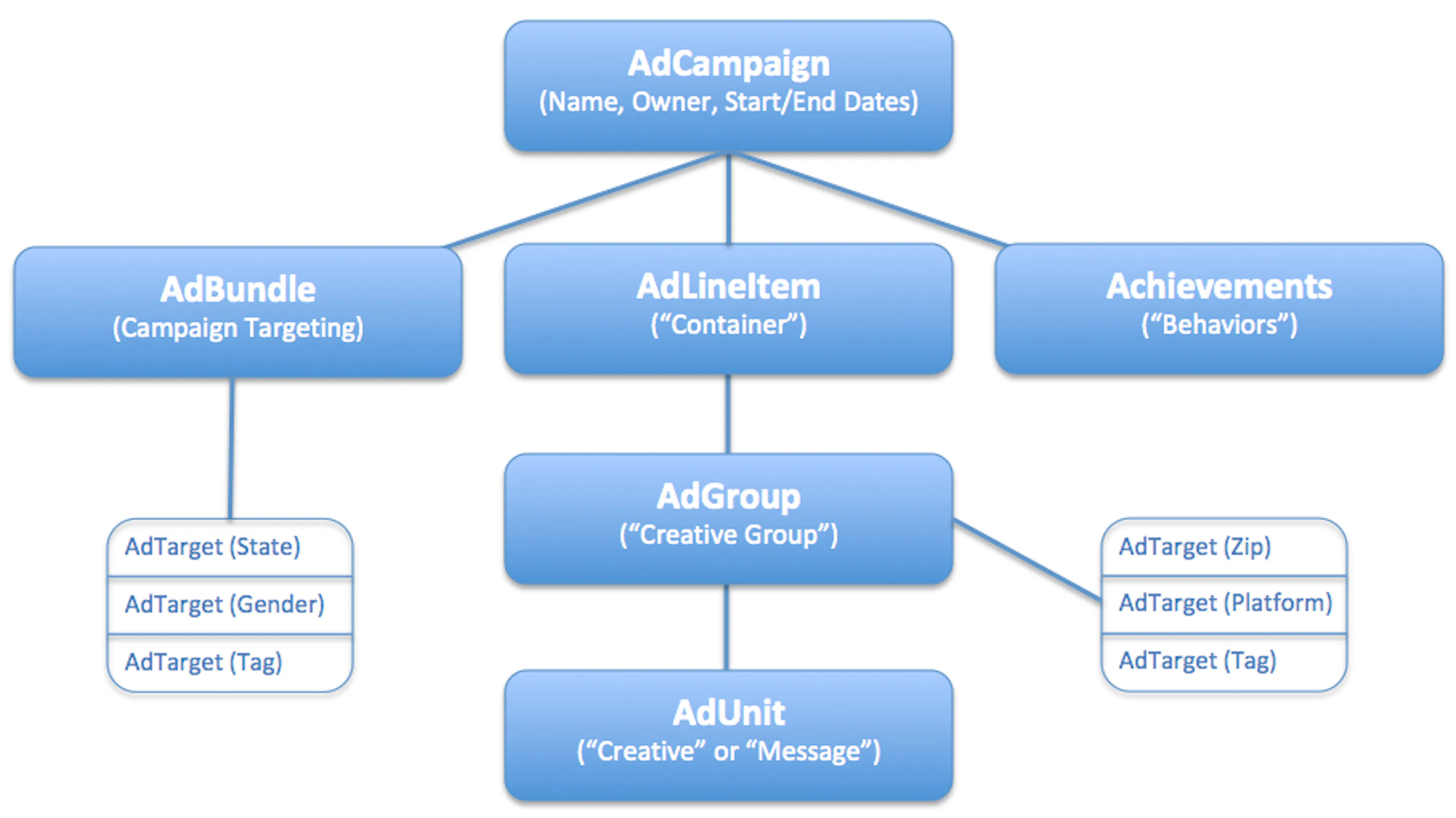
At the top of the diagram is the primary campaign object, AdCampaign. It stores basic information about the campaign, such as its name, owner, and the dates it begins and ends. This campaign object has three children - the ad bundle, the line item, and any achievements defined for the campaign.
To the far left of the diagram is the AdBundle object, which handles targeting information on the campaign level. This targeting data is shown in the related database table with AdTarget attributes for state, gender, and a tag.
Directly below AdCampaign is the AdLineItem object, which is a legacy object that serves only one function - to be a container for the creative group. That group object, called AdGroup in the database, holds message level targeting information. Like the AdBundle, it too owns a related database table with AdTarget attributes; in this case, attributes for zip, platform, and a tag. The final child of AdLineItem is AdUnit, is the actual creative, or message, being delivered for the campaign. It contains delivery option information such as a scheduled delivery date or a specific achievement trigger. In addition, the AdUnit can contain a message template, messaging provider information, and an image URL for any graphic advertisements.
And, finally, to the far right of the diagram, you can see the Achievements object, which contains any of the behaviors that must be met in order to trigger the outcomes offered by the campaign.
The Campaigns Management API provides a collection of APIs that correspond to the following areas of focus:
- Retrieving Campaigns for Management
- Managing Campaign Behaviors
- Managing Containers for Creative Groups
- Managing Creative Groups
- Managing Creatives
- Updating Campaigns
- Performing Campaign Domain Actions
- Deleting Campaigns
Retrieving Campaigns for Management
This family of APIs allows you to:
Get All Campaigns
Fetches all campaigns within a specific platform implementation.
Endpoints for Get All Campaigns
This method offers the following endpoints:
REST Endpoints
GET /priv/v1/apps/:api_key/management/campaigns
For more information on how to specify an endpoint as part of an actual URL, see Before You Begin. The procedure in this section includes a sample URL for a customer transaction.
Endpoint Parameters for Get All Campaigns
The following parameters are available when specifying the endpoint for this method:
| Endpoint Parameter | Description |
|---|---|
| api_key | Supplied by the SessionM Platform, the API key is necessary to authenticate any HTTP request to a SessionM API. This key is associated to an API secret, which ties the authentication to a specific application or web site within the organization. The platform maintains each application or site as a digital property, something that can be configured using the SessionM UI. |
| limit | Number of campaigns to return. Default is 10. |
| page | The 1-based page number. |
Request Object for Get All Campaigns
Not applicable.
Response Object for Get All Campaigns
In addition to a status key-value pair, the response object returned by the method contains an array of campaign objects, which is shown and detailed in the response sample and in the Response Attributes for Campaign table.
Statuses and Errors for Get All Campaigns
When this method makes a successful call to the platform, it returns a 200-level status code. When the string returned with a 200-level status code is ok, the transaction did process. But, if the string returned is error, you need to discover what type of error occurred.
Returned errors can be either method-specific or generic. The platform returns the following error messages for this method:
| Code | Reason |
|---|---|
| missing_data | Missing campaign data. |
| not_found | Parent model not found. |
| validation | Validation error. |
For information on the generic statuses and errors returned for any object, see the associated section in Generic Statuses and Errors.
Get a Campaign
Fetches a campaign by either campaign ID or permalink.
Endpoints for Get a Campaign
This method offers the following endpoints:
REST Endpoints
GET /priv/v1/apps/:api_key/management/campaigns/:campaign_id
GET /priv/v1/apps/:api_key/management/external/campaigns/:permalink
For more information on how to specify an endpoint as part of an actual URL, see Before You Begin. The procedure in this section includes a sample URL for a customer transaction.
Endpoint Parameters for Get a Campaign
The following parameters are available when specifying the endpoint for this method:
| Endpoint Parameter | Description |
|---|---|
| api_key | Supplied by the SessionM Platform, the API key is necessary to authenticate any HTTP request to a SessionM API. This key is associated to an API secret, which ties the authentication to a specific application or web site within the organization. The platform maintains each application or site as a digital property, something that can be configured using the SessionM UI. |
| campaign_id | Internal SessionM identifier for campaign. |
| permalink | Campaign permalink that can be customer-defined or auto-generated. |
Request Object for Get a Campaign
Not applicable.
Response Object for Get a Campaign
In addition to a status key-value pair, the response object returned by the method contains a campaign object, which is shown and detailed in the response sample and in the Response Attributes for Campaign table.
Statuses and Errors for Get a Campaign
When this method makes a successful call to the platform, it returns a 200-level status code. When the string returned with a 200-level status code is ok, the transaction did process. But, if the string returned is error, you need to discover what type of error occurred.
Returned errors can be either method-specific or generic. The platform returns the following error messages for this method:
| Code | Reason |
|---|---|
| missing_data | Missing campaign data. |
| not_found | Parent model not found. |
| validation | Validation error. |
For information on the generic statuses and errors returned for any object, see the associated section in Generic Statuses and Errors.
Get a Complete Hierarchy for a Campaign
Fetches a campaign's complete navigation hierarchy, detailing all of the containers, creative groups, and creatives in the campaign.
Endpoints for Get a Complete Hierarchy for a Campaign
This method offers the following endpoints:
REST Endpoints
GET /priv/v1/apps/:api_key/management/campaigns/:campaign_id/navigation
For more information on how to specify an endpoint as part of an actual URL, see Before You Begin. The procedure in this section includes a sample URL for a customer transaction.
Endpoint Parameters for Get a Complete Hierarchy for a Campaign
The following parameters are available when specifying the endpoint for this method:
| Endpoint Parameter | Description |
|---|---|
| api_key | Supplied by the SessionM Platform, the API key is necessary to authenticate any HTTP request to a SessionM API. This key is associated to an API secret, which ties the authentication to a specific application or web site within the organization. The platform maintains each application or site as a digital property, something that can be configured using the SessionM UI. |
| campaign_id | Internal SessionM identifier for campaign. |
Request Object for Get a Complete Hierarchy for a Campaign
Not applicable.
Response Object for Get a Complete Hierarchy for a Campaign
In addition to a status key-value pair, the response object returned by the method contains a campaign object, as shown below:
JSON Response
{
    "status": "ok",
    "campaign": {
        "id": 730,
        "name": "Campaign Example 730",
        "status": "live",
        "starts_at": "2021-12-31T05:00:00Z",
        "ends_at": "2022-01-04T05:00:00Z",
        "line_items": [
            {
                "id": 726,
                "name": "line item for campaign 730",
                "status": "draft",
                "starts_at": "2021-12-31T05:00:00Z",
                "ends_at": "2022-01-04T05:00:00Z",
                "creative_groups": [
                    {
                        "id": 2331,
                        "name": "new creative group",
                        "status": "draft",
                        "starts_at": "2020-08-12T17:45:48Z",
                        "ends_at": "2020-09-12T17:45:48Z",
                        "creatives": [
                            {
                                "id": 2557,
                                "name": "Email File Export Test 1",
                                "status": "draft"
                            }
                        ]
                    }
                ]
            }
        ]
    }
}
This object contains the core components of a campaign hierarchy, including the campaign itself along with its container, creative group, and creative. For more information on each object, see the following sections:
- For the campaign object, see the response sample and the Response Attributes for Campaign table.
- For the line_items array object, see the response sample and the Response Attributes for Line Items table.
- For the creative_groups array object, see the response sample and the Response Attributes for Creative Groups table.
- For the creatives array object, see the response sample and the two corresponding tables, "Response Attributes for Creatives" and "Response Attributes for Messaging Platform (Issue Audience CSV)".
Statuses and Errors for Get a Complete Hierarchy for a Campaign
When this method makes a successful call to the platform, it returns a 200-level status code. When the string returned with a 200-level status code is ok, the transaction did process. But, if the string returned is error, you need to discover what type of error occurred.
Returned errors can be either method-specific or generic. The platform returns the following error messages for this method:
| Code | Reason |
|---|---|
| missing_data | Missing campaign data. |
| not_found | Parent model not found. |
| validation | Validation error. |
For information on the generic statuses and errors returned for any object, see the associated section in Generic Statuses and Errors.
Managing Campaign Behaviors
This family of APIs allows you to:
Get All Behaviors for a Campaign
Fetches an array of all behaviors defined for a campaign. For a comprehensive view of a campaign, see Get Information on a Campaign.
Endpoints for Get All Behaviors for a Campaign
This method offers the following endpoints:
REST Endpoints
GET /priv/v1/apps/:api_key/management/campaigns/:campaign_id/behaviors
For more information on how to specify an endpoint as part of an actual URL, see Before You Begin. The procedure in this section includes a sample URL for a customer transaction.
Endpoint Parameters for Get All Behaviors for a Campaign
The following parameters are available when specifying the endpoint for this method:
| Endpoint Parameter | Description |
|---|---|
| api_key | Supplied by the SessionM Platform, the API key is necessary to authenticate any HTTP request to a SessionM API. This key is associated to an API secret, which ties the authentication to a specific application or web site within the organization. The platform maintains each application or site as a digital property, something that can be configured using the SessionM UI. |
| campaign_id | Internal SessionM ad campaign ID. |
Request Object for Get All Behaviors for a Campaign
Not applicable.
Response Object 1
This response is for a behavior triggered by a custom event and drops a tag as its outcome. It represents a single behavior named “custom event behavior” that actually consists of 2 achievements, the goal (id 2475) and the composite(id 2476). The composite achievement duplicates the goal achievement data in its goals array.
In addition to a status key-value pair, the response object returned by the method contains a behaviors array object, as shown below:
JSON Response
{
    "behaviors": [
        {
            "data": {
                "consecutive": false,
                "eligible_spend": null,
                "max_times_achievable": null,
                "max_times_achievable_per_month": null,
                "max_times_achievable_per_period": null,
                "max_times_achievable_per_year": null,
                "min_time_between_events": null,
                "min_time_between_events_count": 1,
                "period": 7776000
            },
            "errors": {},
            "id": 2475,
            "name": "MMC-72b1c697-7090-4aef-9f6e-4f0a7e24cd15",
            "points": 0,
            "tags": null
        },
        {
            "data": {
                "consecutive": false,
                "eligible_spend": null,
                "goals_csv_data": "2475,1,true,0,1,false
",
                "max_times_achievable": null,
                "max_times_achievable_per_period": null,
                "min_time_between_events": null,
                "period": 86400,
                "use_same_period": false
            },
            "errors": {},
            "goal_groups": [
                {
                    "goal_count": 1,
                    "goals": [
                        {
                            "achievement": {
                                "data": {
                                    "consecutive": false,
                                    "eligible_spend": null,
                                    "max_times_achievable": null,
                                    "max_times_achievable_per_month": null,
                                    "max_times_achievable_per_period": null,
                                    "max_times_achievable_per_year": null,
                                    "min_time_between_events": null,
                                    "min_time_between_events_count": 1,
                                    "period": 7776000
                                },
                                "errors": {},
                                "event_count": 1,
                                "id": 2475,
                                "name": "MMC-72b1c697-7090-4aef-9f6e-4f0a7e24cd15",
                                "points": 0,
                                "tags": null
                            }
                        }
                    ]
                }
            ],
            "id": 2476,
            "name": "custom event behavior",
            "outcomes": [],
            "points": 0,
            "tags": "custom_behavior_completed"
        }
    ],
    "status": "ok"
}
This behaviors array object is detailed in the tables describing the behaviors array that is returned when creating behaviors in batch for a campaign. You can consult all of the tables in that section, starting with the Response Attributes for Behaviors table.
Response Object 2
This response is for a purchase behavior that requires the user to purchase any 3 items and award 10 points as its outcome.
In addition to a status key-value pair, the response object returned by the method contains a behaviors array object, as shown below:
JSON Response
{
    "behaviors": [
        {
            "data": {
                "consecutive": false,
                "eligible_spend": null,
                "max_times_achievable": null,
                "max_times_achievable_per_month": null,
                "max_times_achievable_per_period": null,
                "max_times_achievable_per_year": null,
                "min_time_between_events": null,
                "min_time_between_events_count": 1,
                "period": 7776000
            },
            "errors": {},
            "id": 2477,
            "name": "MMC-07431719-e3bd-46e9-8f72-f7a6bead9ceb",
            "points": 0,
            "tags": null
        },
        {
            "data": {
                "consecutive": false,
                "eligible_spend": null,
                "goals_csv_data": "2477,1,true,0,1,false
",
                "max_times_achievable": null,
                "max_times_achievable_per_period": null,
                "min_time_between_events": null,
                "period": 86400,
                "use_same_period": false
            },
            "errors": {},
            "goal_groups": [
                {
                    "goal_count": 1,
                    "goals": [
                        {
                            "achievement": {
                                "data": {
                                    "consecutive": false,
                                    "eligible_spend": null,
                                    "max_times_achievable": null,
                                    "max_times_achievable_per_month": null,
                                    "max_times_achievable_per_period": null,
                                    "max_times_achievable_per_year": null,
                                    "min_time_between_events": null,
                                    "min_time_between_events_count": 1,
                                    "period": 7776000
                                },
                                "errors": {},
                                "event_count": 1,
                                "id": 2477,
                                "name": "MMC-07431719-e3bd-46e9-8f72-f7a6bead9ceb",
                                "points": 0,
                                "tags": null
                            }
                        }
                    ]
                }
            ],
            "id": 2478,
            "name": "purchase event test",
            "outcomes": [
                {
                    "account_id": null,
                    "created_at": "2017-10-18T21:00:48Z",
                    "id": 97,
                    "model_id": 87,
                    "model_type": "Offer",
                    "organization_id": 13,
                    "updated_at": "2017-10-18T21:00:48Z"
                }
            ],
            "points": 10,
            "tags": ""
        }
    ],
    "status": "ok"
}
This behaviors array object is detailed in the tables describing the behaviors array that is returned when creating behaviors in batch for a campaign. You can consult all of the tables in that section, starting with the Response Attributes for Behaviors table.
Response Object 3
This response is for a purchase behavior that requires the user to purchase any item. The response also demonstrates the start/end time behavior restriction. For more information, see the event_filters object in the response below.
In addition to a status key-value pair, the response object returned by the method contains a behaviors array object, as shown below:
JSON Response
{
    "status": "ok",
    "behaviors": [
        {
            "id": 2506,
            "name": "MMC-2aef35f7-bff9-4df4-9e26-196816179f4b",
            "points": 0,
            "tags": null,
            "data": {
                "result_trigger": null,
                "eligible_spend": null,
                "precise_event_count": null,
                "unit_precision": null,
                "min_time_between_events": null,
                "min_time_between_events_count": 1,
                "period": 7776000,
                "max_times_achievable": null,
                "max_times_achievable_per_period": null,
                "max_times_achievable_per_month": null,
                "max_times_achievable_per_year": null,
                "consecutive": false
            },
            "errors": {}
        },
        {
            "id": 2507,
            "name": "goal start/end test",
            "points": 0,
            "tags": "",
            "data": {
                "result_trigger": null,
                "eligible_spend": null,
                "precise_event_count": null,
                "unit_precision": null,
                "goals_csv_data": "2506,1,true,0,1,false
",
                "period": 86400,
                "max_times_achievable": null,
                "max_times_achievable_per_period": null,
                "min_time_between_events": null,
                "consecutive": false,
                "use_same_period": false
            },
            "errors": {},
            "goal_groups": [
                {
                    "goal_count": 1,
                    "goals": [
                        {
                            "achievement": {
                                "id": 2506,
                                "name": "MMC-2aef35f7-bff9-4df4-9e26-196816179f4b",
                                "points": 0,
                                "tags": null,
                                "data": {
                                    "result_trigger": null,
                                    "eligible_spend": null,
                                    "precise_event_count": null,
                                    "unit_precision": null,
                                    "min_time_between_events": null,
                                    "min_time_between_events_count": 1,
                                    "period": 7776000,
                                    "max_times_achievable": null,
                                    "max_times_achievable_per_period": null,
                                    "max_times_achievable_per_month": null,
                                    "max_times_achievable_per_year": null,
                                    "consecutive": false
                                },
                                "errors": {},
                                "event_count": 1,
                            }
                        }
                    ]
                }
            ],
            "outcomes": []
        }
    ]
}
This behaviors array object is detailed in the tables describing the behaviors array that is returned when creating behaviors in batch for a campaign. You can consult all of the tables in that section, starting with the Response Attributes for Behaviors table.
Statuses and Errors for Get All Behaviors for a Campaign
When this method makes a successful call to the platform, it returns a 200-level status code. When the string returned with a 200-level status code is ok, the transaction did process. But, if the string returned is error, you need to discover what type of error occurred.
Returned errors can be either method-specific or generic. No error messages are defined for this method except for the generic statuses and errors returned for any object. For more information, see the associated section in Generic Statuses and Errors.
Create Behaviors in Batch for a Campaign
Creates behaviors in batch for a campaign. The request object creates a campaign behavior triggered by a custom event (my_custom_event). The request then awards an offer and tags the user (custom_behavior_completed) as its outcomes.
Endpoints for Create Behaviors in Batch for a Campaign
This method offers the following endpoints:
REST Endpoints
POST /priv/v1/apps/:api_key/management/campaigns/:campaign_id/behaviors/_batch
For more information on how to specify an endpoint as part of an actual URL, see Before You Begin. The procedure in this section includes a sample URL for a customer transaction.
Endpoint Parameters for Create Behaviors in Batch for a Campaign
The following parameters are available when specifying the endpoint for this method:
| Endpoint Parameter | Description |
|---|---|
| api_key | Supplied by the SessionM Platform, the API key is necessary to authenticate any HTTP request to a SessionM API. This key is associated to an API secret, which ties the authentication to a specific application or web site within the organization. The platform maintains each application or site as a digital property, something that can be configured using the SessionM UI. |
| campaign_id | Internal SessionM ad campaign ID. |
Request Object for Create Behaviors in Batch for a Campaign
When this method runs, it passes in a request object that contains a behaviors array, as shown below:
JSON Request
{
   "behaviors":[
      {
          "name": "custom event behavior - campaign 730",
          "tags": "custom_behavior_completed",
          "data": {
              "period": 86400,
              "max_times_achievable": null,
              "use_same_period": false
          },
          "goal_groups": [
              {
                  "goals": [
                      {
                          "achievement": {
                              "name": "goal achievement for custom event behavior - campaign 730",
                              "internal_event_name": "my_custom_event",
                              "event_count": 1,
                              "data": {
                                  "period": 7776000,
                                  "max_times_achievable": null,
                                  "max_times_achievable_per_period": null,
                                  "min_time_between_events": null,
                                  "min_time_between_events_count": 1,
                                  "consecutive": false
                              }
                          }
                      }
                  ]
              }
          ],
          "outcome_config":[
            {
               "deal":{
                  "id": "514dafae-14ab-4104-b4da-3b2ad08f10d5"
               }
            }
         ]
      }
   ]
}
This object is detailed in the following table:
Request Attributes for Behaviors
| Attribute | TypeRequired/Optional | Description |
|---|---|---|
| name | stringrequired | Name of the behavior. Also serves as the name of the composite achievement. |
| tags | stringoptional | Tag - or list of tags - to be dropped on the customer when the behavior is completed. Multiple tags must be separated with a “ |
| ”; for example, “tag1 | ||
| tag2 | ||
| tag3”) | ||
| data | objectrequired | Configuration of the composite achievement. For more information, see the Request Attributes for Data table below. |
| goal_groups | arrayrequired | Goals (goal achievements) can be organized into groups - each with multiple goals. To complete the composite achievement, the customer needs to complete each of the groups. Use "AND" logic between groups and between goals in a group. For example, a simple behavior with one composite and one goal would have 1 goal group with 1 goal. The goal_groups array contains a goals array, which contains an achievement object. For more information, see the Request Attributes for Achievement table below. |
| outcome_config | array??? | Array of outcome objects that can be an offer (deal object) or a message (ad unit object). The deal object which has an id attribute for the ID of an offer from the Offers Module. |
Request Attributes for Data
| Attribute | TypeRequired/Optional | Description |
|---|---|---|
| eligible_spend | booleanoptional | Designates a special achievement type. |
| period | integeroptional | Value in seconds used by other parameters that define time-bound rules. For example, if max_times_achievable_per_period is set to 3 and period to 3600, the goal’s outcome can be earned a maximum 3 times in 1 hour. |
| *min_time_between_events | integeroptional | Minimum time - in seconds - to throttle the events counting towards the achievement. |
| *min_time_between_events_count | integeroptional | Describes the maximum event rate and is only taken into account when min_time_between_events is not nil. For example if min_time_between_events = 1 day and min_time_between_events_count = 2, then no more than 2 event occurrences will be taken into account in a single day. |
| max_times_achievable | integeroptional | Stipulates how many times a customer can achieve the outcome associated with the behavior. |
| *max_times_achievable_per_period | integeroptional | Stipulates how many times a customer can achieve the outcome associated with the behavior in a defined period of time. |
| *max_times_achievable_per_month | integeroptional | Stipulates how many times a customer can achieve the outcome associated with the behavior in a month. |
| *max_times_achievable_per_year | integeroptional | Stipulates how many times a customer can achieve the outcome associated with the behavior in a year. |
| min_time_between_events | integeroptional | Minimum time - in seconds - to throttle the events counting towards the achievement. |
| consecutive | booleanoptional | Controls whether events must occur evenly for consecutive days set by event_count. |
| use_same_period | booleanoptional | All behavior goals must be completed in the same timeframe. |
Request Attributes for Achievement
| Attribute | TypeRequired/Optional | Description |
|---|---|---|
| name | stringrequired | Name of the custom event behavior goal. |
| internal_event_name | stringoptional | Name of the custom event to trigger the goal achievement. |
| event_count | integeroptional | Number of times the event must be sent to trigger the achievement. |
| data | objectrequired | Configuration of the composite achievement. For more information, see the Request Attributes for Data table above. |
Response Object for Create Behaviors in Batch for a Campaign
In addition to a status key-value pair, the response object returned by the method contains a behaviors array, as shown below:
JSON Response
{
   "status":"ok",
   "behaviors":[
      {
         "id":2480,
         "name":"New behavior",
         "points":0,
         "tags":"my_tag_to_target_away_from_user",
         "data":{
            "eligible_spend":null,
            "goals_csv_data":"2479,1,false,0,0,false
",
            "period":86400,
            "max_times_achievable":1,
            "max_times_achievable_per_period":null,
            "min_time_between_events":null,
            "consecutive":false,
            "use_same_period":false
         },
         "errors":{

         },
         "goal_groups":[
            {
               "goal_count":0,
               "goals":[
                  {
                     "achievement":{
                        "id":2479,
                        "name":"MMC-offer_issued",
                        "points":0,
                        "tags":null,
                        "data":{
                           "eligible_spend":null,
                           "min_time_between_events":null,
                           "min_time_between_events_count":1,
                           "period":86400,
                           "max_times_achievable":1,
                           "max_times_achievable_per_period":null,
                           "max_times_achievable_per_month":null,
                           "max_times_achievable_per_year":null,
                           "consecutive":false
                        },
                        "errors":{
                        },
                        "event_count":1,
                     }
                  }
               ]
            }
         ],
         "outcomes":[
            {
               "account_id":null,
               "created_at":"2020-08-13T15:51:52Z",
               "id":357,
               "model_id":120,
               "model_type":"Offer",
               "organization_id":13,
               "updated_at":"2020-08-13T15:51:52Z"
            }
         ]
      }
   ]
}
This object is detailed in the following table:
Response Attributes for Behavior
| Attribute | Type | Description |
|---|---|---|
| id | integer | Database ID. |
| name | string | Name of the behavior. Also serves as the name of the composite achievement. |
| tags | string | Tag - or list of tags - to be dropped on the customer when the behavior is completed. Multiple tags must be separated with a “ |
| ”; for example, “tag1 | ||
| tag2 | ||
| tag3”). | ||
| points | integer | Number of points associated with behavior. |
| data | object | See the Response Attributes for Data (Achievement) table below. |
| errors | object | Contains error code, if any. For example: "errors":{"code":"goal data is invalid"}. |
| goal_groups | array | Contains a goal group object, which is detailed in the Response Attributes for Goal Group table below. |
| outcomes | array | Contains outcome objects which are detailed in the Response Attributes for Outcomes table below. |
Response Attributes for Data (Achievement)
| Attribute | Type | Description |
|---|---|---|
| goals_csv_data | string | An auto generated field that is used internally. Provides configuration by which the composite finds its goal groups and goals. |
| period | integer | Value in seconds used by other parameters that define time-bound rules. For example, if max_times_achievable_per_period is set to 3 and period to 3600, the goal’s outcome can be earned a maximum 3 times in 1 hour. |
| max_times_achievable | integer | Number of times the outcome for a behavior can be achieved. |
| max_times_achievable_per_period | integer | Number of times the outcome for a behavior can be achieved in a specific time period. |
| max_times_achievable_per_month | integer | Number of times the outcome for a behavior can be achieved in a specific month. |
| max_times_achievable_per_year | integer | Number of times the outcome for a behavior can be achieved in a year. |
| min_time_between_events | integer | Minimum time - in seconds - to throttle the events counting towards the achievement. |
| *min_time_between_events_count | integer | Describes the maximum event rate and is only taken into account when min_time_between_events is not nil. For example if min_time_between_events = 1 day and min_time_between_events_count = 2, then no more than 2 event occurrences will be taken into account in a single day. |
| consecutive | boolean | Controls whether events must occur evenly for consecutive days set by event_count. |
| eligible_spend | boolean | Designates a special achievement type. |
| use_same_period | boolean | All behavior goals must be completed in the same timeframe. |
Response Attributes for Goal Group
| Attribute | Type | Description |
|---|---|---|
| goal_count | integer | Number of goal objects in the goals array. |
| goals | array | Contains goal objects, each of which contains achievement objects. See the Response Attributes for Achievement table below. |
Response Attributes for Achievement
| Attribute | Type | Description |
|---|---|---|
| id | integer | Database identifier. |
| name | string | Name of the custom event behavior goal. |
| tags | string | Tag - or list of tags - to be dropped on the customer when the behavior is completed. Multiple tags must be separated with a “ |
| ”; for example, “tag1 | ||
| tag2 | ||
| tag3”). | ||
| points | integer | Number of points associated with behavior. |
| data | object | See the Response Attributes for Data (Achievement) table above. |
| errors | object | Contains error code, if any. For example: "errors":{"code":"goal data is invalid"}. |
| event_count | integer | Number of times the event must be sent to trigger the achievement. |
Response Attributes for Outcomes
| Attribute | Type | Description |
|---|---|---|
| account_id | integer | ID of SessionM Platform account that created the outcome. |
| created_at | Datetime | Timestamp for when the object was created. |
| id | integer | ID of the outcome object for this specific achievement. |
| model_id | integer | ID of the object describing what the actual outcome is. |
| model_type | string | Type of the actual outcome model. Can be one of following: “offer” - if the outcome awards points or issues an offer; “AdUnit” - if the outcome sends a message; or “EventOutcome” - if the outcome triggers another event. |
| organization_id | integer | ID of the organization that owns the object. |
| updated_at | datetime | Timestamp for when the object was last updated. |
Statuses and Errors for Create Behaviors in Batch for a Campaign
When this method makes a successful call to the platform, it returns a 200-level status code. When the string returned with a 200-level status code is ok, the transaction did process. But, if the string returned is error, you need to discover what type of error occurred.
Returned errors can be either method-specific or generic. No error messages are defined for this method except for the generic statuses and errors returned for any object. For more information, see the associated section in Generic Statuses and Errors.
Managing Containers for Creative Groups
This family of APIs allows you to:
- Create a container for a campaign
- Get all containers for a campaign
- Get a container by container ID
- Update a container
- Delete a container
Create a Container for a Campaign
Creates a container in a campaign for creative groups.
Endpoints for Create a Container for a Campaign
This method offers the following endpoints:
REST Endpoints
POST /priv/v1/apps/:api_key/management/campaigns/:campaign_id/line_items
For more information on how to specify an endpoint as part of an actual URL, see Before You Begin. The procedure in this section includes a sample URL for a customer transaction.
Endpoint Parameters for Create a Container for a Campaign
The following parameters are available when specifying the endpoint for this method:
| Endpoint Parameter | Description |
|---|---|
| api_key | Supplied by the SessionM Platform, the API key is necessary to authenticate any HTTP request to a SessionM API. This key is associated to an API secret, which ties the authentication to a specific application or web site within the organization. The platform maintains each application or site as a digital property, something that can be configured using the SessionM UI. |
| campaign_id | Internal SessionM ad campaign ID. |
Request Object for Create a Container for a Campaign
When this method runs, it passes in a request object that contains a line_item object which is shown below:
JSON Request
{
  "line_item": {
      "name": "new line item",
      "starts_at": "2020-08-13 15:52:33 -0400",
      "ends_at": "2020-08-22 15:52:33 -0400",
      "status": "live"
  }
}
This object is detailed in the following table:
Request Attributes for Line Item
| Attribute | TypeRequired/Optional | Description |
|---|---|---|
| name | stringrequired | Name of line item (container) holding creative groups for a campaign. |
| starts_at | datetimerequired | Date and time when line item (container) becomes active. Should match campaign start date/time. |
| ends_at | datetimerequired | Date and time when line item (container) becomes inactive. Should match campaign end date/time. |
| status | stringrequired | Status of line item (container). Same as campaign status (“draft,” “inreview,” “live,” “paused,” or “completed”). It needs to be "live" in order for creatives that it contains to be live. |
Response Object for Create a Container for a Campaign
In addition to a status key-value pair, the response object returned by the method contains a line_items array object, a sample for which is shown and detailed in the response sample and in the Response Attributes for Line Items table.
Get All Containers for a Campaign
Fetches an array of containers (line item objects) for creative groups associated with a campaign by campaign ID. Note that there is only a single line item per campaign.
Endpoints for Get All Containers for a Campaign
This method offers the following endpoints:
REST Endpoints
GET /priv/v1/apps/:api_key/management/campaigns/:campaign_id/line_items
For more information on how to specify an endpoint as part of an actual URL, see Before You Begin. The procedure in this section includes a sample URL for a customer transaction.
Endpoint Parameters for Get All Containers for a Campaign
The following parameters are available when specifying the endpoint for this method:
| Endpoint Parameter | Description |
|---|---|
| api_key | Supplied by the SessionM Platform, the API key is necessary to authenticate any HTTP request to a SessionM API. This key is associated to an API secret, which ties the authentication to a specific application or web site within the organization. The platform maintains each application or site as a digital property, something that can be configured using the SessionM UI. |
| campaign_id | Internal SessionM ad campaign ID. |
Request Object for Get All Containers for a Campaign
Not applicable.
Response Object for Line Items
In addition to a status key-value pair, the response object returned by the method contains a line_items array, as shown below:
JSON Response
{
  "line_items": [
    {
        "campaign_id": 726,
        "starts_at": "2020-08-12T17:45:48Z",
        "ends_at": "2020-09-12T17:45:48Z",
        "id": 722,
        "name": "behaviors api test 2",
        "status": "live"
     }
   ],
   "status": "ok"
}
This array is detailed in the following table:
Response Attributes for Line Items
| Attribute | Type | Description |
|---|---|---|
| campaign_id | integer | Identifier for parent campaign. |
| starts_at | datetime | Date and time when line item (container) becomes active. Should match campaign start date/time. |
| ends_at | datetime | Date and time when line item (container) becomes inactive. Should match campaign end date/time. |
| id | integer | ID of the object. |
| name | string | Name of line item (container). |
| status | string | Status of line item (container). Same as campaign status (“draft,” “inreview,” “live,” “paused,” or “completed”). It needs to be "live" in order for creatives that it contains to be live. |
| display_name | string | Additional descriptive information, if desired. |
| description | string | Additional descriptive information, if desired. |
Statuses and Errors for Get All Containers for a Campaign
When this method makes a successful call to the platform, it returns a 200-level status code. When the string returned with a 200-level status code is ok, the transaction did process. But, if the string returned is error, you need to discover what type of error occurred.
Returned errors can be either method-specific or generic. The platform returns the following error messages for this method:
| Code | Reason |
|---|---|
| not_found | Parent model not found. |
| not_found | Parent model not in same organization. |
For information on the generic statuses and errors returned for any object, see the associated section in Generic Statuses and Errors.
Get a Container by Container ID
Fetches a container (line item) for creative groups associated with a campaign by container ID.
Endpoints for Get a Container by Container ID
This method offers the following endpoints:
REST Endpoints
GET /priv/v1/apps/:api_key/management/line_items/:line_item_id
For more information on how to specify an endpoint as part of an actual URL, see Before You Begin. The procedure in this section includes a sample URL for a customer transaction.
Endpoint Parameters for Get a Container by Container ID
The following parameters are available when specifying the endpoint for this method:
| Endpoint Parameter | Description |
|---|---|
| api_key | Supplied by the SessionM Platform, the API key is necessary to authenticate any HTTP request to a SessionM API. This key is associated to an API secret, which ties the authentication to a specific application or web site within the organization. The platform maintains each application or site as a digital property, something that can be configured using the SessionM UI. |
| line_item_id | Identifier for the container (line item). |
Request Object for Get a Container by Container ID
Not applicable.
Response Object for Get a Container by Container ID
In addition to a status key-value pair, the response object returned by the method contains a line_items array object, a sample for which is shown and detailed in the response sample and in the Response Attributes for Line Items table.
Statuses and Errors for Get a Container by Container ID
When this method makes a successful call to the platform, it returns a 200-level status code. When the string returned with a 200-level status code is ok, the transaction did process. But, if the string returned is error, you need to discover what type of error occurred.
Returned errors can be either method-specific or generic. The platform returns the following error messages for this method:
| Code | Reason |
|---|---|
| not_found | Parent model not found. |
| not_found | Parent model not in same organization. |
For information on the generic statuses and errors returned for any object, see the associated section in Generic Statuses and Errors.
Update a Container
Updates a container (line item) of creative groups.
Endpoints for Update a Container
This method offers the following endpoints:
REST Endpoints
PUT /priv/v1/apps/:api_key/management/line_items/:line_item_id
For more information on how to specify an endpoint as part of an actual URL, see Before You Begin. The procedure in this section includes a sample URL for a customer transaction.
Endpoint Parameters for Update a Container
The following parameters are available when specifying the endpoint for this method:
| Endpoint Parameter | Description |
|---|---|
| api_key | Supplied by the SessionM Platform, the API key is necessary to authenticate any HTTP request to a SessionM API. This key is associated to an API secret, which ties the authentication to a specific application or web site within the organization. The platform maintains each application or site as a digital property, something that can be configured using the SessionM UI. |
| line_item_id | Identifier for the container (line item). |
Request Object for Update a Container
When this method runs, it passes in a request object that contains a line_item object which is shown below:
JSON Request
{
  "line_item": {
      "name": "updated new line item",
      "starts_at": "2020-08-13 15:52:33 -0400",
      "ends_at": "2020-08-22 15:52:33 -0400",
      "status": "live"
  }
}
This object is detailed in the following table:
Request Attributes for Line Item
| Attribute | TypeRequired/Optional | Description |
|---|---|---|
| name | stringrequired | Name of line item (container) holding creative groups for a campaign. |
| starts_at | datetimerequired | Date and time when line item (container) becomes active. Should match campaign start date/time. |
| ends_at | datetimerequired | Date and time when line item (container) becomes inactive. Should match campaign end date/time. |
| status | stringrequired | Status of line item (container). Same as campaign status (“draft,” “inreview,” “live,” “paused,” or “completed”). It needs to be "live" in order for creatives that it contains to be live. |
Response Object for Update a Container
In addition to a status key-value pair, the response object returned by the method contains a line_items array, as shown below:
JSON Response
{
  "line_items": [
    {
        "campaign_id": 726,
        "starts_at": "2020-08-13 15:52:33 -0400",
        "ends_at": "2020-08-22 15:52:33 -0400",
        "id": 722,
        "name": "updated new line item",
        "status": "live"
     }
   ],
   "status": "ok"
}
This array is detailed in the following table:
Response Attributes for Line Items
| Attribute | Type | Description |
|---|---|---|
| campaign_id | integer | Identifier for parent campaign. |
| starts_at | datetime | Date and time when line item (container) becomes active. Should match campaign start date/time. |
| ends_at | datetime | Date and time when line item (container) becomes inactive. Should match campaign end date/time. |
| id | integer | ID of the object. |
| name | string | Name of line item (container). |
| status | string | Status of line item (container). Same as campaign status (“draft,” “inreview,” “live,” “paused,” or “completed”). It needs to be "live" in order for creatives that it contains to be live. |
| display_name | string | Additional descriptive information, if desired. |
| description | string | Additional descriptive information, if desired. |
Statuses and Errors for Update a Container
When this method makes a successful call to the platform, it returns a 200-level status code. When the string returned with a 200-level status code is ok, the transaction did process. But, if the string returned is error, you need to discover what type of error occurred.
Returned errors can be either method-specific or generic. The platform returns the following error messages for this method:
| Code | Reason |
|---|---|
| argument_error | Unknown line item (container) attributes test. |
| missing_data | Missing line item (container) data. |
| not_found | Parent model not found. |
| not_found | Parent model not in same organization. |
| validation | Validation error. |
For information on the generic statuses and errors returned for any object, see the associated section in Generic Statuses and Errors.
Delete a Container
Deletes a container (line item) of creative groups.
Endpoints for Delete a Container
This method offers the following endpoints:
REST Endpoints
DELETE /priv/v1/apps/:api_key/management/line_items/:line_item_id
For more information on how to specify an endpoint as part of an actual URL, see Before You Begin. The procedure in this section includes a sample URL for a customer transaction.
Endpoint Parameters for Delete a Container
The following parameters are available when specifying the endpoint for this method:
| Endpoint Parameter | Description |
|---|---|
| api_key | Supplied by the SessionM Platform, the API key is necessary to authenticate any HTTP request to a SessionM API. This key is associated to an API secret, which ties the authentication to a specific application or web site within the organization. The platform maintains each application or site as a digital property, something that can be configured using the SessionM UI. |
| line_item_id | Identifier for the container (line item). |
Request Object for Delete a Container
Not applicable.
Response Object for Delete a Container
In addition to a status key-value pair, the response object returned by the method contains a line_item object, as shown below:
JSON Response
{
  "status": "ok",
  "line_item": {
    "id": 372,
    "name": "Line Item Example[DELETED AT Oct 25, 2017 03:50 pm]",
    "status": "live",
    "campaign_id": 367,
    "starts_at": "2014-12-31T05:00:00Z",
    "ends_at": "2015-01-04T05:00:00Z"
  }
}
This object is detailed in the Response Attributes for Line Items table.
Statuses and Errors for Managing Containers for Creative Groups
When this method makes a successful call to the platform, it returns a 200-level status code. When the string returned with a 200-level status code is ok, the transaction did process. But, if the string returned is error, you need to discover what type of error occurred.
Returned errors can be either method-specific or generic. The platform returns the following error messages for this method:
| Code | Reason |
|---|---|
| not_found | Parent model not found. |
| not_found | Parent model not in same organization. |
For information on the generic statuses and errors returned for any object, see the associated section in Generic Statuses and Errors.
Managing Creative Groups
This family of APIs allows you to:
- Get all creative groups in a container
- Get a creative group in a container
- Create a creative group in a container
- Update a creative group in a container
- Delete a creative group from a container
Get All Creative Groups in a Container
Fetches all creative groups in a container (line item).
Endpoints for Get All Creative Groups in a Container
This method offers the following endpoints:
REST Endpoints
GET /priv/v1/apps/:api_key/management/line_items/:line_item_id/creative_groups
For more information on how to specify an endpoint as part of an actual URL, see Before You Begin. The procedure in this section includes a sample URL for a customer transaction.
Endpoint Parameters for Get All Creative Groups in a Container
The following parameters are available when specifying the endpoint for this method:
| Endpoint Parameter | Description |
|---|---|
| api_key | Supplied by the SessionM Platform, the API key is necessary to authenticate any HTTP request to a SessionM API. This key is associated to an API secret, which ties the authentication to a specific application or web site within the organization. The platform maintains each application or site as a digital property, something that can be configured using the SessionM UI. |
| line_item_id | Identifier for the container (line item). |
Request Object for Get All Creative Groups in a Container
Not applicable.
Response Object for Creative Groups
In addition to a status key-value pair, the response object returned by the method contains a creative_groups array, as shown below:
JSON Response
{
    "creative_groups": [
        {
            "ends_at": "2020-09-12T17:45:48Z",
            "id": 2326,
            "line_item_id": 722,
            "name": "Email File Export",
            "starts_at": "2020-08-12T17:45:48Z",
            "status": "live"
        },
        {
            "ends_at": "2020-09-12T17:45:48Z",
            "id": 2324,
            "line_item_id": 722,
            "name": "BEHAVIOR AD STAT",
            "starts_at": "2020-08-12T17:45:48Z",
            "status": "live"
        }
    ],
    "status": "ok"
}
This array is detailed in the following table:
Response Attributes for Creative Groups
| Attribute | Type | Description |
|---|---|---|
| ends_at | datetime | Date and time when creative group becomes inactive. Should match campaign end date/time. |
| id | integer | ID of the object. |
| line_item_id | integer | Identifier for the parent object (container or line item). |
| name | string | Name of creative group. |
| starts_at | datetime | Date and time when creative group becomes active. Should match campaign start date/time. |
| status | string | Status of creative group. Same as campaign status (“draft,” “inreview,” “live,” “paused,” or “completed”). It needs to be "live" in order for creatives that it contains to be live. |
Statuses and Errors for Get All Creative Groups in a Container
When this method makes a successful call to the platform, it returns a 200-level status code. When the string returned with a 200-level status code is ok, the transaction did process. But, if the string returned is error, you need to discover what type of error occurred.
Returned errors can be either method-specific or generic. The platform returns the following error messages for this method:
| Code | Reason |
|---|---|
| not_found | Parent model not found. |
| not_found | Parent model not in same organization. |
For information on the generic statuses and errors returned for any object, see the associated section in Generic Statuses and Errors.
Get a Creative Group in a Container
Fetches a specific creative group in a container (line item).
Endpoints for Get a Creative Group in a Container
This method offers the following endpoints:
REST Endpoints
GET /priv/v1/apps/:api_key/management/creative_groups/:creative_group_id
For more information on how to specify an endpoint as part of an actual URL, see Before You Begin. The procedure in this section includes a sample URL for a customer transaction.
Endpoint Parameters for Get a Creative Group in a Container
The following parameters are available when specifying the endpoint for this method:
| Endpoint Parameter | Description |
|---|---|
| api_key | Supplied by the SessionM Platform, the API key is necessary to authenticate any HTTP request to a SessionM API. This key is associated to an API secret, which ties the authentication to a specific application or web site within the organization. The platform maintains each application or site as a digital property, something that can be configured using the SessionM UI. |
| creative_group_id | Identifier for the creative group. |
Request Object for Get a Creative Group in a Container
Not applicable.
Response Object for Get a Creative Group in a Container
In addition to a status key-value pair, the response object returned by the method contains a creative_groups array object, a sample for which is shown and detailed in the response sample and in the Response Attributes for Creative Groups table.
Statuses and Errors for Get a Creative Group in a Container
When this method makes a successful call to the platform, it returns a 200-level status code. When the string returned with a 200-level status code is ok, the transaction did process. But, if the string returned is error, you need to discover what type of error occurred.
Returned errors can be either method-specific or generic. The platform returns the following error messages for this method:
| Code | Reason |
|---|---|
| not_found | Parent model not found. |
| not_found | Parent model not in same organization. |
For information on the generic statuses and errors returned for any object, see the associated section in Generic Statuses and Errors.
Create a Creative Group in a Container
Creates creative groups for a container (line item).
Endpoints for Create a Creative Group in a Container
This method offers the following endpoints:
REST Endpoints
POST /priv/v1/apps/:api_key/management/line_items/:line_item_id/creative_groups
For more information on how to specify an endpoint as part of an actual URL, see Before You Begin. The procedure in this section includes a sample URL for a customer transaction.
Endpoint Parameters for Create a Creative Group in a Container
The following parameters are available when specifying the endpoint for this method:
| Endpoint Parameter | Description |
|---|---|
| api_key | Supplied by the SessionM Platform, the API key is necessary to authenticate any HTTP request to a SessionM API. This key is associated to an API secret, which ties the authentication to a specific application or web site within the organization. The platform maintains each application or site as a digital property, something that can be configured using the SessionM UI. |
| line_item_id | Identifier for the container (line item). |
Request Object for Create a Creative Group in a Container
When this method runs, it passes in a request object that contains a creative_group object which is shown below:
He JSON Requestre
{
  "creative_group": {
    "name":"Group Name",
    "status":"live",
    "starts_at":"2014-12-31T05:00:00Z",
    "ends_at":"2015-01-04T05:00:00Z"}
}
This object is detailed in the following table:
Request Attributes for Creative Group
| Attribute | TypeRequired/Optional | Description |
|---|---|---|
| name | stringrequired | Name of creative group. |
| status | stringrequired | Status of creative group. Same as campaign status (“draft,” “inreview,” “live,” “paused,” or “completed”). It needs to be "live" in order for creatives that it contains to be live. |
| starts_at | datetimerequired | Date and time when creative group becomes active. Should match campaign start date/time. |
| ends_at | datetimerequired | Date and time when creative group becomes inactive. Should match campaign end date/time. |
| display_name | stringoptional | Additional descriptive information, if desired. |
Response Object for Create a Creative Group in a Container
In addition to a status key-value pair, the response object returned by the method contains a creative_groups array object, a sample for which is shown and detailed in the response sample and in the Response Attributes for Creative Groups table.
Statuses and Errors for Create a Creative Group in a Container
When this method makes a successful call to the platform, it returns a 200-level status code. When the string returned with a 200-level status code is ok, the transaction did process. But, if the string returned is error, you need to discover what type of error occurred.
Returned errors can be either method-specific or generic. The platform returns the following error messages for this method:
| Code | Reason |
|---|---|
| argument_error | Unknown creative group attributes test. |
| missing_data | Missing creative group data. |
| not_found | Parent model not found. |
| not_found | Parent model not in same organization. |
| validation | Validation error. |
For information on the generic statuses and errors returned for any object, see the associated section in Generic Statuses and Errors.
Update a Creative Group in a Container
Updates a creative group for a container (line item).
Endpoints for Update a Creative Group in a Container
This method offers the following endpoints:
REST Endpoints
PUT /priv/v1/apps/:api_key/management/creative_groups/:creative_group_id
For more information on how to specify an endpoint as part of an actual URL, see Before You Begin. The procedure in this section includes a sample URL for a customer transaction.
Endpoint Parameters for Update a Creative Group in a Container
The following parameters are available when specifying the endpoint for this method:
| Endpoint Parameter | Description |
|---|---|
| api_key | Supplied by the SessionM Platform, the API key is necessary to authenticate any HTTP request to a SessionM API. This key is associated to an API secret, which ties the authentication to a specific application or web site within the organization. The platform maintains each application or site as a digital property, something that can be configured using the SessionM UI. |
| creative_group_id | Identifier for the creative group. |
Request Object for Update a Creative Group in a Container
When this method runs, it passes in a request object that contains a creative_group object which is shown below:
JSON Request
{
  "creative_group": {
    "name":"Updated Group 3",
    "ends_at":"2015-02-04T05:00:00Z"}
}
This object is detailed in the Request Attributes for Creative Groups table.
Response Object for Update a Creative Group in a Container
In addition to a status key-value pair, the response object returned by the method contains a creative_groups array object, a sample for which is shown and detailed in the response sample and in the Response Attributes for Creative Groups table. The response would include the new values for any updated attributes.
Statuses and Errors for Update a Creative Group in a Container
When this method makes a successful call to the platform, it returns a 200-level status code. When the string returned with a 200-level status code is ok, the transaction did process. But, if the string returned is error, you need to discover what type of error occurred.
Returned errors can be either method-specific or generic. The platform returns the following error messages for this method:
| Code | Reason |
|---|---|
| argument_error | Unknown creative group attributes test. |
| missing_data | Missing creative group data. |
| not_found | Parent model not found. |
| not_found | Parent model not in same organization. |
| validation | Validation error. |
For information on the generic statuses and errors returned for any object, see the associated section in Generic Statuses and Errors.
Delete a Creative Group from a Container
Deletes a creative group from a container (line item).
Endpoints for Delete a Creative Group from a Container
This method offers the following endpoints:
REST Endpoints
DELETE /priv/v1/apps/:api_key/management/creative_groups/:creative_group_id
For more information on how to specify an endpoint as part of an actual URL, see Before You Begin. The procedure in this section includes a sample URL for a customer transaction.
Endpoint Parameters for Delete a Creative Group from a Container
The following parameters are available when specifying the endpoint for this method:
| Endpoint Parameter | Description |
|---|---|
| api_key | Supplied by the SessionM Platform, the API key is necessary to authenticate any HTTP request to a SessionM API. This key is associated to an API secret, which ties the authentication to a specific application or web site within the organization. The platform maintains each application or site as a digital property, something that can be configured using the SessionM UI. |
| creative_group_id | Identifier for the creative group. |
Request Object for Delete a Creative Group from a Container
Not applicable.
Response Object for Delete a Creative Group from a Container
In addition to a status key-value pair, the response object returned by the method contains a creative_group object, as shown below:
JSON Response
{
  "status": "ok",
  "creative_group": {
    "id": 12,
    "name": "Updated Group 2[DELETED AT Jan 1, 2015 05:00 am]",
    "status": "live",
    "line_item_id": 12,
    "starts_at": "2014-12-31T05:00:00Z",
    "ends_at": "2015-02-04T05:00:00Z"
  }
}
This object is detailed in the Response Attributes for Creative Groups table.
Statuses and Errors for Delete a Creative Group from a Container
When this method makes a successful call to the platform, it returns a 200-level status code. When the string returned with a 200-level status code is ok, the transaction did process. But, if the string returned is error, you need to discover what type of error occurred.
Returned errors can be either method-specific or generic. The platform returns the following error messages for this method:
| Code | Reason |
|---|---|
| not_found | Parent model not found. |
| not_found | Parent model not in same organization. |
For information on the generic statuses and errors returned for any object, see the associated section in Generic Statuses and Errors.
Managing Creatives
This family of APIs allows you to:
- Get all creatives for a group
- Get a creative for a group
- Create a creative for a group
- Update a creative for a group
- Delete a creative from a group
Get All Creatives for a Group
Fetches all creatives for a group.
Endpoints for Get All Creatives for a Group
This method offers the following endpoints:
REST Endpoints
GET /priv/v1/apps/:api_key/management/creative_groups/:creative_group_id/creatives
For more information on how to specify an endpoint as part of an actual URL, see Before You Begin. The procedure in this section includes a sample URL for a customer transaction.
Endpoint Parameters for Get All Creatives for a Group
The following parameters are available when specifying the endpoint for this method:
| Endpoint Parameter | Description |
|---|---|
| api_key | Supplied by the SessionM Platform, the API key is necessary to authenticate any HTTP request to a SessionM API. This key is associated to an API secret, which ties the authentication to a specific application or web site within the organization. The platform maintains each application or site as a digital property, something that can be configured using the SessionM UI. |
| creative_group_id | Identifier for the creative group. |
Request Object for Get All Creatives for a Group
Not applicable.
Response Object for Creatives
In addition to a status key-value pair, the response object returned by the method contains a creatives array, as shown below:
JSON Response
{
    "creatives": [
        {
            "ad_type": "issue_audience_csv",
            "application_id": 36,
            "creative_group_id": 2326,
            "creative_type": "issue-audience-csv",
            "id": 2553,
            "issue_audience_csv": {
                "delivery_method": "scheduled",
                "issue_offer_date": "2020-08-13T01:21:48+00:00",
                "next_ad_type": "interstitial",
                "offer_ids": [],
                "orientation": "portrait",
                "portal_description": "Check out this ad!",
                "portal_icon": "/images/icon_starv1_94x94.png",
                "scheduled_delivery_date": "2020-08-15T01:21:48+00:00",
                "second_sn_audience_guid": "cddea1ae-dcb7-11ea-95db-a7d2986d963d",
                "template_id": "my_creative_template",
                "trigger_type": "standard"
            },
            "name": "Email File Export",
            "status": "draft"
        }
    ],
    "status": "ok"
}
Note that actual responses may vary based on message type. This array is detailed in the following table:
Response Attributes for Creatives
| Attribute | Type | Description |
|---|---|---|
| ad_type | string | Internal type for the creative, including the following: "issue_audience_csv," for email file export; "issue_audience_csv_no_msg," for dummy message; "issue_bulk_offer," for bulk offer message; "audience_export," for any audience export (Cheetahmail, Airship); "messaging_platform," for external message; "email_message," for email message; and "push_message," for push notification. |
| ssap_name | string | Display name for the SessionM Platform. |
| application_id | integer | ID of application object. Required for scheduled messages. Usually ID of same application that provides API key and secret for API calls. |
| creative_group_id | integer | ID of the parent object. |
| creative_type | string | Internal subtype of creative, including the following: "issue-audience-csv," for email file export; "issue-audience-csv-no-msg," for dummy message; "issue-bulk-offer," for bulk offer message; "audience-export-airship," for Airship audience export; "audience-export-cheetah," for Cheetahmail audience export; "audience-export-s3," for AWS audience export; "audience-export-facebook," for Facebook audience export; "messaging-platform-external," for external message; "messaging-platform-email," for email message; and "messaging-platform-push," for push notification. |
| id | integer | ID of the object. |
| issue_audience_csv | object | Messaging platform object. Content varies with ad_type. For example, scheduled messages contain scheduling options, while triggered messages have an achievement_id for the behavior that triggers the message. This sample features "issue_audience_csv". For information, see the Response Attributes for Messaging Platform (Issue Audience CSV) table below. |
| name | string | Name of creative. |
| status | string | Defines whether the creative is "live," "paused," "draft," "inreview," or "completed." Should be “live” for this endpoint. Users can engage with only a live creative via actions such as sending messages and allowing display ads to be seen. |
Statuses and Errors for Get All Creatives for a Group
When this method makes a successful call to the platform, it returns a 200-level status code. When the string returned with a 200-level status code is ok, the transaction did process. But, if the string returned is error, you need to discover what type of error occurred.
Returned errors can be either method-specific or generic. The platform returns the following error messages for this method:
| Code | Reason |
|---|---|
| not_found | Parent model not found. |
| not_found | Parent model not in same organization. |
For information on the generic statuses and errors returned for any object, see the associated section in Generic Statuses and Errors.
Get a Creative for a Group
Fetches a creative for a creative group.
Endpoints for Get a Creative for a Group
This method offers the following endpoints:
REST Endpoints
GET /priv/v1/apps/:api_key/management/creatives/:creative_id
For more information on how to specify an endpoint as part of an actual URL, see Before You Begin. The procedure in this section includes a sample URL for a customer transaction.
Endpoint Parameters for Get a Creative for a Group
The following parameters are available when specifying the endpoint for this method:
| Endpoint Parameter | Description |
|---|---|
| api_key | Supplied by the SessionM Platform, the API key is necessary to authenticate any HTTP request to a SessionM API. This key is associated to an API secret, which ties the authentication to a specific application or web site within the organization. The platform maintains each application or site as a digital property, something that can be configured using the SessionM UI. |
| creative_id | Identifier for the creative. |
Request Object for Get a Creative for a Group
Not applicable.
Response Object for Get a Creative for a Group
In addition to a status key-value pair, the response object returned by the method contains a creatives array object, a sample for which is shown and detailed in the response sample and in the two corresponding tables, "Response Attributes for Creatives" and "Response Attributes for Messaging Platform (Issue Audience CSV)".
Statuses and Errors for Get a Creative for a Group
When this method makes a successful call to the platform, it returns a 200-level status code. When the string returned with a 200-level status code is ok, the transaction did process. But, if the string returned is error, you need to discover what type of error occurred.
Returned errors can be either method-specific or generic. The platform returns the following error messages for this method:
| Code | Reason |
|---|---|
| not_found | Parent model not found. |
| not_found | Parent model not in same organization. |
For information on the generic statuses and errors returned for any object, see the associated section in Generic Statuses and Errors.
Create a Creative for a Group
Creates a creative for a group.
Endpoints for Create a Creative for a Group
This method offers the following endpoints:
REST Endpoints
POST /priv/v1/apps/:api_key/management/creative_groups/:creative_group_id/creatives
For more information on how to specify an endpoint as part of an actual URL, see Before You Begin. The procedure in this section includes a sample URL for a customer transaction.
Endpoint Parameters for Create a Creative for a Group
The following parameters are available when specifying the endpoint for this method:
| Endpoint Parameter | Description |
|---|---|
| api_key | Supplied by the SessionM Platform, the API key is necessary to authenticate any HTTP request to a SessionM API. This key is associated to an API secret, which ties the authentication to a specific application or web site within the organization. The platform maintains each application or site as a digital property, something that can be configured using the SessionM UI. |
| creative_group_id | Identifier for the creative group. |
Request Object for Create a Creative for a Group
When this method runs, it passes in a request object that contains a creative object which is shown below:
JSON Request
{
    "creative": {
        "ad_type": "issue_audience_csv",
        "application_id": 36,
        "creative_type": "issue-audience-csv",
        "issue_audience_csv": {
            "delivery_method": "scheduled",
            "scheduled_delivery_date": "2020-08-15T01:21:48+00:00",
            "template_id": "my creative template"
        },
        "name": "Email File Export Test 1",
        "status": "draft"
    }
}
This object is detailed in the following table:
Request Attributes for Creative
| Attribute | TypeRequired/Optional | Description |
|---|---|---|
| ad_type | stringrequired | Internal type for the creative, including the following: "issue_audience_csv," for email file export; "issue_audience_csv_no_msg," for dummy message; "issue_bulk_offer," for bulk offer message; "audience_export," for any audience export (Cheetahmail, Airship); "messaging_platform," for external message; "email_message," for email message; and "push_message," for push notification. |
| application_id | integerrequired | ID of application object. Required for scheduled messages. Usually ID of same application that provides API key and secret for API calls. |
| creative_type | stringrequired | Internal subtype of creative, including the following: "issue-audience-csv," for email file export; "issue-audience-csv-no-msg," for dummy message; "issue-bulk-offer," for bulk offer message; "audience-export-airship," for Airship audience export; "audience-export-cheetah," for Cheetahmail audience export; "audience-export-s3," for AWS audience export; "audience-export-facebook," for Facebook audience export; "messaging-platform-external," for external message; "messaging-platform-email," for email message; and "messaging-platform-push," for push notification. |
| issue_audience_csv | object | Messaging platform object. Content varies with ad_type. For example, scheduled messages contain scheduling options, while triggered messages have an achievement_id for the behavior that triggers the message. This sample features "issue_audience_csv". For more information, see the Request Attributes for Issue Audience CSV table below. |
| name | stringrequired | Name of creative. |
| status | stringrequired | Defines whether the creative is "live," "paused," "draft," "inreview," or "completed." Should be “live” for this endpoint. Users can engage with only a live creative via actions such as sending messages and allowing display ads to be seen. |
Request Attributes for Issue Audience CSV
| Attribute | TypeRequired/Optional | Description |
|---|---|---|
| delivery_method | stringrequired | The way the message will be delivered; allowed values are “triggered” and “scheduled”. |
| scheduled_delivery_date | datetimerequired for scheduled messages | Timestamp for when the message will be delivered. |
| template_id | stringrequired for some message types | GUUID for the message template. Note that what a template is, is different for different messages. |
Response Object for Create a Creative for a Group
In addition to a status key-value pair, the response object returned by the method contains a creatives array object, a sample for which is shown and detailed in the response sample and in the two corresponding tables, "Response Attributes for Creatives" and "Response Attributes for Messaging Platform (Issue Audience CSV)".
Statuses and Errors for Create a Creative for a Group
When this method makes a successful call to the platform, it returns a 200-level status code. When the string returned with a 200-level status code is ok, the transaction did process. But, if the string returned is error, you need to discover what type of error occurred.
Returned errors can be either method-specific or generic. The platform returns the following error messages for this method:
| Code | Reason |
|---|---|
| argument_error | Unknown creative attributes test. |
| missing_data | Missing creative data. |
| not_found | Parent model not found. |
| not_found | Parent model not in same organization. |
| validation | Validation error. |
For information on the generic statuses and errors returned for any object, see the associated section in Generic Statuses and Errors.
Update a Creative for a Group
Updates a creative for a group.
Endpoints for Update a Creative for a Group
This method offers the following endpoints:
REST Endpoints
PUT /priv/v1/apps/:api_key/management/creatives/:creative_id
For more information on how to specify an endpoint as part of an actual URL, see Before You Begin. The procedure in this section includes a sample URL for a customer transaction.
Endpoint Parameters for Update a Creative for a Group
The following parameters are available when specifying the endpoint for this method:
| Endpoint Parameter | Description |
|---|---|
| api_key | Supplied by the SessionM Platform, the API key is necessary to authenticate any HTTP request to a SessionM API. This key is associated to an API secret, which ties the authentication to a specific application or web site within the organization. The platform maintains each application or site as a digital property, something that can be configured using the SessionM UI. |
| creative_id | Identifier for the creative. |
Request Object for Update a Creative for a Group
When this method runs, it passes in a request object that contains a creative object which is shown and detailed in the request sample and in the two corresponding tables, "Request Attributes for Creative" and "Request Attributes for Issue Audience CSV".
Response Object for Update a Creative for a Group
In addition to a status key-value pair, the response object returned by the method contains a creatives array object, a sample for which is shown and detailed in the response sample and in the two corresponding tables, "Response Attributes for Creatives" and "Response Attributes for Messaging Platform (Issue Audience CSV)".
Statuses and Errors for Update a Creative for a Group
When this method makes a successful call to the platform, it returns a 200-level status code. When the string returned with a 200-level status code is ok, the transaction did process. But, if the string returned is error, you need to discover what type of error occurred.
Returned errors can be either method-specific or generic. The platform returns the following error messages for this method:
| Code | Reason |
|---|---|
| argument_error | Unknown creative attributes test. |
| missing_data | Missing creative data. |
| not_found | Parent model not found. |
| not_found | Parent model not in same organization. |
| validation | Validation error. |
For information on the generic statuses and errors returned for any object, see the associated section in Generic Statuses and Errors.
Delete a Creative from a Group
Deletes a creative from a group.
Endpoints for Delete a Creative from a Group
This method offers the following endpoints:
REST Endpoints
DELETE /priv/v1/apps/:api_key/management/creatives/:creative_id
For more information on how to specify an endpoint as part of an actual URL, see Before You Begin. The procedure in this section includes a sample URL for a customer transaction.
Endpoint Parameters for Delete a Creative from a Group
The following parameters are available when specifying the endpoint for this method:
| Endpoint Parameter | Description |
|---|---|
| api_key | Supplied by the SessionM Platform, the API key is necessary to authenticate any HTTP request to a SessionM API. This key is associated to an API secret, which ties the authentication to a specific application or web site within the organization. The platform maintains each application or site as a digital property, something that can be configured using the SessionM UI. |
| creative_id | Identifier for the creative. |
Request Object for Delete a Creative from a Group
Not applicable.
Response Object for Delete a Creative from a Group
In addition to a status key-value pair, the response object returned by the method contains a creatives array object, a sample for which is shown and detailed in the response sample and in the two corresponding tables, "Response Attributes for Creatives" and "Response Attributes for Messaging Platform (Issue Audience CSV)".
Statuses and Errors for Delete a Creative from a Group
When this method makes a successful call to the platform, it returns a 200-level status code. When the string returned with a 200-level status code is ok, the transaction did process. But, if the string returned is error, you need to discover what type of error occurred.
Returned errors can be either method-specific or generic. The platform returns the following error messages for this method:
| Code | Reason |
|---|---|
| not_found | Parent model not found. |
| not_found | Parent model not in same organization. |
For information on the generic statuses and errors returned for any object, see the associated section in Generic Statuses and Errors.
Updating Campaigns
Updates a campaign by campaign ID or permalink.
Endpoints for Updating Campaigns
This method offers the following endpoints:
REST Endpoints
PUT /priv/v1/apps/:api_key/management/campaigns/:campaign_id
PUT /priv/v1/apps/:api_key/management/external/campaigns/:permalink
For more information on how to specify an endpoint as part of an actual URL, see Before You Begin. The procedure in this section includes a sample URL for a customer transaction.
Endpoint Parameters for Updating Campaigns
The following parameters are available when specifying the endpoint for this method:
| Endpoint Parameter | Description |
|---|---|
| api_key | Supplied by the SessionM Platform, the API key is necessary to authenticate any HTTP request to a SessionM API. This key is associated to an API secret, which ties the authentication to a specific application or web site within the organization. The platform maintains each application or site as a digital property, something that can be configured using the SessionM UI. |
| campaign_id | Campaign identifier internal to SessionM. |
| permalink | Permanent, static hyperlink for campaign. |
Request Object for Updating Campaigns
When this method runs, it passes in a campaign object, as shown below:
JSON Request
{
  "campaign": {
    "name":"Campaign Example - name change",
    "status":"live",
    "starts_at":"2021-12-31T05:00:00Z",
    "ends_at":"2022-01-04T05:00:00Z
  }
}
This object is detailed in the following table:
Request Attributes for Campaign
| Attribute | TypeRequired/Optional | Description |
|---|---|---|
| name | stringrequired | Name of campaign. Must be unique. |
| status | stringrequired | Defines whether the campaign is "live," "paused," "draft," "inreview," or "completed." Should be “live” for this endpoint. Users can engage with only a live campaign via actions such as triggering behaviors and receiving outcomes. |
| starts_at | datetimerequired | Timestamp when campaign becomes active. |
| ends_at | datetimerequired | Timestamp when campaign becomes inactive. |
Response Object for Updating Campaigns
In addition to a status key-value pair, the response object returned by the method contains a campaign object, which is detailed in Response Attributes for Campaign table.
Statuses and Errors for Updating Campaigns
When this method makes a successful call to the platform, it returns a 200-level status code. When the string returned with a 200-level status code is ok, the transaction did process. But, if the string returned is error, you need to discover what type of error occurred.
Returned errors can be either method-specific or generic. The platform returns the following error messages for this method:
| Code | Reason |
|---|---|
| argument_error | Unknown campaign attributes test. |
| missing_data | Missing campaign data. |
| not_found | Parent model not found. |
| not_found | Parent model not in same organization. |
| validation | Validation error. |
For information on the generic statuses and errors returned for any object, see the associated section in Generic Statuses and Errors.
Performing Campaign Domain Actions
Campaign domain actions programmatically force customers to progress through a sequence of campaign milestones without having to actually perform an action. Normally, these actions are written to the platform through live integrations, which include purchases, store visits, and custom events.
These actions are performed for a specific campaign by some combination of user IDs (internal or external) and campaign ID or permalink. The endpoints available with this API complete a campaign by earning all of the simple behaviors (goals) belonging to a composite behavior. Doing so earns the composite behavior of a given campaign.
Note: Once the campaign has already been completed - the behaviors have reached their frequency cap - it can’t be completed again.
Implementation Notes for Performing Campaign Domain Actions Using V2 APIs
As you work with any of the V2 endpoints that perform domain actions via V2 routes, consider some important implementation details.
Base controller for any of the Campaigns V2 APIs:
/dev/core1/app/controllers/priv/v2/users/campaigns/base_controller.rb
Controller for the perform routes:
/dev/core1/app/controllers/priv/v2/users/campaigns_controller.rb (edited)
Endpoints that perform domain actions offer a few different kinds of parameters:
Sections:
- progress_section?
- behaviors_section?
- offers_section?
- redemptions_section?
Filters:
- eligible_filter?
- ineligible_filter?
Creatives:
- promotion_creative?
- tile_creative?
These parameters are defined in the "Endpoint Parameters" section below.
Sample Curl:
curl -g -H 'Content-Type:application/json' -u ':redacted' 'https://api-acme.stg-sessionm.com/priv/v2/apps/64f15f67f03de170fb01dd41c0a4321e5d5dfc01/users/c4ce8a2e-bd20-11e8-83a5-ef4eff57e974/campaigns/565?sections[]=behaviors§ions[]=progress,§ions[]=offers§ions[]=redemptions'
Endpoints for Performing Campaign Domain Actions
This method offers the following endpoints:
REST Endpoints
POST /priv/v2/apps/:api_key/users/:user_id/campaigns/:ad_campaign_id/perform
POST /priv/v2/apps/:api_key/users/:user_id/external/campaigns/:permalink/perform
POST /priv/v2/apps/:api_key/external/users/:external_id/campaigns/:ad_campaign_id/perform
POST /priv/v2/apps/:api_key/external/users/:external_id/external/campaigns/:permalink/perform
For more information on how to specify an endpoint as part of an actual URL, see Before You Begin. The procedure in this section includes a sample URL for a customer transaction.
Endpoint Parameters for Performing Campaign Domain Actions
The following parameters are available when specifying the endpoint for this method:
| Endpoint Parameter | Description |
|---|---|
| api_key | Supplied by the SessionM Platform, the API key is necessary to authenticate any HTTP request to a SessionM API. This key is associated to an API secret, which ties the authentication to a specific application or web site within the organization. The platform maintains each application or site as a digital property, something that can be configured using the SessionM UI. |
| user_id | Internal identifier for the customers within the SessionM Platform. |
| external_id | Identifier for a customer in an external system integrating with the SessionM Platform. |
| ad_campaign_id | Campaign identifier internal to SessionM. |
| permalink | Permanent, static hyperlink for campaign that can be customer-defined or auto-generated. |
| sections[] | Controls which sections of the campaign will appear. Possible values: progress includes user progress through campaign; behaviors includes all behaviors (achievements) in campaign; offers includes detailed deals request; and, redemptions includes customer redemptions. |
| filters[] | Controls which campaigns appear for associated customer. Possible values: ineligible includes only campaigns customer is ineligible for; eligible includes just campaigns customer is eligible for; and, all includes all active campaigns, ineligible and eligible. |
| creatives[] | Controls which creatives are shown. Leaving parameter blank removes the creative section. Possible values: promotion includes promotion section if available; and tile includes tile section if available. |
Request Object for Performing Campaign Domain Actions
When this method runs, it passes in a request object, as shown below:
JSON Request
{
  "domain": "complete_campaign"
}
This object is detailed in the following table:
Request Attributes for Domain
| Attribute | TypeRequired/Optional | Description |
|---|---|---|
| domain | stringrequired | The action this endpoint tells the platform to perform on the provided campaign and user ID (or list of IDs). In the request example, domain value is “complete_campaign”, which tells the platform to complete the campaign for the user (or users). Completing a campaign in this context means earning all the campaign behaviors - as if the user actually performed all the required actions to complete it. |
Response Object for Performing Campaign Domain Actions
In addition to a status key-value pair, the response object returned by the method contains a campaign object, as shown below:
JSON Response
{
  "status": "ok",
  "campaign": {
      "campaign_id": 401,
      "campaign_permalink": "7ecea43c-d478-11e7-97fa-26a9d64d3094",
      "ends_at": "2018-12-31 10:33:20",
      "name": "New Campaign",
      "qualified": false,
      "starts_at": "2017-11-28 05:34:20",
      "status": "completed"
  }
}
This object is detailed in Response Attributes for Campaign table.
Statuses and Errors for Performing Campaign Domain Actions
When this method makes a successful call to the platform, it returns a 200-level status code. When the string returned with a 200-level status code is ok, the transaction did process. But, if the string returned is error, you need to discover what type of error occurred.
Returned errors can be either method-specific or generic. The platform returns the following error messages for this method:
| Code | Reason |
|---|---|
| not_available | Unknown domain. |
| failed_to_perform | Domain call was not successful. |
For information on the generic statuses and errors returned for any object, see the associated section in Generic Statuses and Errors.
Deleting Campaigns
Deletes a campaign by campaign ID or permalink.
Endpoints for Deleting Campaigns
This method offers the following endpoints:
HeREST Endpointsre
DELETE /priv/v1/apps/:api_key/management/campaigns/:campaign_id
DELETE /priv/v1/apps/:api_key/management/external/campaigns/:permalink
For more information on how to specify an endpoint as part of an actual URL, see Before You Begin. The procedure in this section includes a sample URL for a customer transaction.
Endpoint Parameters for Deleting Campaigns
The following parameters are available when specifying the endpoint for this method:
| Endpoint Parameter | Description |
|---|---|
| api_key | Supplied by the SessionM Platform, the API key is necessary to authenticate any HTTP request to a SessionM API. This key is associated to an API secret, which ties the authentication to a specific application or web site within the organization. The platform maintains each application or site as a digital property, something that can be configured using the SessionM UI. |
| campaign_id | Campaign identifier internal to SessionM. |
| permalink | Permanent, static hyperlink for campaign. |
Request Object for Deleting Campaigns
Not applicable.
Response Object for Deleting Campaigns
In addition to a status key-value pair, the response object returned by the method contains a campaign object, which is detailed in Response Attributes for Campaign table.
Statuses and Errors for Deleting Campaigns
When this method makes a successful call to the platform, it returns a 200-level status code. When the string returned with a 200-level status code is ok, the transaction did process. But, if the string returned is error, you need to discover what type of error occurred.
Returned errors can be either method-specific or generic. The platform returns the following error messages for this method:
| Code | Reason |
|---|---|
| not_found | Parent model not found. |
| not_found | Parent model not in same organization. |
For information on the generic statuses and errors returned for any object, see the associated section in Generic Statuses and Errors.