

October 2024 Release Notes
SessionM platform release notes for October 2024 (release version 2024.5).
DETAILS
| Release to Staging | Release to Production | Release Version |
|---|---|---|
| Oct 1 - Oct 3, 2024 | Oct 21 - 24, 2024 | 2024.5 |
There will be no downtime during the release.
Campaigns & Content
Bug Fixes and Minor Improvements
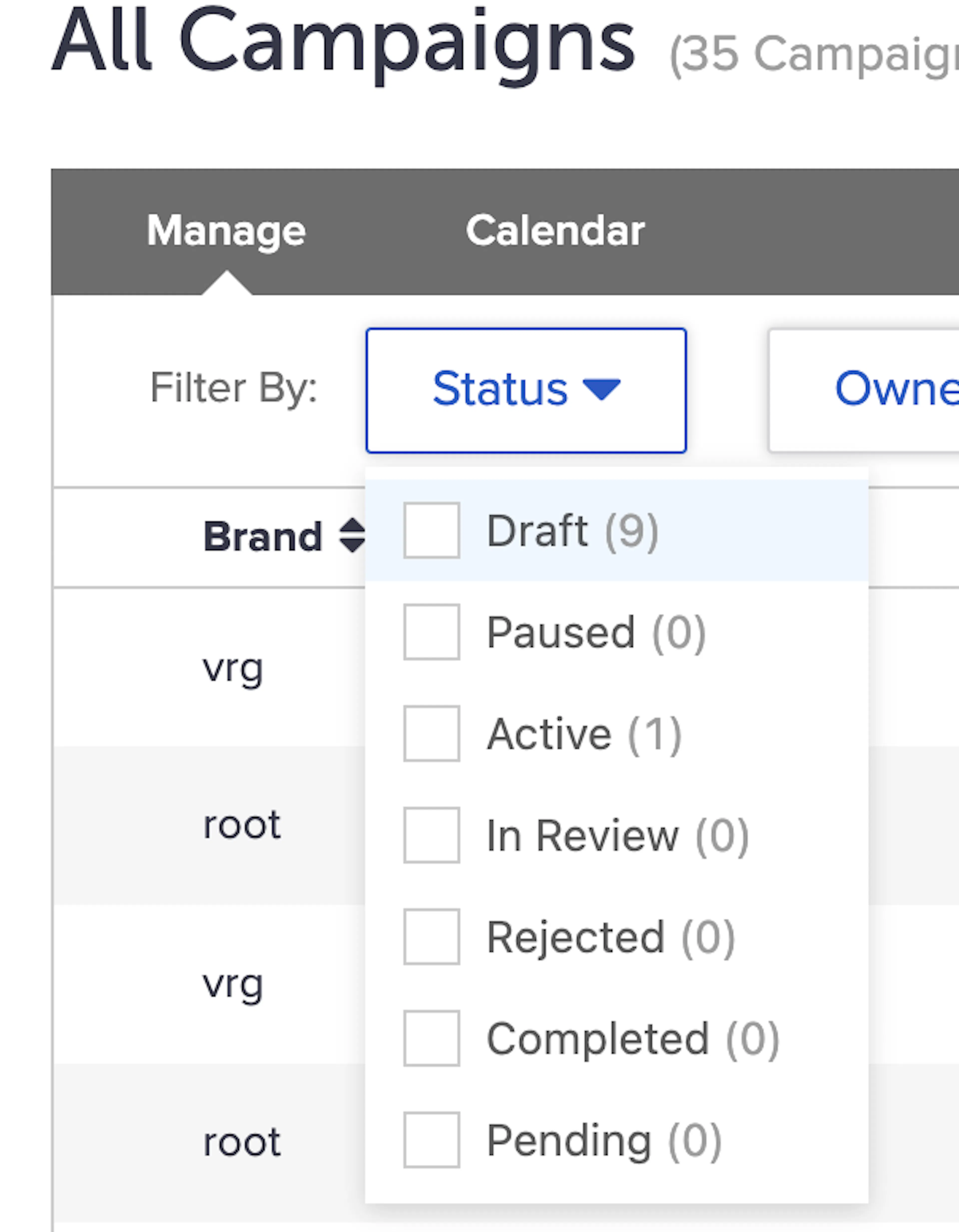
Status Filter Counts Corrected
In a prior release, the counts displayed in the Status dropdown in the Campaigns module were impacted and began to only show counts from the Campaigns on the first page. The issue has been resolved and the counts now accurately reflect all Campaigns.
Points Outcome Processing Error
In rare cases, point outcomes from Campaigns failed to be processed due to a cross-domain connection issue. This fix solves for that error scenario, so that points outcomes never fail to be processed.
Improved Error Handling for Update User Api
This fix resolved a false error that the Update User API was returning with a valid request.
Improved Validation for User Tags
User Tags are expected to be in the format tagname or tagname;;TTL-in-seconds, or even tagname;;value unit (e.g. tagname;;7 days). In some cases, SessionM was allowing tags with other characters or formats to be saved to the database, causing downstream issues. With this improvement, additional validations have been added so that invalid tags can no longer be saved.
Notice of Deprecation: Campaign Activity Data “sent” records
SessionM will be removing a specific record type from campaign activity data.
In SessionM’s Campaign Activity data, there are records created every time the Campaign API is called to retrieve a Campaign for a specific customer profile.
These records are:
- Included in the “campaign_activity” table in SessionM Data Cloud and daily Data Extracts where creative_type = behavior and action = sent
- Visualized in the Campaigns Performance dashboard under the “impression” metric
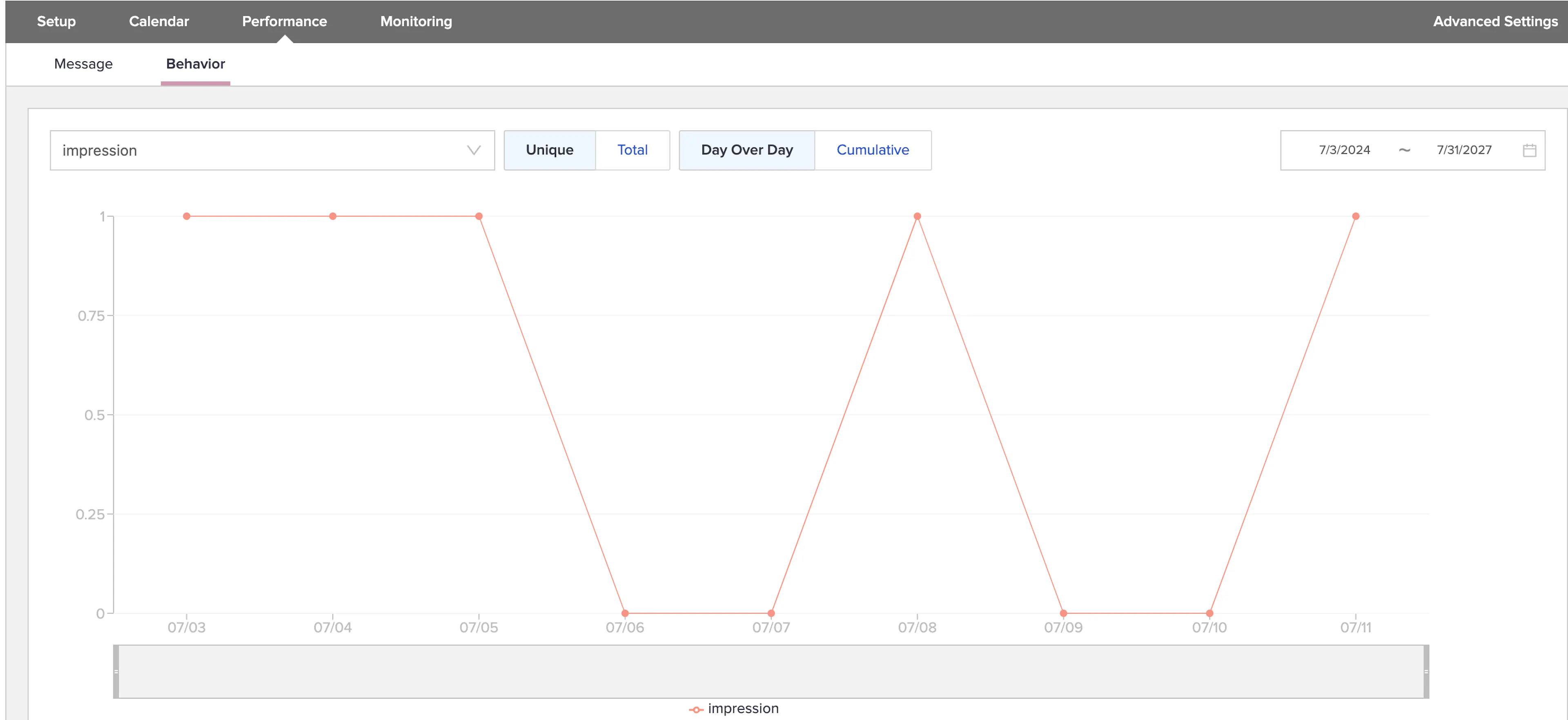
This is a legacy metric that is not currently utilized to track campaign outcomes and will not materially impact campaign reporting.
By removing this record type from the campaign activity data, some clients may see improved processing times in Campaign-related operations. In addition, Data Cloud hydration times may be improved for some clients due to the reduction in daily data volume.
If you have any questions or concerns about this change, please reach out to your Account team.
Loyalty
Points Ledger Upgrade
As part of ongoing platform improvements, the technology behind the Points Engine is being upgraded to ensure enhanced scalability, reliability, and future readiness. The Point Ledger Upgrade development is completed and will be executed gradually in three phases. This upgrade will be managed via configuration changes.
The upgraded Points Engine is now on par with the existing one, and you’ll enjoy the following benefits as part of this enhancement:
- Robust performance at scale
- Point Idempotency on Deposits and Spends
- Point Traceability from Spend to Deposit
- Near real-time refresh of Points operations data in the data cloud, specifically for user_point_transactions and point_accounts tables, significantly reducing refresh times.
- Additionally, this will lay the groundwork for a flexible system that can accommodate future points enhancements such as displaying upcoming point expirations or pay with points.
Points Idempotency
Feature Description for Points Idempotency
The Point Management Upgrade introduces a new idempotency identifier. This identifier can be included when calling the Spend or Deposit APIs to ensure the uniqueness of the spend and deposit transactions.
How it Works for Points Idempotency
When an offer is purchased or clients call our Deposit or Spend APIs directly through their integration, the system identifies duplicate responses. By including this unique identifier, the system prevents processing the same transaction multiple times, even if the same request is submitted more than once. This ensures accurate point allocation.
Enhanced Points Traceability
Feature Description for Enhanced Points Traceability
Points Traceability enhancement provides clients with the ability to reconcile liability reporting by linking point redemptions to their source of earning. This data can be used by your reporting team to expand financial reporting.
How it Works for Enhanced Points Traceability
Additional Data Recorded
For Spend Transactions:
- We will now record extra data linked to the deposit that initially earned the points.
- This includes Transaction ID, Reference ID, reference type, point account ID, point source ID, and transaction amount.
For Deposit Transactions:
- We will capture additional data related to the spent transaction.
- This detailed data helps establish clear links between points spent and their original deposits.
Data Access
- The enriched data will be available through the Data Lake.
- Ability to extract this information and use it in daily exports to expand on your own liability reporting and analysis.
Search PAL in SMP UI
Feature Description for Search PAL in SMP UI
The keyword search in the Point Audit log, accessed via the Customers Module, will no longer be available. Instead, you can search by entering specific details such as Transaction ID, Reference ID, or Reference Type. Additionally, you can apply filters based on Transaction Type (e.g., Spend, Deposit, Expired, Overdraft) and Date.
How it Works for Search PAL in SMP UI
Search Criteria:
- You can enter exact strings for Transaction ID, Reference ID, or Reference Type.
Filtering Options:
- You can filter results by selecting a Transaction Type.
- You can also narrow down results based on a specific date range.
NOTE: Only exact string matches are supported for the entered details. Additionally, we have deprecated the Point Audit Log tab in the Point Management Module. Instead, you can access Point Audit Log functionality above via the Customer Module
Additional Non-Functional Changes include:
- A revised database schema that facilitates scalability.
- New version of UserPoints and PointAuditLogs APIs, v2
Changes were done on the following APIs:
- Spend_multiple
- Deposit
- Fetch_point_audit_log
- Pagination on Fetch PAL will be different from the current system.
- Currently, API supports a skip – take for pagination.
- The new version it will change to take + continuation token where the token will be provided by our system
- Balance
- Account_history
- Merge_user_data
- GDPR/forget
Points Ledger Upgrade Timing
To minimize the impact of the upgrade, we’ve introduced a passthrough mechanism. This enables access to our new endpoints. Eventually, we will retire the current versions of the APIs. We’ll notify you about the timeframes and provide ample time for you to switch to the new services before we deprecate the APIs.
Upgrades for points ledger enhancements will commence in Q3 of 2024 for eligible customers and will continue through 2025 in a phased manner. To be eligible for this upgrade, an upgrade to Loyalty 2 is required.
Your SessionM representative will reach out to you regarding your points ledger upgrade eligibility and timelines. If you have any questions about your points upgrade, please reach out to your SessionM representative.
Tier Maintenance
Applies to Loyalty 2 only
Feature Description for Tier Maintenance
The ability to configure rules within a tier that evaluates whether a consumer should remain in the tier or be demoted. These rules are triggered through a tier maintenance policy that is configured within the UI. Consumers will always be evaluated with the most up to date status. If a user is within the queue to be run through maintenance and makes a transaction, they will skip the queue, be run through maintenance, then the transaction will be processed.
How it Works for Tier Maintenance
- Maintenance policies are configured within the UI
- UTC offsets for maintenance policies are configured by SessionM. This should be a one time setting where you do not need SessionM support for every maintenance scheduled time.
- This needs to be set before configuring a policy within the UI.
- Users receive the maintenance policy date and time whenever they join a tier or are run through maintenance.
- This means a policy needs to be set in a tier prior to a user joining for the tier maintenance policy to apply to them.
- If a policy is changed while users are within a tier, they will be run through maintenance with the policy they were originally given before given the new policy.
Division in Loyalty Rules
Applies to Loyalty 2 only
Feature Description for Division in Loyalty Rules
The new rules engine offers a flexible way to configure the logic behind your rules within rule templates. Rule templates have been enhanced to include division as a mathematical operation for any values defined as a numerical value on the transaction schema. This is most commonly used when a rule has a payment type constraint and tax excluded from eligible spend. In this case, tax needs to be portioned between multiple payment types in a transaction, then subtracted from the eligible payment type amount.
How it Works for Division in Loyalty Rules
- Given the impact to changing how point issuance can be calculate, please contact your SessionM representative if you are interested in this feature.
- With this release, this functionality is only available via API. The UI will support this configuration within Rule Templates in the next release.
Deleted Tiers
Applies to Loyalty 2 only
Feature Description for Deleted Tiers
To allow for more control over customer tier placement when restructuring a loyalty program, if a customer is in a deleted tier, they will remain assigned to that tier until moved. The customer will not receive any rewards/outcomes associated to the deleted tier. This enhancement reduces customer impact to any accidentally deleted tier. To reverse the mistake, the tier will need to be reactivated. There will not be a need to find mistakenly moved customers and move them back to the appropriate tier. This differs from the legacy rules engine where a customer drops down a tier level when a tier is deleted.
How it Works for Deleted Tiers
- A tier level is deleted
- Customers remain assigned to their current tier level
- Customers will not receive any outcomes until moved to an active tier
- Customers can be moved to another tier via the move user API
Tier Member History Data
Applies to Loyalty 2 only
Feature Description for Tier Member History Data
Multi-tier programs need a way to track the full movement history of a customer. Tracking how long a customer remained in a tier or how often they get demoted during tier maintenance can give you insights into whether certain tier level rewards are more enticing than others. Use tier movement data to target customers who have not moved from their tier in a long time. Previous to this enhancement exit dates were not populated for every tier movement. There was an inference made from the tier level join dates.
How it Works for Tier Member History Data
- Within the tier_member_history table each customer will have a tier join date
- For customers who left a tier they will have a tier exited date
- Customers who do not have an exit date are currently in that tier
- Every tier move will create a new record within the tier_member_history table
Subtract Values in Loyalty Templates
Applies to Loyalty 2 only
Feature Description for Subtract Values in Loyalty Templates
The new rules engine offers a flexible way to configure the logic behind your rules within rule templates. Rule templates have been enhanced to include subtraction as a mathematical operation for any values defined as a numerical value on the transaction schema. The most common use case is tax excluded from eligible spend. When sending in a transaction where the tax is included in the unit price, payment amount or sub total, you can now configure the eligible spend for point issuance to subtract the tax amount, present on the transaction, from the eligible spend calculation.
How it Works for Subtract Values in Loyalty Templates
Given the impact to changing how point issuance can be calculate, please contact your SessionM representative if you are interested in this feature.
Item Selection
Applies to Loyalty 2 only
Feature Description for Item Selection
When building loyalty rules you can select items that are eligible or ineligible for points issuance. Previous to this release, the rule builder would limit the amount of selection that could be made to 100. You will now be able to make up to 9,000 selections. It is best practice to categorize your catalog to avoid needing to make many manual selections when determining eligible/ineligible items. For example, one category could have 10,000 items and selecting the category for eligible spend is 1 selection, versus 10,000.
How it Works for Item Selection
- Navigate to the rule builder
- Add a constraint to a rule and select the drop down for items
- Make up to 9,000 selections
Reporting & Analytics
New Visuals in Insights
Feature Description for New Visuals in Insights
Unique purchasing user at different aggregation levels.
How it Works for New Visuals in Insights
Unique purchasing users are counted at different aggregation levels: daily, monthly, quarterly, yearly. The aggregation range can be selected through a local drop-down menu.
This visual provides insights into how many unique purchasers have been active over time and enables period-of- period comparison.
New Anomaly Detection Model
Feature Description for New Anomaly Detection Model
We are excited to introduce an advanced Anomaly Detection capability within the Insights module. The new feature is now accessible as an additional subtab within the existing Anomaly Detection tab. It leverages an enhanced Machine Learning model that identifies non-standard user behavior by comparing individual user data with aggregated data from the entire user base.
The feature provides a comprehensive anomaly score for each user, highlighting any deviations from normal patterns. For every detected anomaly, the model also generates a list of the most relevant features that contributed to the anomaly score.
How it Works for New Anomaly Detection Model
This feature operates by analyzing historical behavior for each user and comparing it with the broader user base. The system applies a sophisticated Machine Learning model based on multiple features related to user behavior to detect outliers and anomalies that may indicate non-standard activity (e.g. unusually high purchase frequency; too many points earned in the past week). For each user, an anomaly score is generated, representing the degree to which their activity is considered anomalous.
Results are presented in a detailed table, where each row represents a user, showing their anomaly score and the top features driving that score. This allows users to quickly identify which behaviors contributed most to the anomaly.
It is important to note that while the feature detects anomalies, it does not take any action on the users. It is up to the client to decide what, if any, follow-up action should be taken based on the resulting scores.
This new model will help organizations detect potential risks earlier and enhance their understanding of user behavior trends.
Updates to the Data Lake
Multi-Org Specific - applies only if multi-org is enabled
The following attributes have been added:
- Division identifier added to Offers table.
- Division identifier added to Product Catalog.
- Five new tables related to divisions:
- The divisions table shows the relationship between one division and its parent. The other tables show the mapping between the division_id and the ids in other tables (point_sources, reward_stores, tier_systems, venue_tags)
Co-Brand Optimizer Specific
- New attribute catalog_type was added to tables master_categories, master_items and master_item_parents to support Co-Brand Optimizer (CBO) requirements for new types of catalogs available in the data cloud.
- The catalog_type attribute is not propagated to standard daily exports for non-CBO tenants. For CBO enabled tenants, this attribute will be added to data exports when enabling CBO.
Custom Export Specific
Due to an AWS change, all data of type: timestamp will have UTC appended on the end of the field. This was done to make timestamps more inclusive – AWS moved away from Zulu (NATO) time to UTC. The change does not affect the standard daily exports from the data cloud. It only affects certain custom and Audience exports.
If you require further details about the changes above, you can contact your technical account manager for more information and our latest data schema.
Platform Wide
Campaign API Filtering by Organization
Feature Description for Campaign API Filtering by Organization
If you’re using Multi-Org to run multiple loyalty programs out of a single SessionM instance, say for different brands or countries, you likely need to display different Campaigns in your websites and apps accordingly. With this release SessionM has improved the Campaign API to make that as simple as passing in a new parameter in requests to only get the Campaign data relevant to each Org.
The following API routes have been enhanced to filter response data for one or more Organizations:
- GET /priv/v1/apps/:api_key/users/:user_id/campaigns
- GET /priv/v1/apps/:api_key/external/users/:external_id/campaigns
- GET /api/v1/apps/:api_key/campaigns
- GET /priv/v2/apps/:api_key/users/:user_id/campaigns
- GET /priv/v2/apps/:api_key/external/users/:external_id
They have also been enhanced to include the Organization assignment of Campaigns in the API response, as well as the following two additional Campaign routes:
- GET /priv/v1/apps/:api_key/campaigns/:campaign_id/info
- GET /priv/v1/apps/:api_key/external/campaigns/:permalink/info
How it Works for Campaign API Filtering by Organization
- For an environment with Organization Management activated, an optional query string parameter “division_ids” will now be available in the above API routes.
- Pass one or more division_ids:
GET /priv/v1/apps/:api_key/users/:user_id/campaigns?division_ids=root,gbr - The response will only return data related to Campaigns that are assigned to the divisions passed in the request
- A new attribute will be returned per Campaign in the API response, “division_id”
For more information, see our Campaign API Documentation.
Organization settings - new validations
Feature Description for Organization settings - new validations
There have been a few new validations added to Organization settings in the Organization Management module.
- Currency
- Currency is now a required field
- Currency code must be from ISO 4217 standard
- Division_id
- Allowed characters include: alphabetical and numerical characters and dashes
- Any alphabetical characters must be lowercase
- Maximum length is 64 characters
- No white space
Campaign Change Log
Feature Description for Campaign Change Log
The Campaign Change Log tracks and displays the actions of SessionM Platform users in the Campaigns module. In this release, it is now fully supported in Multi-Org environments.
Change Log records are assigned to Orgs based on the Org the Campaign is assigned to. You will see this in a new column present in the table.
When in the Campaigns module, the Change Log table will display all records from campaigns assigned to the Org that you’re currently active in, plus those assigned to child orgs. These are also the only records that will be included in the file when you press “Export records” .
When viewing the Change Log tab for a single Campaign, all records associated with that Campaign will be displayed. When exporting records from the individual Campaign, all records for that Campaign will be included.
Insights Support for Parent-level Orgs
Feature Description for Insights Support for Parent-level Orgs
Introducing support for Insights dashboards for Orgs that are parents of leaf-level Orgs!
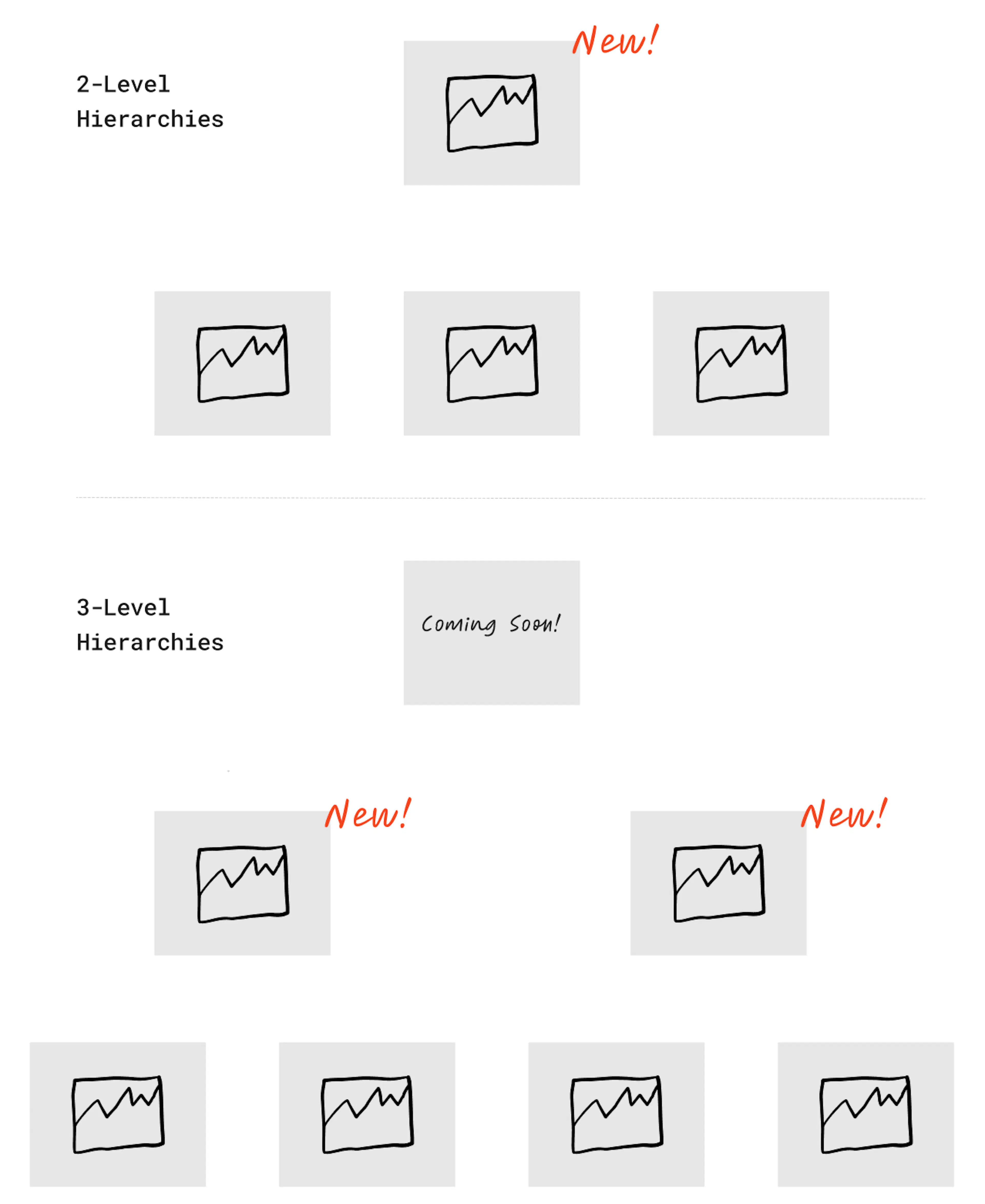
Insights now supports dashboards that aggregate data and metrics across all of the child Orgs for Parent Orgs that are direct ascendants of the leaf-level Orgs in your Multi-Org hierarchy.
Key features include:
- Configurable visuals to use for Parent-level dashboards
- Restricted access based on Multi-Org permissions - only users with access to the Parent org will be able to view its dashboards
- Currency normalization for aggregated spend metrics, based on the currency specified in the Parent Org’s configuration
How it Works for Insights Support for Parent-level Orgs
If you have Multi-Org enabled in your SessionM instance, work with your Account team to get the Parent-level Insights dashboard activated.
- Choose your visuals.
- Choose the currency you want spend metrics normalized to if the child Orgs use different currencies. This is specified in the “Currency” selection in the Orgs settings set in the Organization Management module.
- Provide users permissions that need access for the Parent Org level. These permission groups are specified in the Orgs settings in the Organization Management module and must be provisioned to users by your Single Sign-On administrator.
- Navigate to Insights and select the Parent Org in the Header Org Selector in the top right of your screen.
Offers Module - Native Multi-Org Support
Feature Description for Offers Module - Native Multi-Org Support
SessionM Offers allows you to create unique Offers, target them to audience segments or individuals in real-time, verify eligibility and activate the discount right at the point of sale through one platform.
Now, for Multi-Org tenants, you can empower your teams to create and manage their own Discounts and Rewards with self-service support for Offers!
The Offers module now acts like other self-service modules (e.g. Campaigns) in that it restricts visibility and access to Offer configurations based on Org assignment.
The following Offers API routes have been enhanced to support a “division_ids” request parameter:
- /api/2.0/offers/fetch_offers_overview
- /api/2.0/offers/fetch_offers_details
- /api/2.0/offers/get_user_offers
Sample request body with “division_ids” request parameter:
{
  "retailer_id": "65af36a3-2d99-4fb2-9936-2eec6bf32f5d",
  "division_ids": [
    "DivisionId_1",
    "Division_2",
    "Division_N"
  ],
  "culture": "en-US"
}
This allows your developers to easily fetch the Offers and User Offers they need depending on the Market, Brand or Business Unit that they’re building for.
The following Offers API routes have been enhanced to return a "division_id" field in API response, for each Offer object returned.
- /fetch_offer
- /fetch_offer_bulk
- /fetch_offer_overview
- /fetch_offer_details
- /get_user_offers
- /get_user_offer_details
- /acquisition/issue
- /acquisition/purchase
- /acquisition/issue_bulk
- /acquisition/issue_multiple_bulk
The Offers table in Data Cloud has been updated to include a “division_id” column that can be used to filter records based on the Org assignment of the Offer. This enables reporting and analytics team to easily filter Offer issuance and redemption data by Org.
This feature requires activation to be enabled. For environments with Multi-Org enabled, existing Offers will be migrated to the appropriate Org as part of feature activation in partnership with your SessionM Account team.
How it Works for Offers Module - Native Multi-Org Support
Creating Offers within an Org
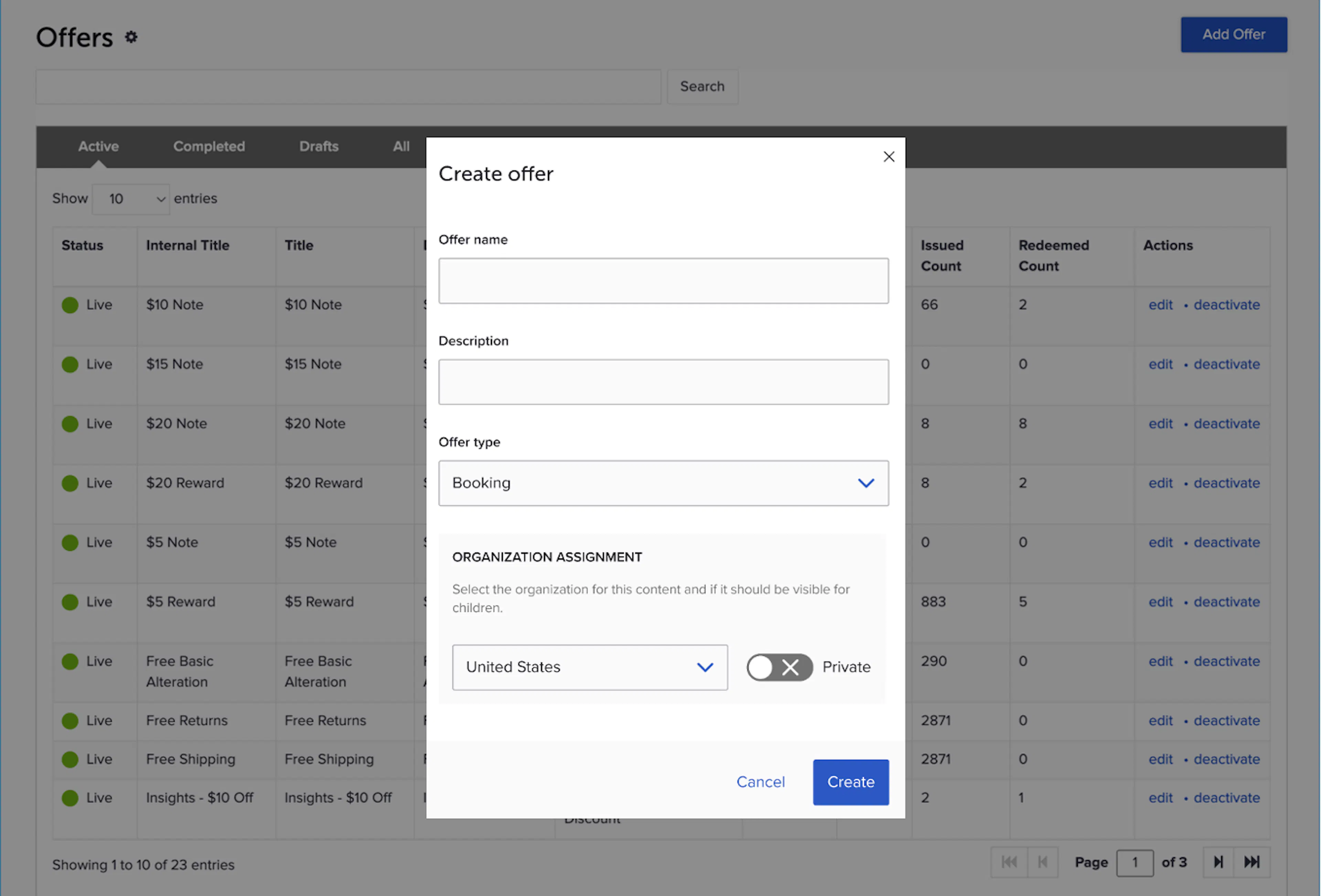
- Click “Add Offer” from the Offers module landing page
- Populate Offer Name and Description, then select an Offer Type
- Note the new “Organization Assignment” selector. This will default to the Org the SMP user is active in at the time.
- If you wish to change the assignment to another Org that you have permission to, you’ll see the options in the selector, which can be selected.
- Click “Create” and proceed with configuration of your new Offer!
Fetching Offers for one or more Orgs using the API
- Make a request to
POST /api/2.0/offers/fetch_offers_overviewand in the request body, include a new parameter: “division_ids” - To make the request for a single org, pass a single ID in the array “division_ids”: [“org1”]
- To make the request for multiple orgs, pass a list of IDs in the array “division_ids”: [“org1”, “org2”]
- SessionM will validate the IDs are valid and if so return all matching offers with a new “division_ids” key in each offer object in the response, populated with the ID of the Org its assigned to.
For more information on the Offers API, visit the Offers API documentation.
Examples for Offers Module - Native Multi-Org Support
Market-specific offer: Empower your local marketing teams to create Offers specific to their Market. These Offers will only be available for use as Campaign outcomes or to Bulk Issue to Audiences of customers belonging to their local market’s program.
Global offer: Have a cross-border program? Want to allow customers to earn in one place but burn in another? Assign an Offer to the Root Org in your hierarchy so that it can be issued and redeemed by members in any child Org.
Brand-specific: Create compelling incentives specific to each brand. Brand-level marketing teams can create and manage their own catalogs of Offers without getting in each other’s way.
Cross-brand: Simplify program management by using shared Offers whenever Offers or Rewards are able to be redeemed across brands. Assigning the Offer to the same level of the hierarchy that your loyalty program is assigned to ensures that all members will be able to redeem it!
Product Catalogs - Native Multi-Org Support
Feature Description for Product Catalogs - Native Multi-Org Support
For clients using Organization Management, this release allows each Organization to either have their own product catalogs or they can all share the same one.
Now different Orgs with distinct Product Catalogs can manage them independently of one another!
When making catalog selections in Campaigns, Offers, or Loyalty Rules the Catalog picker now includes a selector that allows the User to navigate and select the Org’s catalog that is relevant to the Campaign.
How it Works for Product Catalogs - Native Multi-Org Support
Loading Product Catalogs
When loading a Product Catalog via file, prepare a file per Org that needs its own distinct Product Catalog. If all Orgs share a single Catalog, then only a single file is needed.
Each file will have to specify the Org that the Catalog should be uploaded against. This is specified in the file name using the following convention:
new_division_<divisionID>_<api_key>_<timestamp>_<file_set_name>_connect_upload_catalog_V3.json
Updates to Product Catalogs continue to require a full replacement but each Orgs catalog can be updated independently of one another.
Making Catalog Selections
When making Catalog selections in modules like Campaigns, the Catalog picker will now include a selector that will display all of the Orgs that have Product Catalogs present.
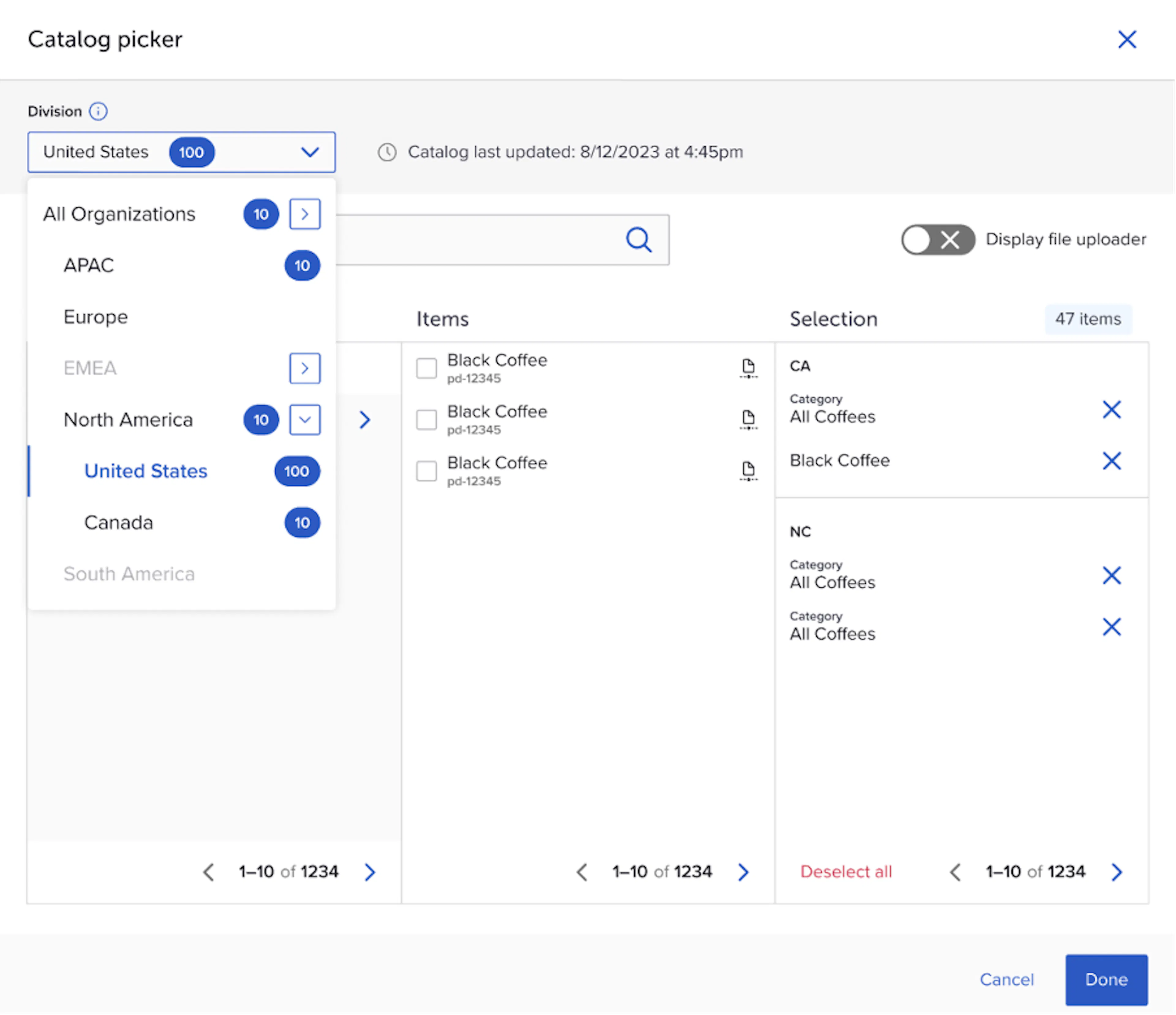
If the Org the Campaign is assigned to has a Product Catalog present, then the selector will default to it. The Categories and Items column will populate based on the contents of the selected Org’s Catalog.
Users can change the selection at any time and continue to make selections across multiple Catalog sets. When there are selections made in an Org’s Catalog the count will be displayed in the Org selector within the Blue circle, as depicted in the image above. Selections will be grouped and displayed by Org in the Selections column.
Uploading Selections
The file upload mechanism for making selections has also been updated to work in Multi-Org environments. Items in the file will be validated to ensure they belong to the catalog(s) that the Organizations relevant to the Campaign.
When files contain items not present in an existing catalog or belonging to a different Org’s catalog, the File Uploader will return an error and an error file with appropriate reason codes.
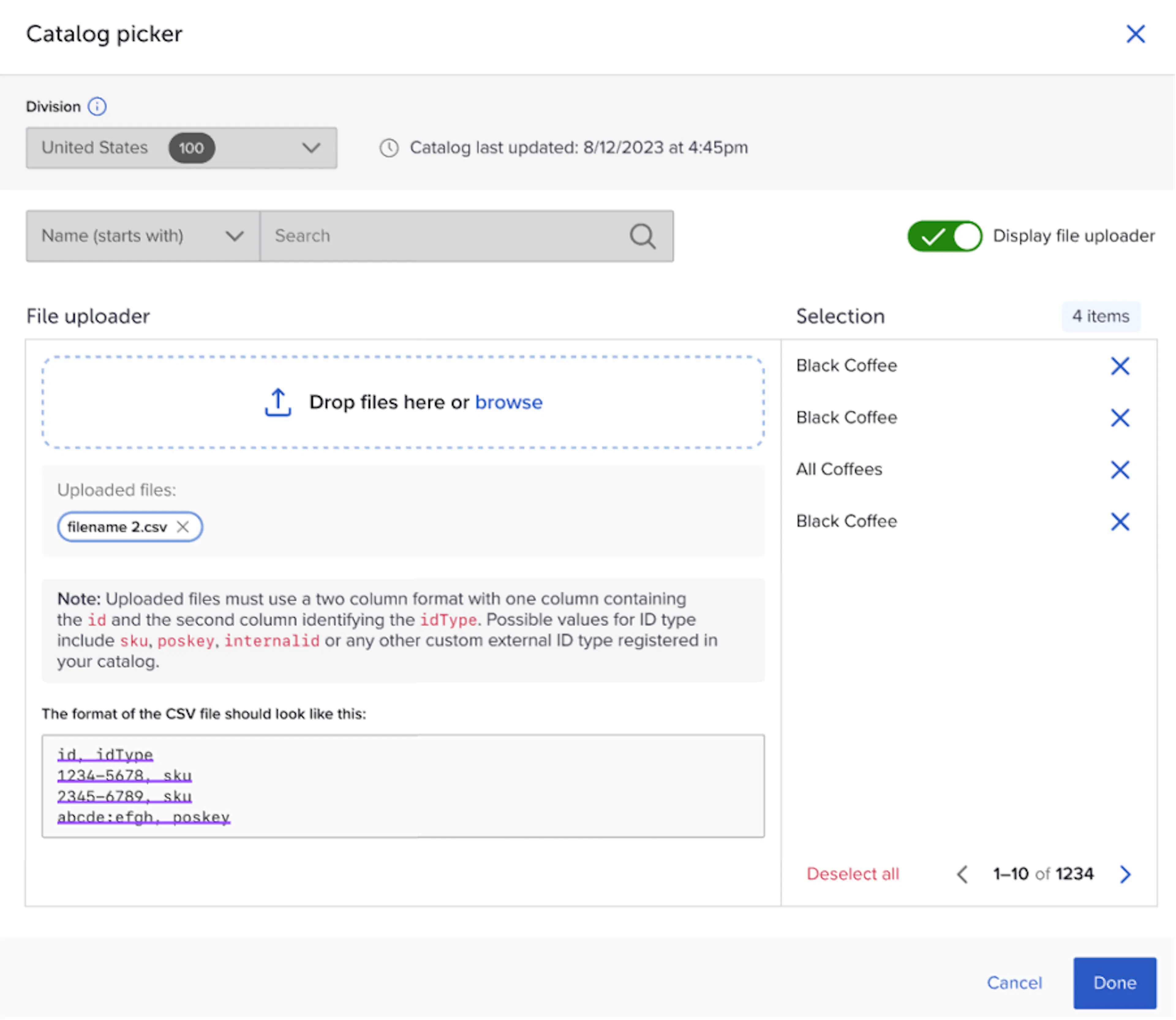
Examples for Product Catalogs - Native Multi-Org Support
Market-specific: Upload a Product Catalog per Market so that independent IT teams don’t have to orchestrate Product Catalog syncing to SessionM. Marketers benefit from a smaller, more personalized Product Catalog set to navigate when making selections in Campaigns, Offers, and Loyalty Rules.
Global Catalogs: Do all of your Orgs use the same Product Catalog set? Upload the single catalog to the root Org in your hierarchy, where it will become available to all to use in rules and restrictions.
Brand-Specific: For clients leveraging Multi-Org to run programs for multiple brands out of a single SessionM instance, you can now load a Product Catalog specific to each brand. This helps brand IT teams work with SessionM independently of one another and marketing teams to only navigate the Product Catalog relevant to their brand.
RFM and CLV Models - Native Multi-Org Support
Feature Description for RFM and CLV Models - Native Multi-Org Support
SessionM calculates metrics like Customer Lifetime Value (CLV), Risk of Churn (RoC), and Recency, Frequency, Monetary spend (RFM) scores for each customer profile.
In this release SessionM is introducing enhanced metrics for Multi-Org tenants.
Customer profiles are usually assigned to one Org in the Org hierarchy, but that’s not always the case. In programs where customers are allowed to belong to more than one Org at a time, how these metrics are calculated matters.
In Multi-Org environments, RFM, CLV, and RoC are now calculated for each user for every level of the hierarchy they belong to.
This means that when making Audiences in Composer leveraging the CLV card, you can now select which level of the Org hierarchy you want to use, providing more targeting use cases to choose from for the most impactful promotion effect.

As a result of these changes, audience targeting based on these metrics will only be supported in Composer going forward. In addition, the Customer’s module Performance Metrics widget will cease to refresh its data set until a future release where it is re-introduced and powered by this new and improved dataset.
Examples for RFM and CLV Models - Native Multi-Org Support
Scenario: Hosting independent loyalty programs for multiple countries, where consumers can belong to more than one program at a time, but can not earn & burn across borders.
- A marketer for the Spain program wants to target customers whose CLV is in the top 80% of members, based on spend history at stores belonging to just the Spain org.
- A marketer for the Europe region wants to target customers whose CLV is in the top 80% of members, based on spend history at stores belonging to any of the European countries.
Scenario: Hosting a global program across multiple countries, where consumers can earn & burn across borders
- A marketer for the Spain program wants to target customers whose CLV is in the top 80% of members, based on spend history at stores belonging to just the Spain org.
- A marketer for the Spain program wants to target customers whose CLV is in the top 80% of members, based on spend history at stores across all countries.
Bug Fixes and Other Improvements
Case Insensitive Customer Search
When customer profiles were assigned to Orgs with a division_id value that had a different case than that was defined in the Organization Management, Customer Search would fail to return results. With this fix, Customer Search was improved to handle case insensitive search. It is still recommended to assign Users to their Orgs with a matching case when division_ids include alphabetical characters.
Division_id Replaced with Display Name in Table Columns
Previously, division_id was populating a new column that was added to tables containing things like Campaigns and Audiences.
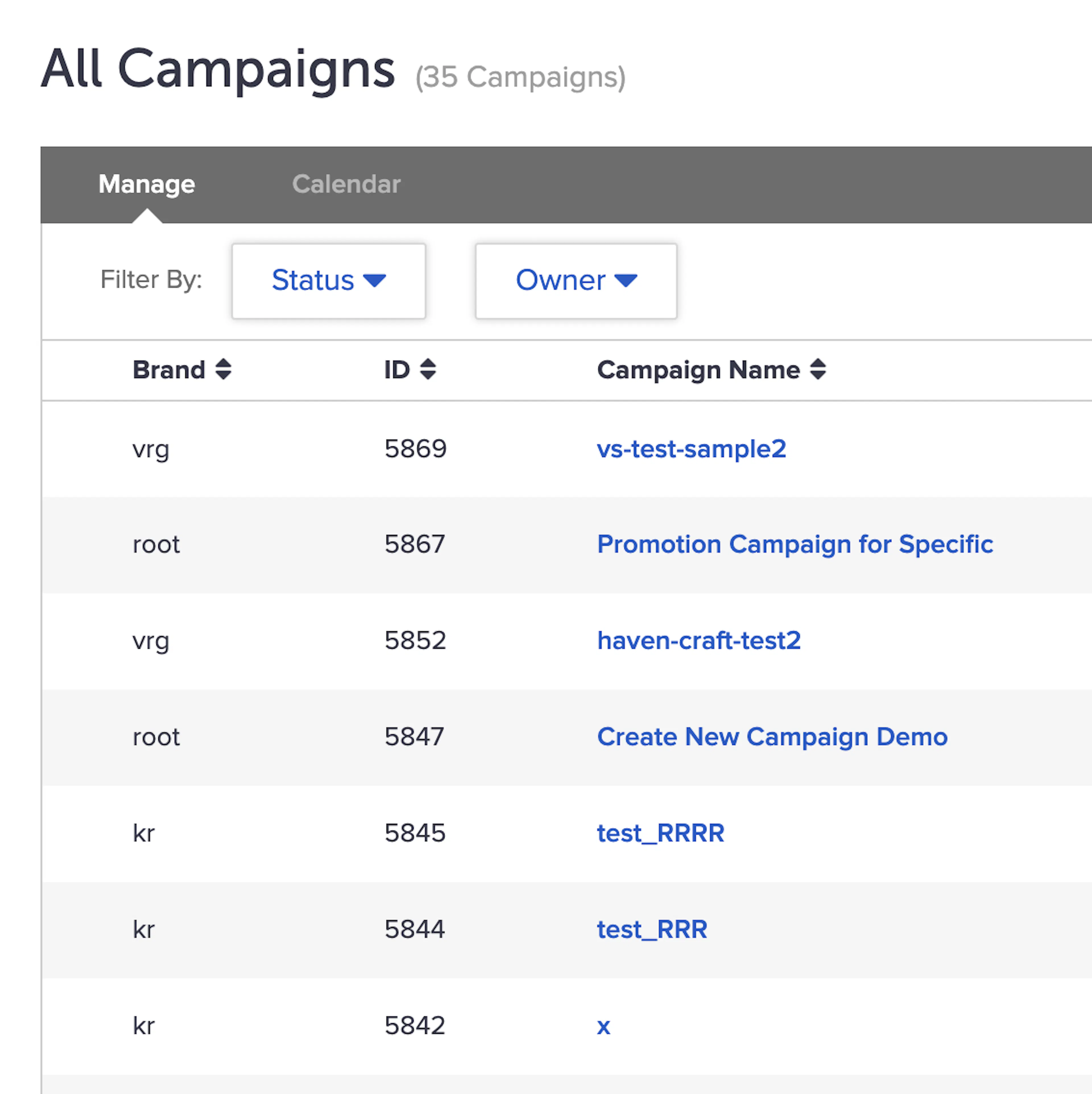
Since an Org’s ID is not always helpful in understanding which Org the Campaign or Audience belongs to, this column will now be populated with the “Display Name” for each Org. The Display Name is set in the Organization Management module when configuring each Org and is meant to be the intuitive, human-readable name for users to understand what the Org represents.
SessionM Dashboard Update
The first version will be enabled for clients who agreed to be part of the pilot for V1 homepage.
Feature Description for SessionM Dashboard Update
A new landing page that highlights the loyalty program activities. This intuitive experience supports informed decision- making by providing insightful information to monitor clients' loyalty programs. Prioritizing clarity and simplicity ensures an optimal experience.
How it Works for SessionM Dashboard Update
- Embeds the left navigation menu to maintain consistency with the entire platform.
- Contains the latest news section about releases, Learning Hub updates, featured content, and important updates
- Provides the opportunity to swiftly review and react to insightful information.
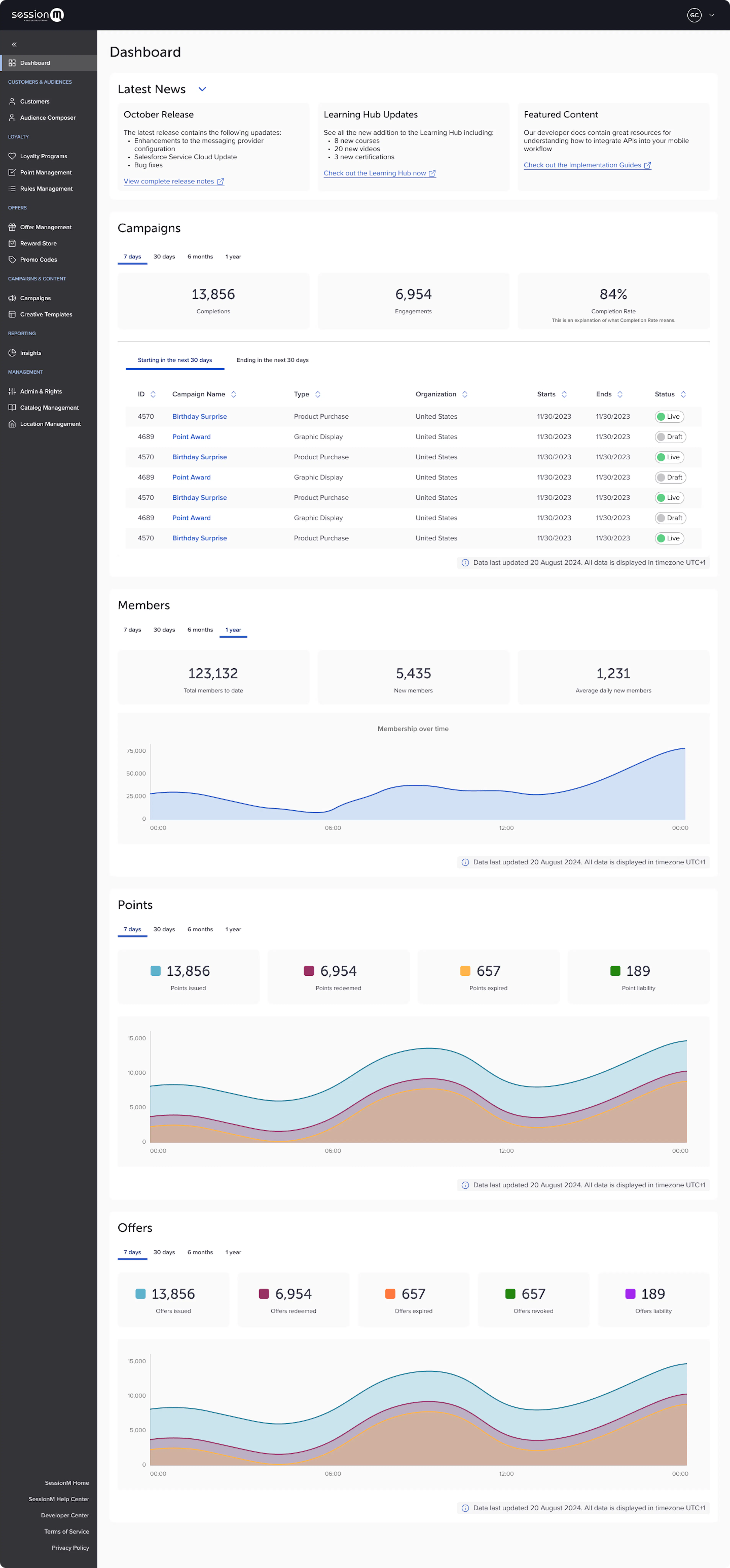
Read the SessionM Dashboard Explainer article for more details.
Data Retention Policy Change
Feature Description for Data Retention Policy Change
In accordance with Mastercard standard data retention policies, SessionM will be changing to an 18 month retention period for all Timeline service data. Requests for exceptions are permitted but must include a detailed justification outlining the specific business or legal need for the exception.