

November 2025 Release Notes
SessionM platform release notes for November 2025 (release version 2025.4).
DETAILS
| Release to Staging | Release to Production | Release Version |
|---|---|---|
| Oct 7 - 8, 2025 | Oct 29 - Nov 13, 2025 | 2025.4 |
There will be no downtime during the release.
Campaigns & Content
Award Points Based on Qualifying Payments
Feature Description for Award Points Based on Qualifying Payments
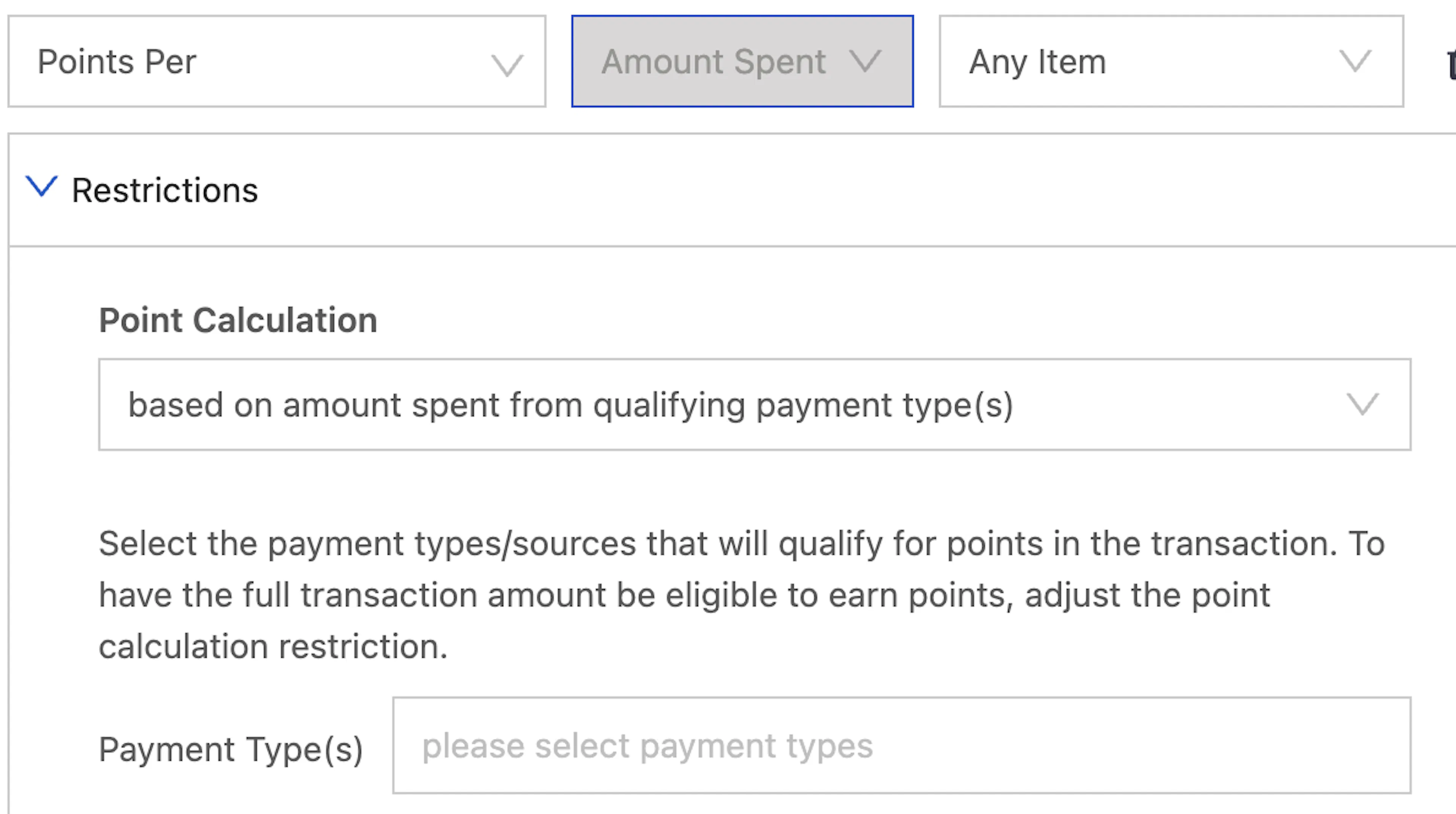
SessionM supports the ability to award bonus points when a customer uses one or more specified payment types. You will now have the option to decide whether to award bonus points based on the entire purchase or the amount associated with the specified payment type(s).
How it Works for Award Points Based on Qualifying Payments
- Create a Points Per → Amount Spent → Any Item behavior
- Under Point Calculation, select “based on amount spent from qualifying payment types(s)”
- Input the Payment Type(s) you would like to award on
Example for Award Points Based on Qualifying Payments
- A retailer has a partnership with Mastercard and they would like to run a promotion where they give double points when you purchase using a Mastercard credit card
- Their base earn is 1 point per 1 dollar, so they configure a campaign with the above setup to also award 1 point per 1 dollar when using a Mastercard credit card
- Customer’s will receive the base earn plus 1 bonus point for every dollar they spend with a Mastercard. For example, a $25 purchase with a Mastercard credit card will receive 25 bonus points
Customers & Audiences
Build Audiences Using Custom Transaction Data
Feature Description for Build Audiences Using Custom Transaction Data
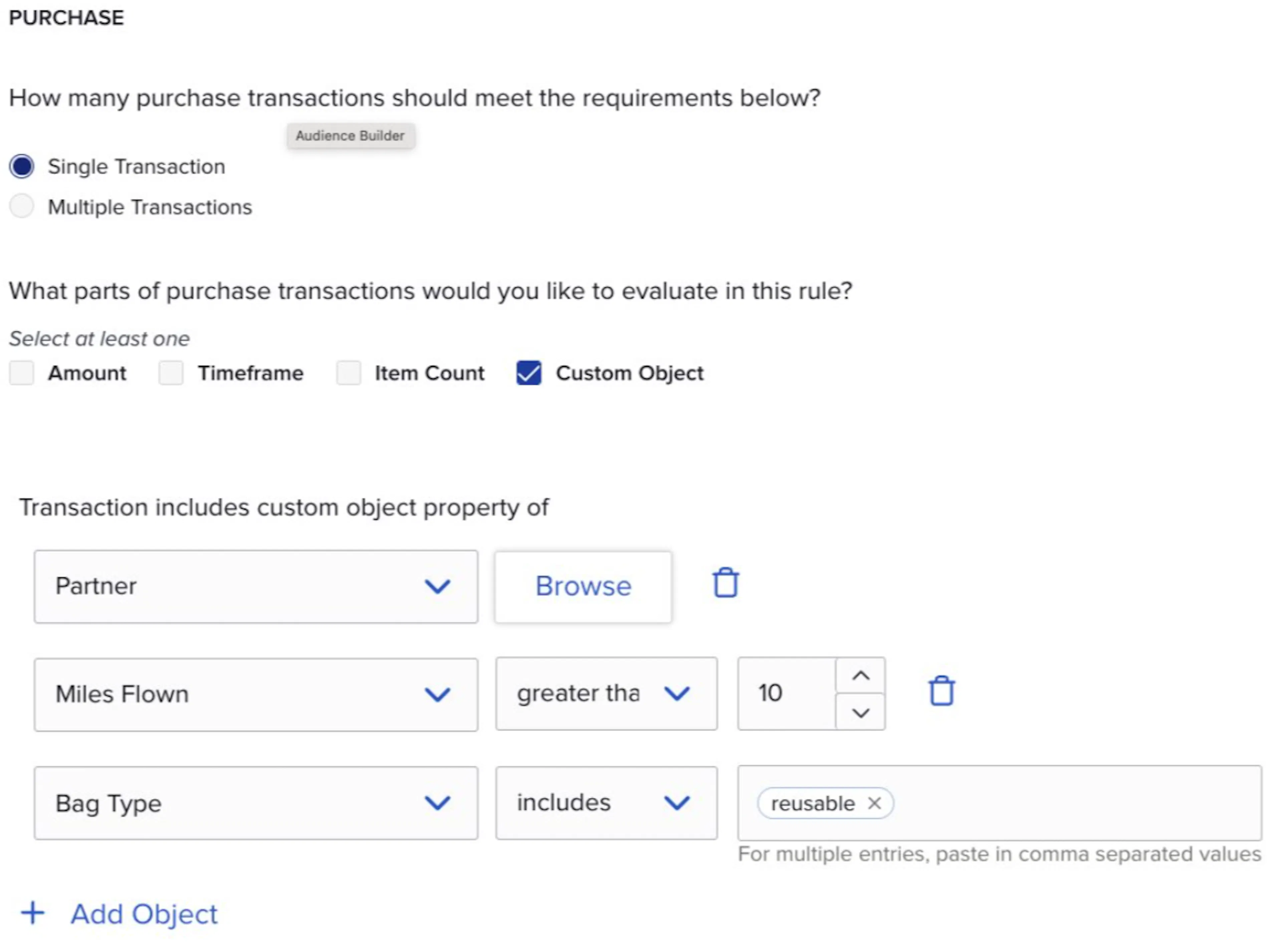
SessionM supports the ability to send custom data in the business defined object of the transaction (see our explainer About the SessionM transaction schema for more details). Composer is adding a new Custom Object option into the Purchase card. This enables you to create audiences using your unique business data.
How it Works for Build Audiences Using Custom Transaction Data
- In the purchase card, there will now be a new Custom Object option
- This option will only appear if the
business_def_collectiontable is available in the data cloud. If you have any questions about the availability of this feature, please reach out to your SessionM representative.
- This option will only appear if the
- After checking this option, you can select the variable you would like to reference from a dropdown
- After selecting a variable you can configure the audience rule condition. The overall user experience will change based on the selected variable type. For example, a boolean variable will display true or false but a numeric variable will show options like “greater than”
- If you select an “Xcatalog” type variable, a picker will display and allow you to easily selection your catalog options
Example for Build Audiences Using Custom Transaction Data
Segment users based on the following criteria:
- Shopped with a reusable bag
- Ordered through a preferred third-party ordering provider
- Flight segment was over 1,000 miles
Reporting & Analytics
OPTIONAL CONFIGURATION: Exclude Tax from Sales Calculations in Insights (Summary Tab)
Feature Description for OPTIONAL CONFIGURATION: Exclude Tax from Sales Calculations in Insights (Summary Tab)
A new configuration is available to exclude tax from sales-related visuals in the Summary tab of Insights Reporting.
To enable this feature, please reach out to your Customer Success (CS) or Technical Account Manager (TAM) representative
Platform Wide
Householding
Feature Description for Householding
SessionM now supports the ability to organize accounts into a Household (hierarchy). This unlocks opportunities for end consumers to pool earning and redeeming across a group of user accounts.
How it Works for Householding
- A member can create a household and they will automatically assume the role of head of household. As the head, they have household management permissions including inviting other members to the household or removing members
- When members accept a household invite, they join the household and any “pooled” offers or points will be transferred into the household
- Offers and point accounts can be designated as pooled during the creation process
- All household members will have the ability to redeem the pooled offers or points
- If members leave the household, any pooled points and offers will remain in the household
- New data will be added to Timeline and Data Cloud to support tracking of household activity
Example for Householding
Nancy wants to pool her family’s points so they can redeem for a reward faster:
- Nancy starts a household and assumes the head of household role. She brings 200 points into the household.
- She invites her husband and child to the household. They both accept their invitation and join the household as members. They bring a combined 300 points into the household, which means the household has a total of 500 points.
- Anyone in the household can spend those 500 points, so Nancy’s husband decides to redeem it for a “Free Cheeseburger” offer
- Anyone in the household can redeem the “Free Cheeseburger” offer, so their child redeems it at the restaurant.
Integrations
Householding In Service Cloud
Feature Description for Householding In Service Cloud
SessionM now supports the ability to retrieve the household composition for the household that a given user is part of and the status of the members in the household when loading the member’s page in the Salesforce Service Cloud Cartridge
How it Works for Householding In Service Cloud
The SFSC cartridge will call the newly released household membership API to retrieve the memberships details for the household that the user is a part of. If the user is not currently part of a household the table will not display.